EasyManua.ls Logo

Technics SX-G5 - Page 35

Technics SX-G5
44 pages
Print Icon
To Next Page IconTo Next Page
To Previous Page IconTo Previous Page
Loading...
Ill.
To
Store
Other
Parts
for
Automatic
Performance
(Multiplex
Storage)
1.
Turn
off
all
four
Play
Sequencer
buttons.
2.
Press
the
record
button.
The
button
will
flash.
3.
Press
the
Play
Sequencer
button
for
the
part
to
be
stored
first.
The
button
will
flash
slowly.
4.
Play
the
part
to
be
stored.
5.
After
playing
the
part,
press
the
Play
Sequencer
button
for
the
next
part
to
be
stored.
The
button
will
flash
slowly.
®The
rhythm
automatically
stops.
®Check
at
this
time
that
the
button
for
the
previously
stored
part
is
stilt
lit.
*Instead
of
step
5,
you
may
press
the
record
button
to
turn
it
off.
Then
press
the
button
again
(the
button
will
flash)
and
press
the
Play
Sequencer
button
for
the
part
you
wish
to
store
next.
This
button
will
then
flash
slowly.
6.
Pressing
the
start/stop
button
begins
the
automatic
performance
of
the
previously
stored
part,
to
which
you
can
add
a
second
part.
*
You
can
also
begin
a
song
which
has
no
rhythm
by
pressing
the
start/stop
button.
To
store
one
portion
of
a
song,
press
the
button
for
the
part
to
be
stored
next.
You
need
not
wait
for
the
automatic
performance
to
be
completed.
In
this
case,
do
not
stop
the
rhythm.
7.
Repeat
steps
5
and
6
to
complete
storage
in
the
other
Play
Sequencer
buttons.
8.
Press
the
record
button
to
turn
it
off.
For
storage
in
the
solo
button,
the
upper
solo
synthe
preset
button
of
the
Orchestral
Conductor
is
automatically
turned
on.
Play
a
melody
on
the
upper
keyboard
and
it
will
be
stored.
Iv.
To
Modify
Previously
Stored
Parts
or
Add a
Solo
Part
1.
Turn
on
the
Play
Sequencer
button
for
the
part
to
be
automatically
played.
2.
Press
the
record
button.
The
button
will
flash
slowly.
3.
Press
the
Play
Sequencer
button
for
the
part
to
be
replaced,
The
button
will
flash
slowly.
eCheck
at
this
time
that
the
button
for
the
part
to
be
automatically
played
is
still
lit.
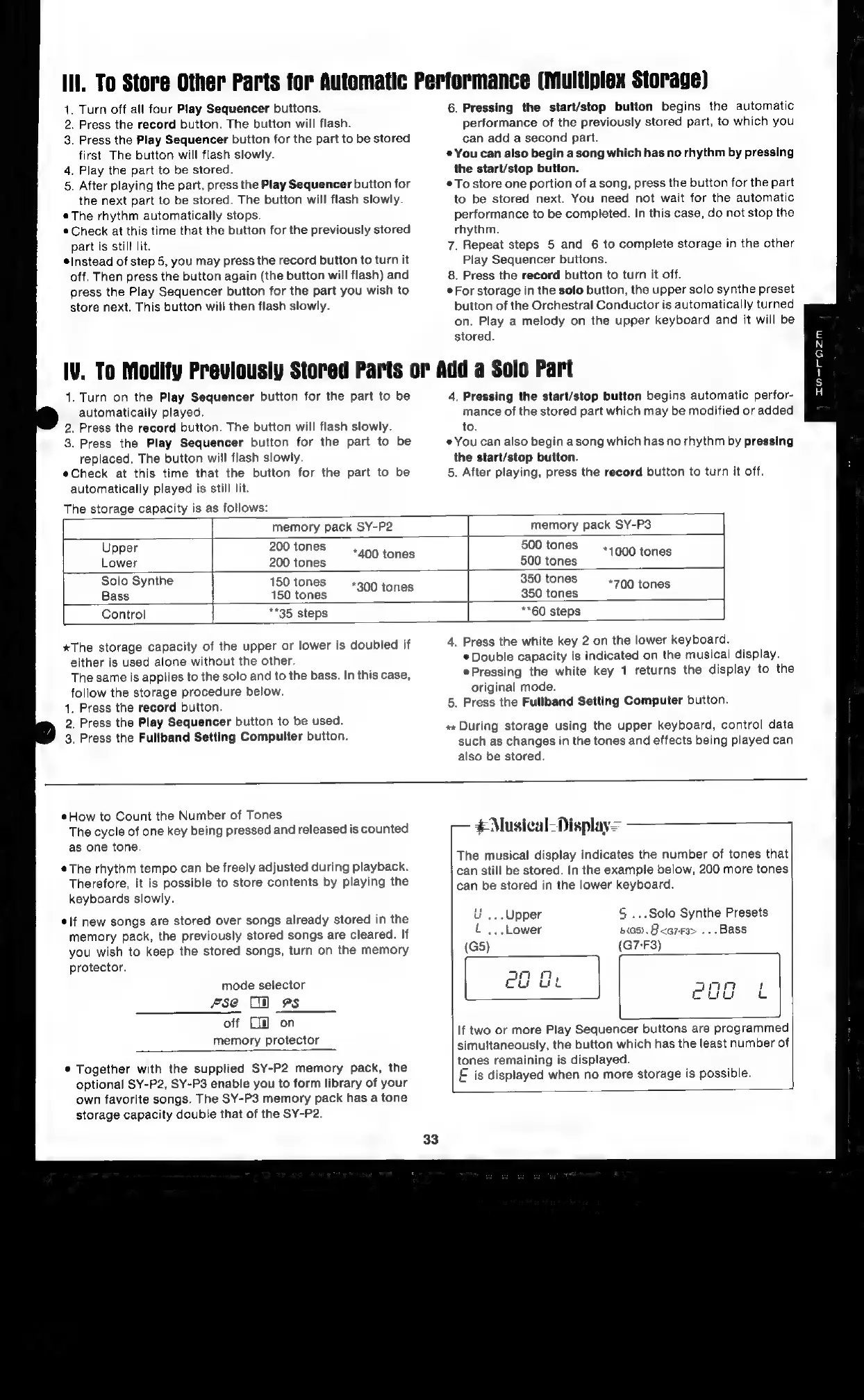
The
storage
capacity
is
as
follows:
4.
Pressing
the
start/stop
button
begins
automatic
perfor-
mance
of
the
stored
part
which
may
be
modified
or
added
to.
«You
can
also
begin
a
song
which
has
no
rhythm
by
pressing
the
start/stop
button.
5.
After
playing,
press
the
record
button
to
turn
it
off.
memory
pack
SY-P2
memory
pack
SY-P3
Upper
200
tones
-
500
tones
Lower
200
tones
aoe
tones
500
tones
1000
tones
Solo
Synthe
150
tones
350
tones
FY
Lt
t
Bass
150
tones
sc0ltones
350
tones
{00
tones
Control
**35
steps
**60
steps
*The
storage
capacity
of
the
upper
or
lower
is
doubled
if
either
is
used
alone
without
the
other.
The
same
is
applies
to
the
solo
and
to
the
bass.
In
this
case,
follow
the
storage
procedure
below.
1.
Press
the
record
button.
2,
Press
the
Play
Sequencer
button
to
be
used.
3,
Press
the
Fullband
Setting
Compulter
button.
4.
Press
the
white
key
2
on
the
lower
keyboard.
¢
Double
capacity
is
indicated
on
the
musical
display.
Pressing
the
white
key
1
returns
the
display
to
the
original
mode.
5.
Press
the
Fullband
Setting
Computer
button.
+*
During
storage
using
the
upper
keyboard,
control
data
such
as
changes
in
the
tones
and
effects
being
played
can
also
be
stored.
¢How
to
Count
the
Number
of
Tones
The
cycle
of
one
key
being
pressed
and
released
is
counted
as
one
tone.
¢The
rhythm
tempo
can
be
freely
adjusted
during
playback.
Therefore,
it
is
possible
to
store
contents
by
playing
the
keyboards
slowly.
¢\f
new
songs
are
stored
over
songs
already
stored
in
the
memory
pack,
the
previously
stored
songs
are
cleared.
If
you
wish
to
keep
the
stored
songs,
turn
on
the
memory
protector.
mode
selector
fse
Cl
9s
off
[i]
on
memory
protector
©
Together
with
the
supplied
SY-P2
memory
pack,
the
optional
SY-P2,
SY-P3
enable
you
to
form
library
of
your
own
favorite
songs.
The
SY-P3
memory
pack
has
a
tone
storage
capacity
double
that
of
the
SY-P2.
33
-—
€Musical-Display>=
The
musical
display
indicates
the
number
of
tones
that
can
still
be
stored.
In
the
example
below,
200
more
tones
can
be
stored
in
the
lower
keyboard.
ue...
Upper
S
...So0lo
Synthe
Presets
i
...Lower
acs),
A<e7-ra>
...Bass
(G5)
(G7-F3)
fog
tb
If
two
or
more
Play
Sequencer
buttons
are
programmed
simultaneously,
the
button
which
has
the
least
number
of
tones
remaining
is
displayed.
E
is
displayed
when
no
more
storage
is
possible.

Related product manuals