English - 19 -
Colour Temp
Press “ ” or “ ” button to select Colour Temp . Press
“
” or “ ” to choose from one of these options: Cool ,
Normal and Warm .
Note :
• Setting Cool option gives white colours a slight blue
stress.
• Setting Warm option gives white colours a slight red
stress.
• For normal colours, select Normal option.
Noise Reduction
If the broadcast signal is weak and the picture is
noisy, use Noise Reduction setting to reduce the
noise amount.
Press “
” or “ ” button to select Noise Reduction.
Press “
” or “ ” to choose from one of these options:
Low , Medium , High or Off .
Game Mode (optional)
Select Game Mode by pressing “ ” or “ ” button.
Use “ ” or “ ” button to set Game Mode as On or
Off . When Game Mode is set to On, specifi c game
mode settings, which are optimized for better video
quality, will be loaded.
Also; Picture Mode, Contrast, Brightness, Sharpness,
Colour and Colour Temp settings will be invisible and
disabled while Game Mode is on.
Note :
Picture mode selection button on the remote control will have
no function while Game Mode is on.
Picture Zoom
Select Picture Zoom by pressing “ ” or “ ” button.
Use “
” or “ ” buttons, to change picture zoom to
Auto , 16:9 , 4:3 , Panoramic , 14:9 , Cinema , Subtitle
or Zoom .
Store
Press “ ” or “ ” button to select Store. Press “ ”
or OK button to store the settings. “ Stored... ” will be
displayed on the screen.
Reset
Press “ ” or “ ” button to select Reset . Press
“ ” or “ ” or OK button to reset the picture modes to
factory default settings.
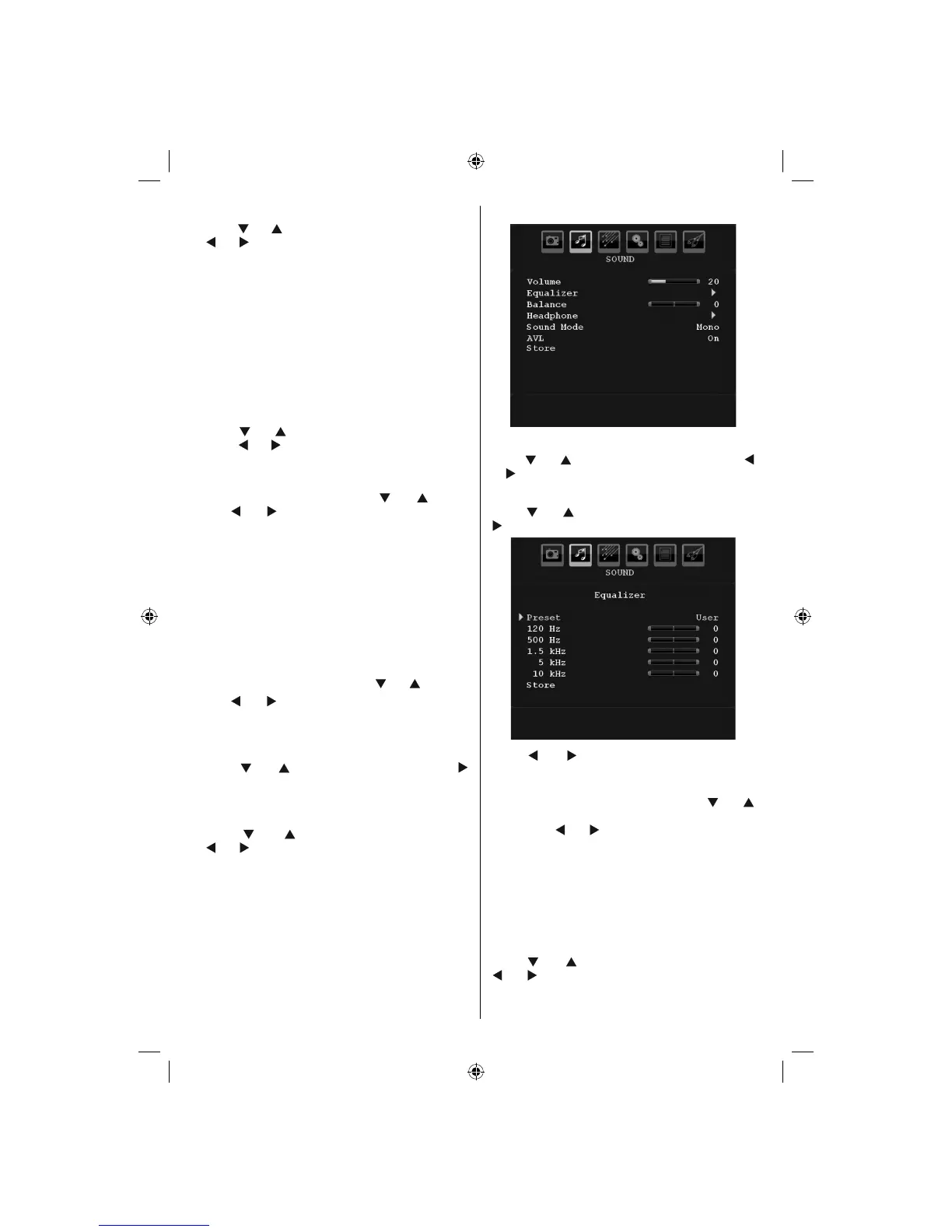
Sound Menu
Volume
Press “ ” or “ ” button to select Volume . Press “ ”
or “ ” button to change the level of the Volume.
Equalizer
Press “ ” or “ ” button to select Equalizer . Press
“ ” button to view equalizer menu.
Press “ ” or “ ” button to change the preset. In
equalizer menu, the preset can be changed to Music ,
Movie , Speech , Flat , Classic and User .
Select the desired frequency by pressing “
” or “ ”
button and increase or decrease the frequency gain
by pressing “ ” or “ ” button.
Press the “ MENU ” button to return to the previous
menu.
Note : Equalizer menu settings can be changed only when
the Equalizer Mode is in User .
Balance
This setting is used for emphasizing left or right
speaker balance.
Press “
” or “ ” button to select Balance. Press
“ ” or “ ” button to change the level of the balance.
Balance level can be adjusted between -32 and +
32.
00_MB45M_[GB]_(01-TV)_1900UK_IDTV_NICKEL13_(Powersave)_32882W_10068534_50174932.indd 1900_MB45M_[GB]_(01-TV)_1900UK_IDTV_NICKEL13_(Powersave)_32882W_10068534_50174932.indd 19 18.08.2010 09:13:5918.08.2010 09:13:59






 To Next Page