English - 23 -
buttons, select the desired language option, and press
OK button to activate.
Afterwards “First time installation” OSD will appear
on the screen. By pressing “
” or “ ” buttons, select
the Country you want to set and press “OK” button
(* only for EU countries).
Press the “OK” button to start installation. After search
is completed for digital channels, a message asking
whether to search for analogue channels appears
on the screen.This process is same as described in
Automatic Search section. .
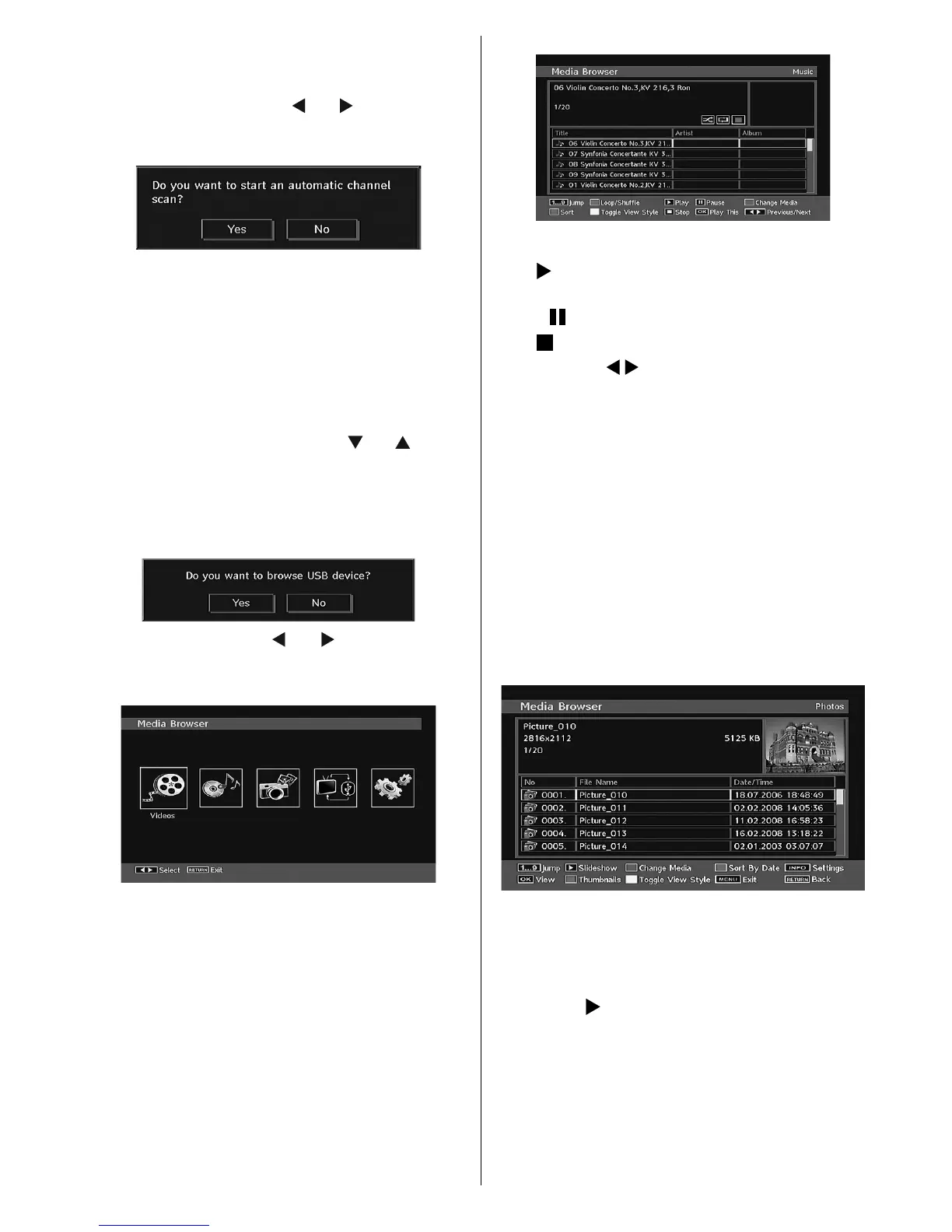
Media Browser
• To display Media Browser window, press either
“ M ENU” button on the remote control and then
select Media Browser by pressing “ ” or “ ” button.
Press “OK” button to continue. Media Browser menu
contents (depending on the contents of your USB
drive) will be displayed.
• Also, when you plug a USB device, the following
screen will be displayed:
Select YES by pressing “ ” or “ ” button and press
OK button. Media browser will be displayed.
• You can play music, picture and video fi les from a
USB memory stick.
Note : If you plug USB stick while in analogue mode, the TV
will automatically switch to digital TV mode.
Note : Some USB compliant devices may not be supported.
Note : If the USB stick is not recognized after power off/on
or First Time Installation, fi rst, plug the USB device out and
power off/on the TV set. Plug the USB device in again.
Playing MP3 Files
Select MUSIC option from the main media browser
window and all available music files will be
displayed:
Play This (OK button) : Plays the selected fi le.
Play (
button) : Plays all media fi les in the folder
starting with the selected one.
Pause (
button) : Pause playing fi le.
Stop (
button) : Stop the playing fi le.
Previous/Next (
buttons) : Jumps to previous or
next fi le to play.
Loop/Shuffle (GREEN button): Press once and
the selected fi le is played repeatedly. / Press again
and fi les will be played randomly. If shuffl e mode is
enabled, previous/next function will also jump to the
tracks randomly.
BLUE: Changes media type.
RED: Displays sorting options.
YELLOW: Toggles media browser viewing style.
Viewing JPG Files
Select PHOTOS option from the main media
browser window and all available photo fi les will be
displayed:
Jump (1...9 buttons) : jump to selected fi le using the
numeric buttons.
OK : (OK button) views the selected picture in full
screen.
Slideshow (
button): starts the slideshow with all
pictures in the folder.
BLUE: Changes media type.
RED: Sorts fi les by date.
MB45_[GB]_1900UK_PVR_IDTV_NICKEL9_19882W_10066963_50161761.indd 23 29.01.2010 14:24:53



 To Next Page