English - 4 -
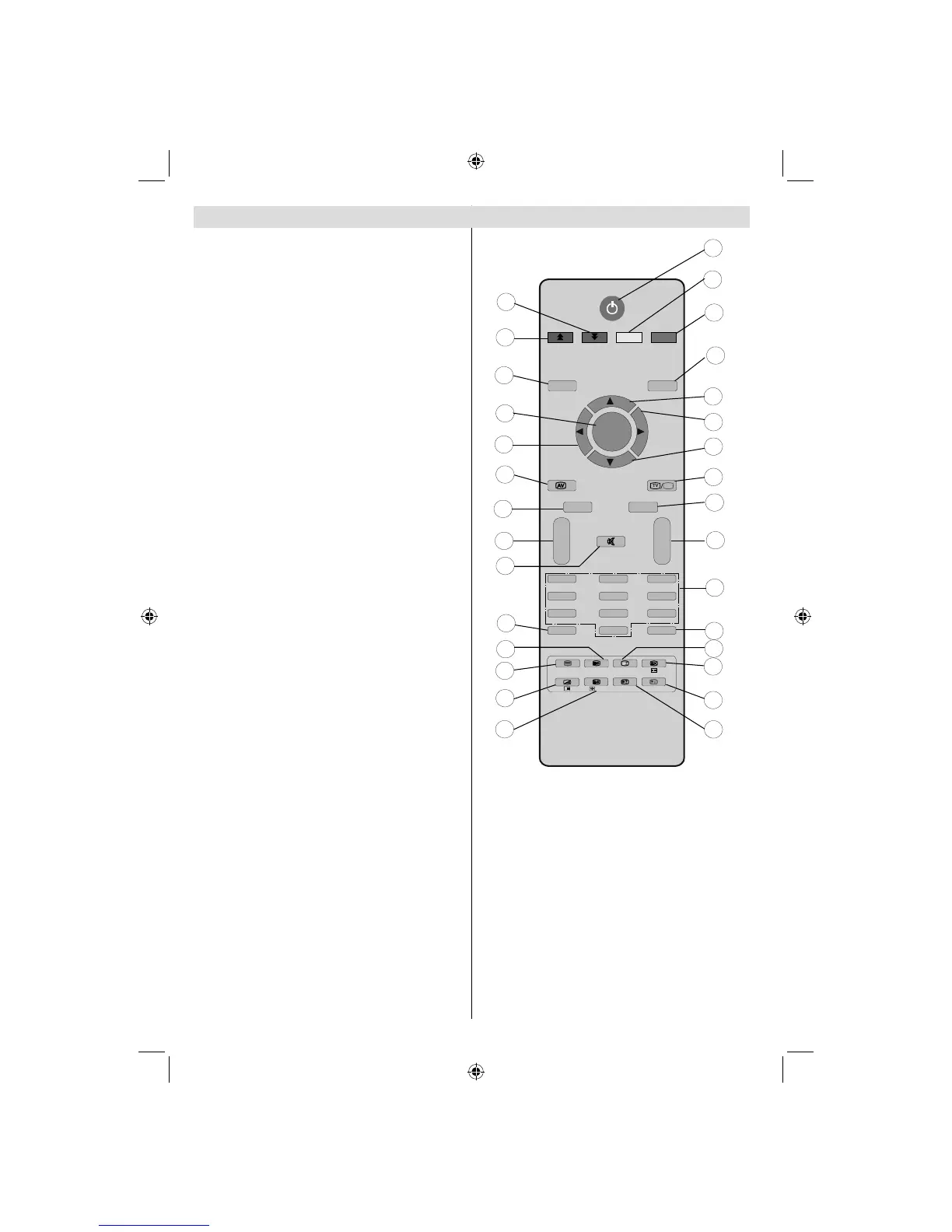
Overview of the Remote Control
EXIT
/
GUIDE
WIDE
ABC
DEF
GHI
JKL MNO
PQR
STU
VWX
YZ
1
2
3
4
5
6
7
8
9
10
11
12
13
14
15
16
17
18
19
20
21
22
23
24
25
26
27
28
29
30
M
P<P
TV
DTV
i
I-II
INFO
--
VP
++
-/--
PP
0
1
2
3
4
5
6
7
8
9
PC
OK
Standby1.
Yellow (Feature menu) / Current language 2.
(in DTV mode) (*)
Blue (Install menu)3.
Previous programme4.
Cursor up5.
Cursor right6.
Cursor down7.
TV / Digital TV8.
Mono/Stereo - Dual I-II 9.
Programme up / Page down (in DTV 10.
mode) /Programme down / Page up (in
DTV mode)
Numeric buttons11.
Exit (in DTV mode)12.
Hold (in TXT mode)13.
Update (in TXT mode) / No function 14.
Index page / Guide (in DTV mode)15.
Reveal (in TXT mode) / Switch from TV to 16.
PC
Green (Picture menu)17.
Red (Sound menu)18.
Menu19.
OK / Select 20.
Cursor Left21.
AV / Source22.
Info23.
Volume up/down24.
Mute25.
Picture mode selection26.
Time / Subtitle on-off (in DTV mode) (**)27.
Teletext / PAT mode28.
Mix (in TXT mode) / No function29.
Expand (in TXT mode) / Image size30.
(*) Only available for EU country options.
(**) Only available for UK.
Remote range is approximately 7m/23ft
00_MB45M_[GB]_1205UK_IDTV_NICKEL13_32855W_10066808_50164923.indd 400_MB45M_[GB]_1205UK_IDTV_NICKEL13_32855W_10066808_50164923.indd 4 18.02.2010 15:44:2418.02.2010 15:44:24



 To Next Page