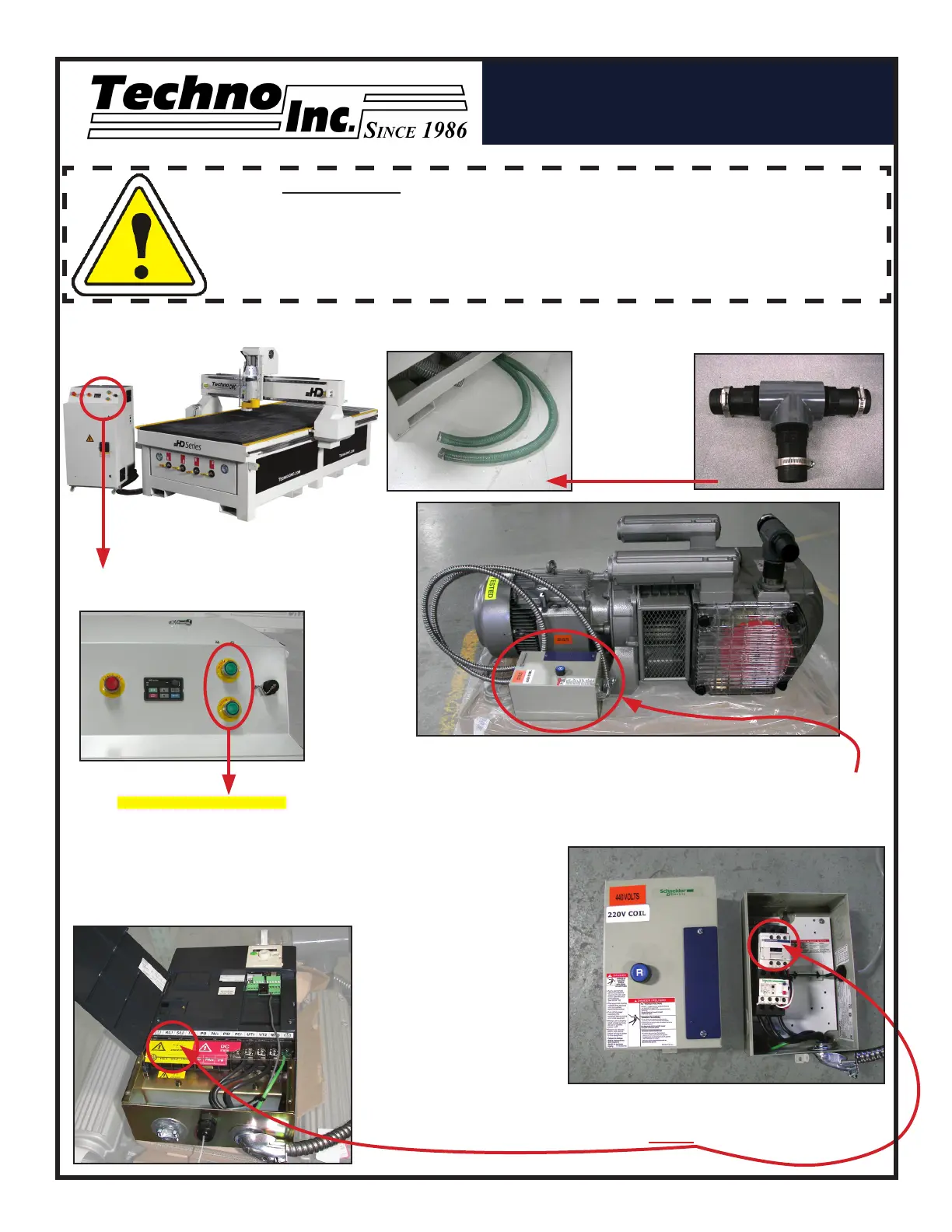
Control Box Front Panel
(for Vacuum System)
The ,
highlighted above come
standard if the Vacuum Table
is purchased with the machine.
Vacuum Pump Switches
WARNING: Direction of Pump Rotation is critical.
Briey start Pump and check rotation (arrow on casing).
Exchange phases if rotation is incorrect.
IF YOU RUN THE PUMP/BLOWER CONTINUOUSLY IN THE
WRONG DIRECTION, THE VANES WILL BE DAMAGED.
NOTE: The cover was
removed from Motor
Starter.
II. VACUUM PUMP SETUP: SINGLE PHASE & 3 PHASE
Vacuum Hoses
If a Vacuum Pump/Blower was part of your order, you
will have an electrical starter box that looks like this.
You should not need to wire the Vacuum Pump/Blower
Motor, it has been wired and tested at the factory.
You will need to have the electrician connect
AC power (220 or 440VAC) as specied
on the unit here to the Motor Starter.
3 Phase Control Box
Single Phase Control Box
Pump/Blower Motor
Starter Box & Connector
Vacuum Hose Kit
Use the
T-Connector
to connect the
Blue Hose to
the 2 Vacuum
Hoses to the
Machine.
HD SERIES Setup Instructions
HTT06031110
Tel: 516-328-3970
Email: support@technocnc.com
www.technocnc.com


 To Previous Page