For Support Visit· support.technocnc.com or Call: (631) 648-7481
23
HDS User Manual
(HTT06291133)
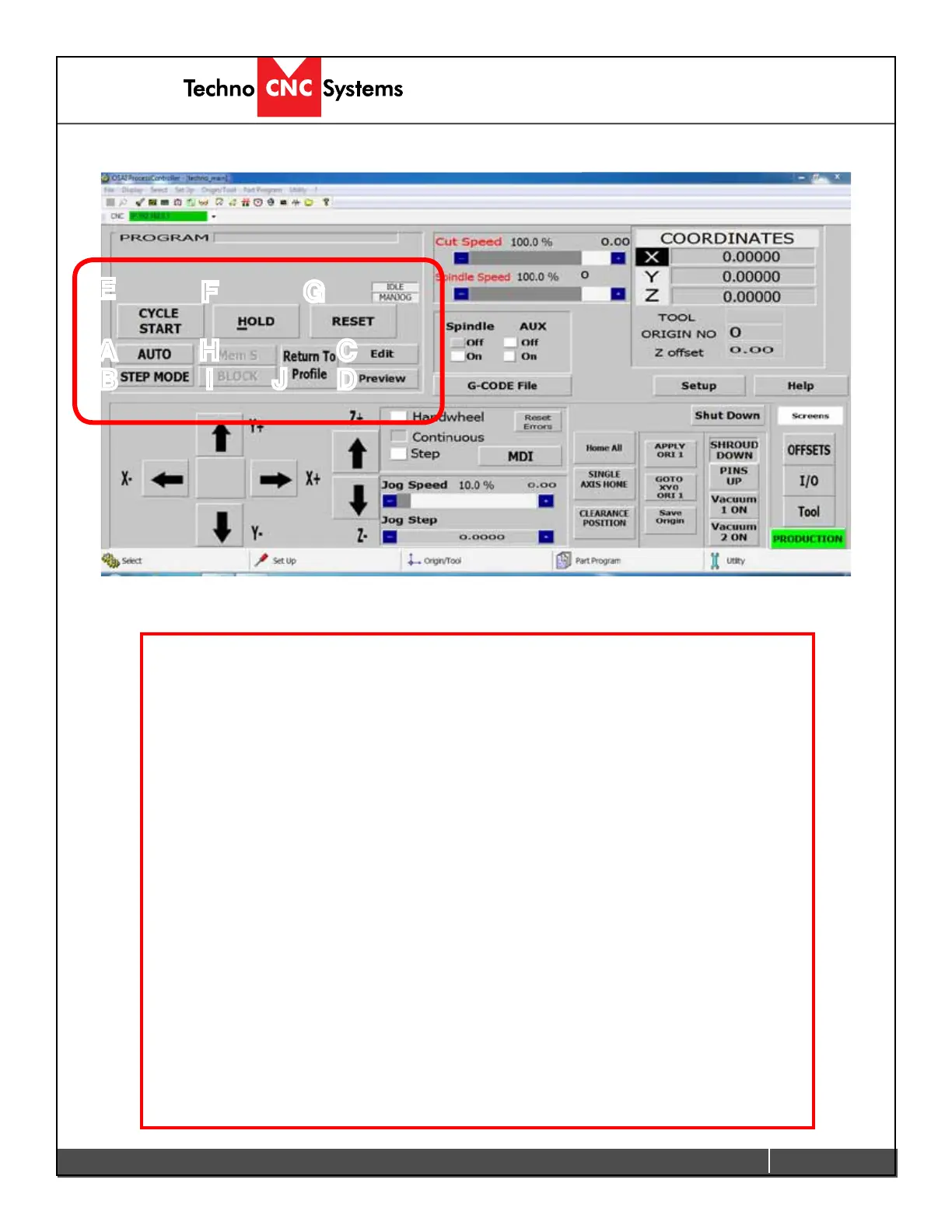
J-Program Functions
The section highlighted below contains the program
functions that are used when running a G-code le.
A - AUTO:Whenthisbuttonisactive,theG-codelewillrunincontinuousmode.
B - STEP MODE:Whenthisbuttonactive,theG-codelewillruninStepmode.
C - Edit: Leftclickingonthisbuttonwillopentheledirectoryallowingtheusertoeditthe
lesinatexteditor.
D - Preview: Leftclickingonthisbuttonwillopentheledirectoryallowingtheuserto
previewtheG-codeleintheTechnoPreviewer.
E - CYCLE START:PressingthisbuttonwillstarttheactiveG-codele,ineitherStepor
Auto mode. If no mode is selected then nothing will happen. Cycle start will also carry out
commands in MDI mode.
F - HOLD: Pressing this button will pause the operation that is in progress. Releasing hold
and pressing Cycle Start will continue the operation.
G - RESET: Pressing this button will abort the operation that is in progress. Reset will clear
theTool,originandlesettings.
H - Mem S:ThisbuttonwillsearchtheG-codeletondthepointwherethelastReset
occurred.Thenthelecanbestartedfromthispoint.
I - BLOCK:Thisbuttonwillopentheblockwindow,allowingtheusertoselectaspecic
block of G-code to run. ie N400 to N1200.
J - Return To Prole:IfthemachineisjoggedoffthepartduringHold,itwillneedtoreturn
thepointitwasinontheG-codeleifyouwanttocontinuetheoperation.Leftclickingthis
button and then holding down the directional arrow for each axis will move the machine back
to the correct position. Left clicking this button will pause whatever action is taking place.
A
B
C
D
E
F G
H
I
J


 To Next Page
 Loading...