For Support Visit· support.technocnc.com or Call: (631) 648-7481
7
HDS User Manual
(HTT06291133)
1.4.2
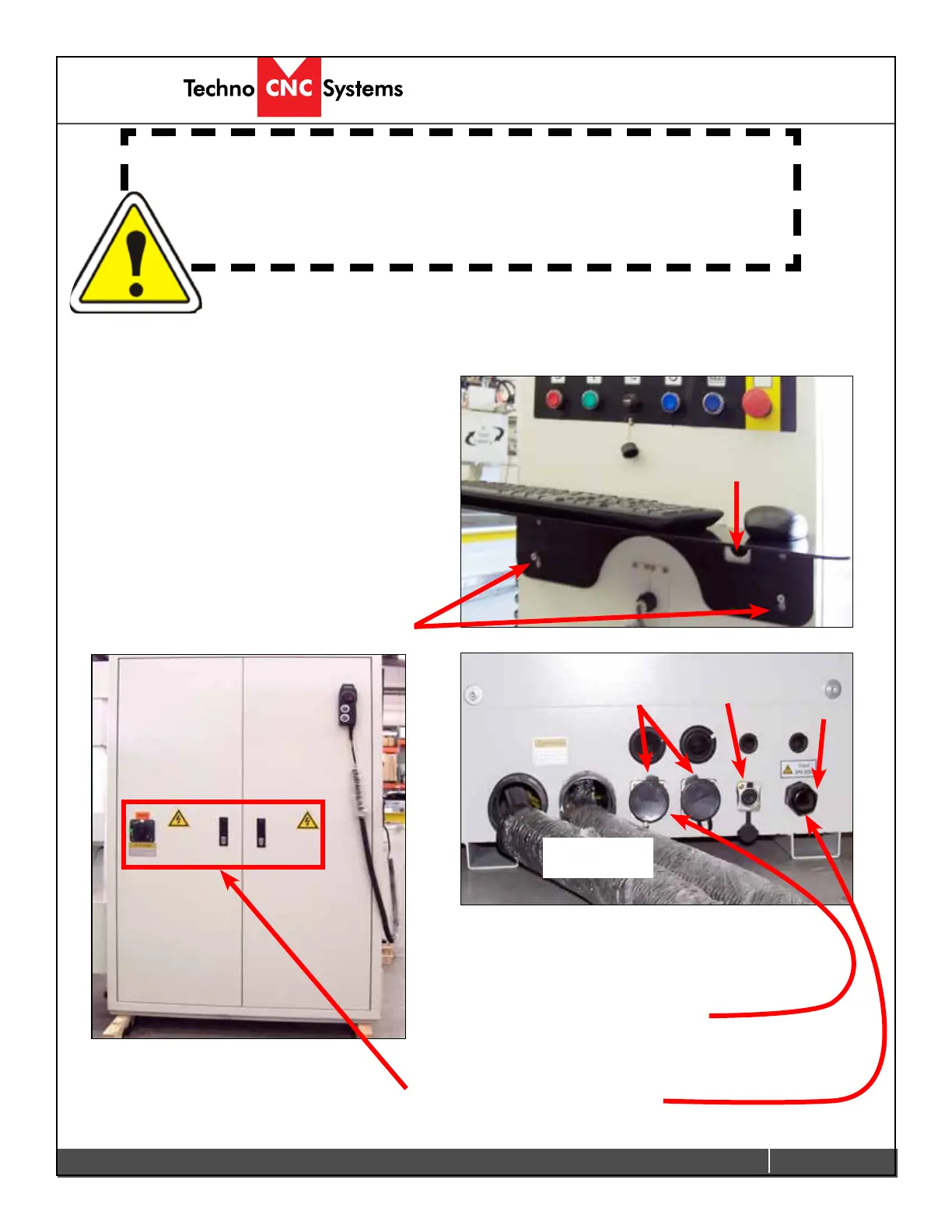
All the electronics for the HDS machine are
located in the housing cabinet. Do not open these
doors when power is applied to the machine.
1.4.3
There are two rounded connectors on the side of the
controller, these connectors provide 220 volts for the
vacuum pump starter contactors.
Lead the cable for 3 phase 220 volts through the hole on
the bottom of the cabinet.
Fig 1.4.2
220V In
220V
Out
Network
Connection
Motor/Encoder
Cables etc.
Fig 1.4.3.
1.4 Electrical and Pneumatic connections.
The Techno HDS series machine is powered by three phase 220 volts.
Theamperagerequirementsforthismachineare40amps.
1.4.1
When the machine has been unpacked, it will be
necessary to attach the keyboard shelf to the front
of the machine.
When the shelf is in place, lead the mouse and
keyboard cables through the small hole in the font
of the machine. Plug the cables into an available
USB connection on the PC.
Screws to attach shelf
Fig 1.4.1
Hole for mouse and
keyboard cable
WARNING: Ensure that all electrical connections are
carried out by a qualied electrician.
Improper electrical connections can result in
damage to the equipment, re and death.



 To Next Page
 Loading...