Control panel functions
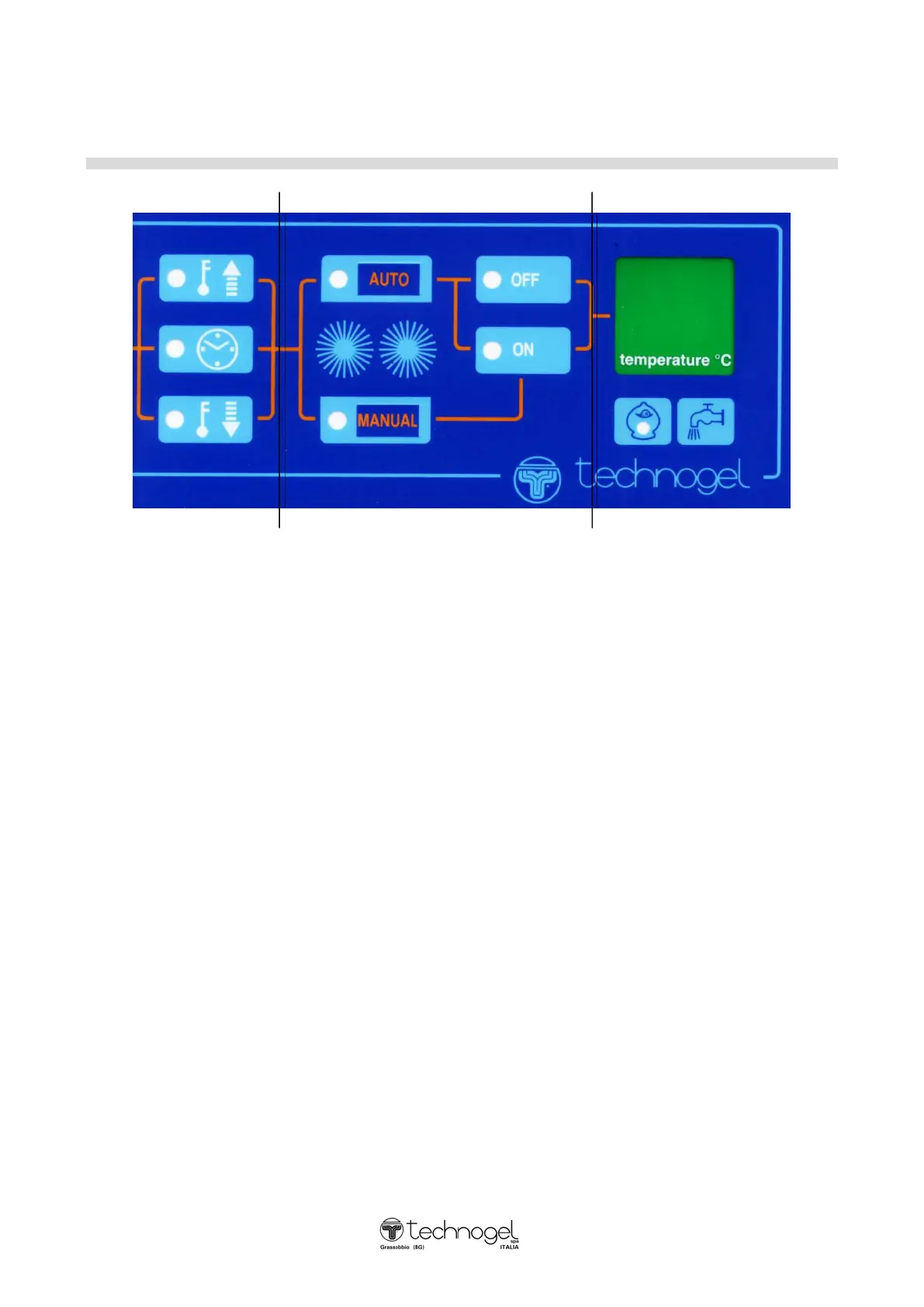
(D) (E) (F)
D) Example only of heating cycle sector
ARROW POINTING UPWARDS (led lights on ) =the machine is heating up
ARROW POINTING DOWNWARDS (led lights on) =the machine is cooling down
CLOCK (led lights on and flashing) =the machine is on pause after having
finished the cycle and is therefore
preserving at +4°C.
E) Emulsioner setting and control sector:
By pressing AUTO, the emulsioner will start automatically when the mixture reaches +55°C in the
heating phase and will stop only when the mixture reaches +55°C again during the cooling phase.
By pressing MANUAL the emulsioner will never start during the cycle.
Apart from the AUTO or MANUAL setting, if the MANUAL push button is pressed for 2 seconds
during the cycle and at a temperature lower than +55°C, the emulsioner will start up, operate for 2
minutes and then stop.
The lights (led) indicate: ON - emulsioner on OFF - emulsioner off
F) Sector with display indicator of temperature:
washing water inlet switch - by keeping the tap symbol pressed, water will enter the tank.
saving switch (MONEY BOX) - light (led) on for heating half the tub.
- light (led) off for heating the whole tub.



 To Next Page