EN8
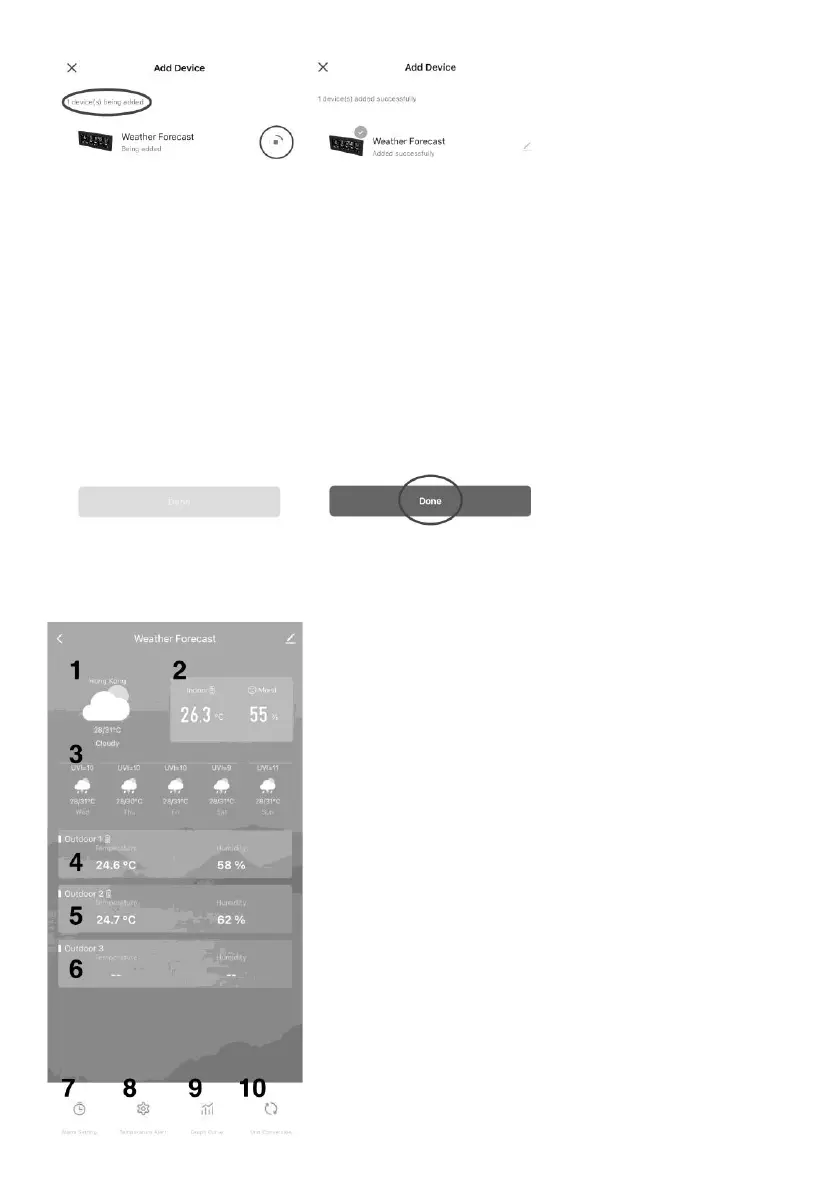
12. Upon a device found,
press “Add” to connect
the device.
13. When connection
completed, click
“Done” to enter the
App information screen
and the local time / 5
days weather forecast
will synchronize to the
weather station unit.
THE FUNCTIONS OF THE APP
The main screen of the App shows the following information:
1. Today weather forecast / temperature / humidity
2. Indoor temperature and humidity
3. Next 5 days weather forecast / temperature / humidity / UV
index
4. Outdoor sensor 1 temperature / humidity
5. Outdoor sensor 2 temperature / humidity
6. Outdoor sensor 3 temperature / humidity
7. Alarm setting
8. Temperature and humidity alert
9. Graph curve
10. Unit conversion










 To Next Page