EN14
To read maximum-minimum in-out temperatures and humidities
At normal time display mode, press the button once to view the maximum indoor-outdoor
temperatures and humidities records with “MAX” icons appearing on the display. Press the button
again to view the minimum indoor-outdoor temperatures and humidities and the air pressure with “MIN”
icons appearing on the display.
When the maximums or minimums are displayed, press and hold the button to reset both records
and it will start to record the maximums and minimums again.
If lost connection with outdoor transmitter
When the outdoor temperature and humidity digits show '---", the wireless transmission is either
interrupted or lost. Press and hold the button of the Wi-Fi Weather Station to restart signal
searching from the outdoor transmitter (the icon on display flashing). If still failed to connect, try
placing the outdoor transmitter in a different location as extreme weather may affect the transmission.
To synchronize additional outdoor sensor (maximum 3 units) with your Wi-Fi Weather
Station
At the top of your weather station, Press the button once. icon appears near your outdoor
temperature and humidity.
- Press and hold the button until the icon blinks, your weather station is searching
for the signal of another outdoor transmitter at Channel 2.
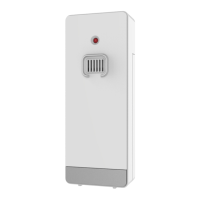
- Slide open the battery door of your second transmitter, slide the switch to the middle position
marked with 2, then insert two AAA batteries into the battery compartment by observing the
correct +/- polarity.
- Replace the battery cover.
- The outdoor temperature and humidity of your second transmitter will appear on the LCD
together with icon within few seconds. If the data still does not appear, take out and reinstall
batteries to your second transmitter once.
- To synchronize your weather station with a third outdoor sensor, repeat the same step by
choosing on your weather station and select 3 on the switch on your third transmitter.
Reset the Wi-Fi connection
If necessary, user can press and hold the button to reset the WIFI connection between
the App and the device.
To activate auto scrolling of temperature and humidity data from different outdoor
transmitter
Press the button once at a time until the icon appears under icon . Then the outdoor
temperature and humidity of different outdoor transmitters will be displayed for few seconds alternately with
, , . To stop the auto scrolling, press the button again and to get back to constant display of
the temperature and humidity of the transmitter, the icon remains static on the display.










 To Next Page