WS9050-DCF Manual
-”display on the LCD), check if the right channel number is selected and press
and hold “CH” button for 3 seconds to receive a transmission manually. RF
icon “ ” flashes on the LCD. The Weather Station tries to receive the outdoor
sensor then.
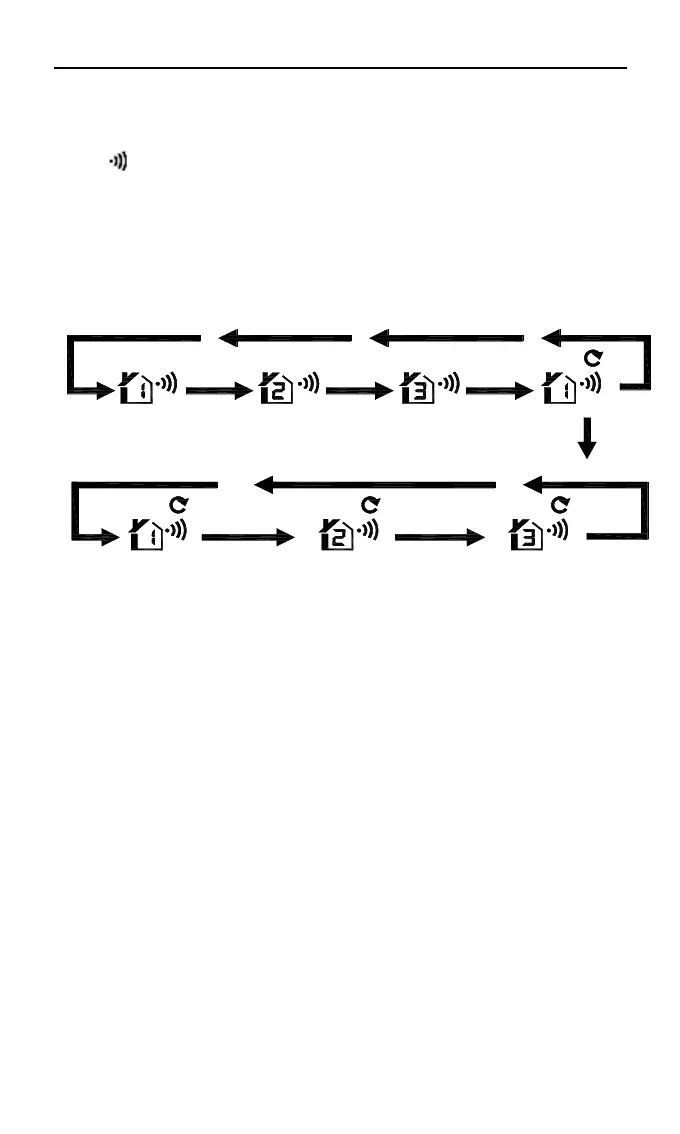
If the weather station is used with 2 or 3 transmitters, press “+/CH” button
shortly to display CH2, CH3 or cyclic display.
P re ss "C H " b u tto n
P re ss "C H " P re ss "C H " P re ss "C H "
A u to m a tic A u to m a tic
A u to m a tic
5S 5S
5S
Maximum/minimum temperature/humidity
Press “MEM” button once, the LCD will display maximum value of temperature/
humidity. Press “MEM” button again, the LCD will display minimum value of
temperature/ humidity. Press “MEM” button again and the LCD will display
current value of temperature/ humidity.
While displaying MAX or MIN values, there is “MAX” or “MIN” on the LCD.
Press and hold “MEM” button for 3 seconds. The temperature/humidity
maximum/minimum value will reset to the current values
Please note:
If the temperature reading is below measuring range, LL.L will be displayed. If
the temperature reading is above measuring range, HH.H will be displayed.










 To Next Page