This document is the user manual for the Techno Piano TP300C, a digital piano designed in Italy. It provides comprehensive information on the device's functions, technical specifications, usage, and maintenance.
Function Description
The Techno Piano TP300C is a versatile digital piano offering a rich musical experience. It features a powerful Record/Play function, allowing users to record and playback their performances. The instrument supports Bluetooth connectivity, enabling seamless integration with smartphones or computers for playing songs and learning software. It also includes a metronome with various time signatures (1/4, 2/4, 3/4, 4/4, 5/4, 6/4, 3/8, 6/8, 12/8) and a tempo range of 20-280 beats per minute. The storage function allows for saving up to 4 sets of memory function keys.
For accompaniment, the TP300C offers Start/Stop, Sync Chord, Intro/End, and Fill functions. It supports USB/MIDI connection for connecting to computers, realizing unlimited numbers of song recording storage, and connecting to other MIDI devices and software sequencers. The instrument also features Audio In/Out for connecting external audio sources and amplifiers.
The control panel includes dedicated buttons for Power, Volume, REC/PLAY, Metronome/Tempo, Sync Start/Stop, Chord, Fill, Intro/End, Demo, Tone/Rhythm, Function, and Menu. Function keys allow for controlling Reverb Effect, Chorus Effect, Dual Voice, Split Function, and Percussion Function. The MP3/Bluetooth function enables playing/pausing and skipping MP3 tracks from a USB thumb drive or connecting via Bluetooth with a PIN of 8888.
Important Technical Specifications
- Type: Digital Piano
- Color: Black/White
- Keyboard: Fully weighted hammer action keyboard
- Sound Source: Pure France DREAM 5 series sound source
- Polyphony: 128 Polyphony, 256 MBit
- Tone: 200 Tones including GM Standard
- Rhythms: 100 Rhythms, including piano accompaniments, world-style rhythms, etc.
- Demo: 60 Demos
- Record/Play Function: Powerful Record/Play function, recordable accompaniment track
- Bluetooth Function: Connect phone or computer to play songs, can connect learning software that supports Bluetooth operation
- Metronome: 9 metronome types: 1/4, 2/4, 3/4, 4/4, 5/4, 6/4, 3/8, 6/8, 12/8 - Range: 20-280 Beats Per Minute
- Storage Function: 4 Sets of Storage Memory function keys
- Accompaniment Control: Start/Stop, Sync Chord, Intro/End, Fill
- Menu: Rhythm vol., Transpose(±12), Touch (3 levels), Balance, Split Key, Dual, Rev. level, Chor. level, Tempo signature
- USB/MIDI Connection: Connect computer, realize unlimited number of songs recording storage
- Other Connections: 2x Headphone jacks, Audio Line In/Out jacks, MIDI In/Out
- Power Supply: 15V, 3A
- Dimensions: cm 135x36x79
- Weight: 40 kg
- Pedals: Soft, Sostenuto, Sustain
- Speakers: 2x 15W
Usage Features
The TP300C offers a user-friendly interface with clearly labeled controls.
- Power Button: Turns the instrument on and off.
- Volume Knob: Adjusts the sound level. Clockwise increases volume, anti-clockwise decreases volume.
- REC/PLAY: Press REC to start recording, play the piano, then press REC again to stop recording. Press PLAY to playback the last recording.
- Metronome and Tempo: Turn on/off the metronome and adjust the tempo speed. Press METRONOME to activate, hold to display beats per minute. Use +/- buttons to increase or decrease tempo.
- Sync Start/Stop: Press and hold to display the currently selected rhythm. Press CHORD button to start accompaniment. Press again to stop synchronization.
- Chord Button: Use to turn on/off the chord accompaniment function. Press START/STOP to start/stop chord mode. Play different performances according to different fingering on the accompaniment section of the keyboard (keys 1 to 22 keys, from the left).
- Fill Button: Press RHYTHM to select a rhythm. Press START/STOP to start rhythm performance. Press FILL to insert a fill-in to the accompaniment, press and hold FILL to continue inserting the fill-in arrangement.
- Intro/End Button: Press RHYTHM to select a rhythm. Press INTRO/END to enter INTRO mode, then press START/STOP to insert an intro pattern. When the rhythm is in progress, press INTRO/END again to add an end pattern.
- Demo Button: Listen to all demo songs by pressing and holding +/- buttons. Stop demo by pressing and holding +/- buttons again. Use +/- to select a different demo song.
- Tone/Rhythm Button: Press to start TONE mode, LED screen shows abbreviation for TONE. Use +/- or FUNCTION button and input a NUMBER (0-9) to recall a desired tone. For RHYTHM, press to enter RHYTHM mode, LED screen shows abbreviation for RHYTHM. Use +/- or FUNCTION button and input a NUMBER (0-9) to recall a desired rhythm.
- Function Button: Press and hold to select a number directly (LED screen shows number you enter). While holding, press one of the function keys to select a function directly (LED screen shows status as ON or OFF).
- Menu Button: Use to enter the Function Menu option and select a function. Adjustable ranges include Rhythm Volume (0-31), Transpose (+/- 12 Semitones), Touch (001-003), Balance (000-127), Split Note (045-096), Reverb Level (001-008), Chorus Level (001-008), and Time Signature (1/4, 2/4, 3/4, 4/4, 5/4, 6/4, 3/8, 6/8, 12/8).
- Function Keys:
- Reverb Effect: Press and hold FUNCTION, then press REVERB ON/OFF key on keyboard to switch effect on/off. LED screen shows ON/OFF. Under MENU, select Reverb Level to adjust the effect.
- Chorus Effect: Press and hold FUNCTION, then press CHORUS ON/OFF key on keyboard to switch effect on/off. LED screen shows ON/OFF. Under MENU, select Chorus Level to adjust the effect.
- Dual Voice: Press and hold FUNCTION, then press DUAL VOICE ON/OFF key on keyboard to switch dual voice function on/off. LED screen shows ON/OFF. Start Tone mode and select an instrument as main voice. Press DUAL VOICE ON/OFF to select second dual voice tone (default: 050 STRINGS2). Use +/- or NUMBER KEY to select a sound. Under MENU, select Balance to adjust volume balance.
- Split Function: Press and hold FUNCTION, then press SPLIT ON/OFF key on keyboard to switch split function on/off. LED screen shows ON/OFF. Start Tone mode and select an instrument as main voice. Press SPLIT ON/OFF to select second split tone (default: 050 STRINGS2). Use +/- or NUMBER KEY to select a sound. Under MENU, select Split Note to adjust split note position.
- Percussion Function: Press and hold FUNCTION, then press PERCUSSION ON/OFF key on keyboard to switch percussion function on/off. LED screen shows ON/OFF.
- Tone/Rhythm Memory Storage: Select a desired TONE/RHYTHM setting, hold FUNCTION, press a Memory key (M0-M3). Screen shows "S-0", "S-1", "S-2", "S-3" for stored settings. Recall settings by pressing R0, R1, R2, R3.
- MP3/Bluetooth Function: Insert a USB thumb drive, use control buttons to play/pause and skip MP3 tracks. Connect via Bluetooth with PIN 8888.
- MIDI In/Out: Standard for connecting synthesizers, sequencers, and other electronic instruments. This piano has two MIDI jacks for exchanging data. MIDI IN for receiving note messages, program change and other data. MIDI OUT for sending note messages, program change and other data.
- USB Port: Connects the digital piano to other MIDI devices and computers with software sequencer.
- Audio Input/Output: Audio Input: Connect external audio source, adjust volume to satisfactory level. Audio Output: Connect an audio amplifier, adjust volume to satisfactory level.
Maintenance Features
The manual emphasizes several safety precautions and maintenance guidelines to ensure the longevity and proper functioning of the TP300C.
- General Safety: Avoid heating, damping, or direct sunlight. Do not expose the instrument to direct sunlight or place it near air conditioners or hot baking devices. Avoid using near TV sets, radio, and magnetic fields, as electromagnetic fields may cause disturbance. Move the instrument away from electromagnetic devices.
- Cleaning: Clean the product with a dry and soft cloth. For stubborn dirt, use a very weak solution with water and some neutral detergent. Dip the cloth in the solution, then wring it dry before cleaning. Avoid using paint, diluents, or similar chemicals.
- Handling: The product must be handled with care. Avoid bumps and shocks to prevent damage to the shell or internal electronic components.
- Temperature: Avoid thermal shocks, too high, and too low temperatures. High or low temperatures may cause malfunctions or make pictures and digits on the LCD screen turn gray and hard to read. When keeping the product under normal temperature range, the display problems will be corrected automatically.
- Water and Foreign Matter: Never place the product in fire, otherwise it may lead to explosion and result in fire and personnel injury. Keep away from water, other liquid, metallic matter, etc. If the above cases occur, carry out the following operations immediately: turn power off, unplug AC transformer, contact dealer for servicing.
- Placement: Avoid placing the product on uneven surfaces or any other unbalanced places, otherwise it may result in dropping off the product and possible personnel injury.
- Disassembly and Modification: Never dismantle or modify the product in any way, otherwise it may result in electric shock, scald or other physical injury. Commission all internal inspection, adjustment, repairing and maintenance to your dealer or authorized personnel.
- Moving the Product: Before moving the product, unplug the AC transformer from the wall outlet and unplug all other cables and connecting wires, otherwise it may lead to electric line damage, fire and electrical shock.
- Cleanliness: Before cleaning the product, unplug the AC transformer from the wall outlet, otherwise it may lead to AC transformer damage and result in fire or electrical shock.
- Drop Out or Impact: Using this product after dropped out or violently impacted may cause fire or electric shock. If the above cases occur, carry out the following operations immediately: turn power off, unplug AC transformer, contact dealer for servicing.
- Interfaces: The interfaces of this product can only be connected to appointed instruments and devices. Connecting this instrument to improper devices may result in fire and electric shock.
- Plastic Bag: Never put the plastic bag of this product casing on your head or insert into the mouth, otherwise it may lead to asphyxial danger. Families with kids should take particular care.
- Choosing a Place: Avoid placing the product as follows, otherwise it may lead to fire and electric shock:
- Places with high temperature or dust.
- Kitchen or other places with smoke or lampblack.
- Places exposed to direct sunlight or any other place that may take this product to generate high temperature.
- Places with moisture, water or other dripping liquids.
Troubleshooting
The manual also provides a troubleshooting guide for common issues:
- No sound when turning off the piano: Don't worry, this is a normal condition.
- Power is on, no sound when pressing keys: Check the main volume control and whether the headphone is connected.
- Different voice in the same tone: This is a normal condition when a different tone is selected.
- Notes are sustained when the sustain pedal is not pressed - the sustain pedal works in reverse: Connect the pedal plug before turning on the power switch.
- Main volume or accompaniment volume is not normal: Adjust the levels via the proper functions.
- Noise when using a mobile phone: Avoid using mobile phones near the instrument.
- In sync state, no auto accompaniment functions: Playing with synchronous auto accompaniment, the notes that define the accompaniment must be played in the left section of the keyboard (34 keys on the left) - the lead lines must be played in the right side of the keyboard.
For any technical service, if troubles cannot be solved otherwise, contact customer support.

 Need help?
 General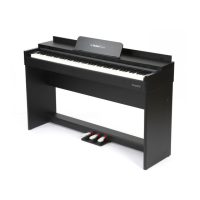

 To Next Page