Software version 2.2.1_2015-02-21
-
16
-
3.6. Settings and Oil-Pick dialog
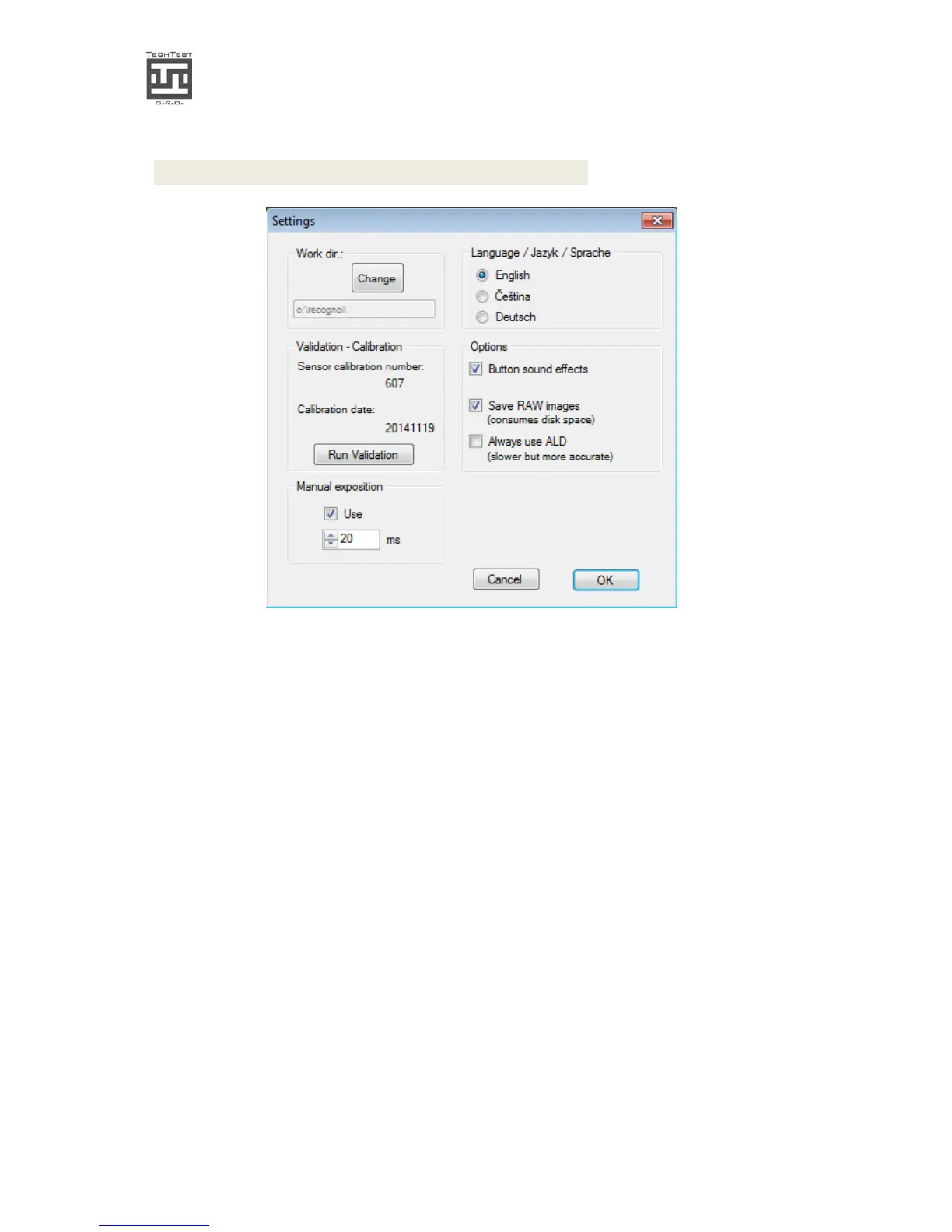
img. 11. The Options dialog
• Validation - calibration module: Please see chapter 6.
• Working directory: click Change if you want to choose other directory, which
contains oil files, RAW files and Result files.
• Manual exposition – in case of need of very short or very long exposure times, use
this option. The Detector output outcome may not be the same as in the automatic
intelligent mode. For advanced users only.
• You can disable the button sound effects by un-checking “Button sound effects”
• Save RAW images – the default setting is ON – the software records every detection
into a RRW file, which can be later opened and evaluated. Every files has approx.
0.5 Mbytes.
• Always use ALD option – in automatic intelligent mode, the ALD method is
activated, when there is the environment light getting to the detector. If you want
to use this mode every detection, regardless on this amount of light, check this
option. The detection then takes twice the time


 To Next Page