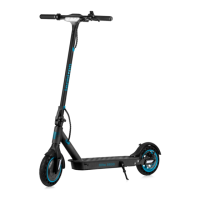
The Techtron Pro 3500 is a foldable eScooter designed for personal transportation, emphasizing performance, safety, and smart connectivity. It combines a robust build with advanced features to provide an efficient and enjoyable riding experience.
Function Description
The Techtron Pro 3500 is a personal electric scooter primarily used for commuting and leisure. It is designed to be easily foldable for portability and storage. The scooter features two pre-configured speed modes, which can be customized via a smart app, and includes a cruise control function for consistent speed maintenance. Its main function is to provide a convenient and eco-friendly mode of transport for individuals aged 16-50 years, with a focus on urban environments and smooth, dry surfaces.
Important Technical Specifications
- Model: Pro 3500
- Range: 25 km
- Power: 350W
- Top Speed: 25 km/h
- Speed Modes: 2 (customizable via app)
- Hill Incline: 15%
- Rider Age: 16-50 years
- Max. Load: 120 kg
- Battery: 37V 7.5Ah
- Charger: 42V/1.5A
- Storage Temp: -20°C to 45°C
- Working Temp: -10°C to 40°C
- Rider Height: 120cm - 200cm
- Frame Material: Aluminium
- Current Limit: 16A
- Motor Type: Brushless DC
- IP Rating: IPX4 (splash resistant)
- Foldable: Yes
- Tyre Size: 8.5"
- Charging Time: 5-6 hours for a full charge.
- Connectivity: Bluetooth® for smart app integration.
Usage Features
The Techtron Pro 3500 offers several features to enhance its usability and rider experience:
Assembly:
- Crossbar Installation: The crossbar is installed onto the standpipe.
- Standpipe Unfolding: The scooter's standpipe is unfolded, the handle moved into position, and the folding mechanism locked.
- Crossbar Fastening: The crossbar is fastened to the standpipe using four M3 hex screws and the provided M3 hex key.
Charging:
- Process: To charge, open the rubber stopper on the side of the base and plug in the charging adaptor.
- Duration: A full charge takes approximately 5-6 hours.
- Protection: Replace the stopper after charging to prevent water damage.
- Battery Indicator: A five-bar display panel indicates the current charge status. When only one bar remains, the battery is below 10%, and the scooter will slow down and require recharging.
Display Panel Function:
- Speed Display: Shows the current speed. The scooter has two pre-configured speed modes (20km/h and 25km/h), which can be adjusted via the smart app. The app also allows toggling between mph and km/h.
- Power ON/OFF: Press the button briefly to turn ON. Hold for two seconds to turn OFF.
- Light Control: A short press of the button turns the main light ON/OFF.
- Speed Mode Toggle: A quick double press of the button toggles between speed mode 1 (green LED) and speed mode 2 (red LED).
- Cruise Control: Activated by pressing and holding the accelerator at a constant speed for five seconds. The device beeps when activated and deactivates upon applying the brake.
- Power Saving: The eScooter automatically powers OFF after 15 minutes of inactivity.
Folding Mechanism:
- Process: Unlock the standpipe, collapse the scooter, and hook it onto the folding clasp located on the rear mudguard. This allows for easy carrying and transport.
Techtron® Smart App Integration:
- Customization: Users can configure desired settings, including riding mode and speed limiter.
- Security: The scooter can be locked via the app to prevent unauthorized access.
- Settings Persistence: Settings applied through the app are remembered even when Bluetooth® is disconnected.
- Home Screen: Displays remaining range, allows control of lights, access to settings, locking the scooter, viewing connection status, toggling riding modes, viewing trip info, and controlling cruise control.
- Settings Menu: Allows changing units (km/h to mph), enabling/disabling cruise control, choosing preferred speed presets, setting a speed limiter (useful for children), and enabling "Zero Start" (starting from a stationery position, which may reduce battery range).
- Trip Info: Provides detailed information such as remaining range, mileage for the current journey, total mileage, scooter temperature, total driving time, current speed, current, voltage, power, error codes, warning codes, electronic control version, Bluetooth version, and app version.
- Firmware Upgrade: The device firmware can be upgraded via the app (internet connection required).
Riding Guidance:
- Safety Gear: Wearing cycle helmets is recommended, ensuring they conform to regulations and are securely fastened. Light-coloured or fluorescent clothing is advised for visibility.
- Braking Distance: Be aware that faster speeds require longer braking distances.
- Pedestrian Courtesy: Respect pedestrians' right of way.
- Pre-Ride Check: Always check for loose parts and general tyre wear and tear before riding.
- Starting: Push off with a foot first to reduce motor load and extend battery life.
- Surface Conditions: Best performance is on smooth, dry surfaces. Avoid uneven gravel, sand, grass, slick, or wet surfaces. Do not ride over curbs or jump, as this can damage the scooter and void the warranty.
- Passenger Limit: Do not ride with more than one person to avoid loss of control.
- Legal Compliance: Riders are responsible for complying with all local laws and regulations.
Maintenance Features
- Cleaning: Use a soft cloth with a small amount of water. For difficult areas, toothpaste and a toothbrush can be used, followed by a damp cloth. Avoid alcohol, petrol, kerosene, or corrosive solvents. Do not use pressure washers. Ensure the charging cable is unplugged and the port stopper is closed to prevent water damage and electric shock.
- Standpipe Shake Adjustment: If the standpipe develops a slight shake, tighten the two folding mechanism screws using the M3 hex key.
- Brake Adjustment:
- Tightening: Insert the M5 hex key into the slot, turn counterclockwise to release the pressure plate screw. Return the brake line to make the exposed tail length slightly longer, then lock the screw.
- Loosening: If brakes are too tight, release the pressure plate screw, pull the brake cable to make the exposed tail length slightly shorter, then lock.
- Fine Tuning: Brakes can be fine-tuned by hand; turn the screw counterclockwise to tighten and clockwise to loosen.
- Battery Maintenance and Disposal:
- Do not touch battery contacts, open, or expose the shell. Avoid metal objects touching contacts to prevent short circuits or damage.
- Dispose of batteries responsibly.
- Recharge and store batteries after use to preserve life.
- Avoid high temperatures (above 50°C) or low temperatures (below -20°C) to prevent battery failure, overheating, or fire risk.
- Store in a cool, dry place, fully charged, at standard room temperature for optimum performance. Removing the battery may invalidate the warranty.
- Troubleshooting: The manual provides a list of error codes displayed on the scooter's panel, along with descriptions and solutions. If issues persist and the scooter is under warranty, contact customer services.
Warranty Policy:
- Batteries: One-year guarantee on rechargeable batteries.
- Parts/Manufacturing Defects: Two-year guarantee against parts and manufacturing defects. Terms & Conditions/Exclusions apply; details are available on the techtron website.
- Product Registration: Register the product on the techtron website (https://techtron.co/pages/warranty) for exclusive offers, product support, and information on innovations.
The Techtron Pro 3500 is designed to be a reliable and user-friendly eScooter, with comprehensive support for assembly, usage, and maintenance, ensuring a long and safe operational life.

 Need help?

 To Next Page
 General