Revised 03/25/2020 9
3.) Gun Shift
a.) Select “Gun Shift” from the “Direct Alignments” panel.
b.) Set the “Spot size” to 9.
c.) Converge the beam to crossover using the “Intensity” (LC) knob and center
the beam using the beam shift trackball (LC)
Note: if the beam moves significantly when changing the intensity, roughly
center the condenser aperture (see step 4.) before proceeding.
d.) Set the “Spot Size” to 3.
e.) Converge the beam to crossover and center the beam using the gun shift
(MF knobs).
f.) Repeat steps b–e until the beam does not move when changing between
spot sizes 3 and 9.
g.) Press “Done” in “Direct Alignments”.
h.) If the gun shift must be adjusted a substantial amount and it results in a
significant change in the measured exposure time at a given spot size, re-
check the gun tilt alignment.
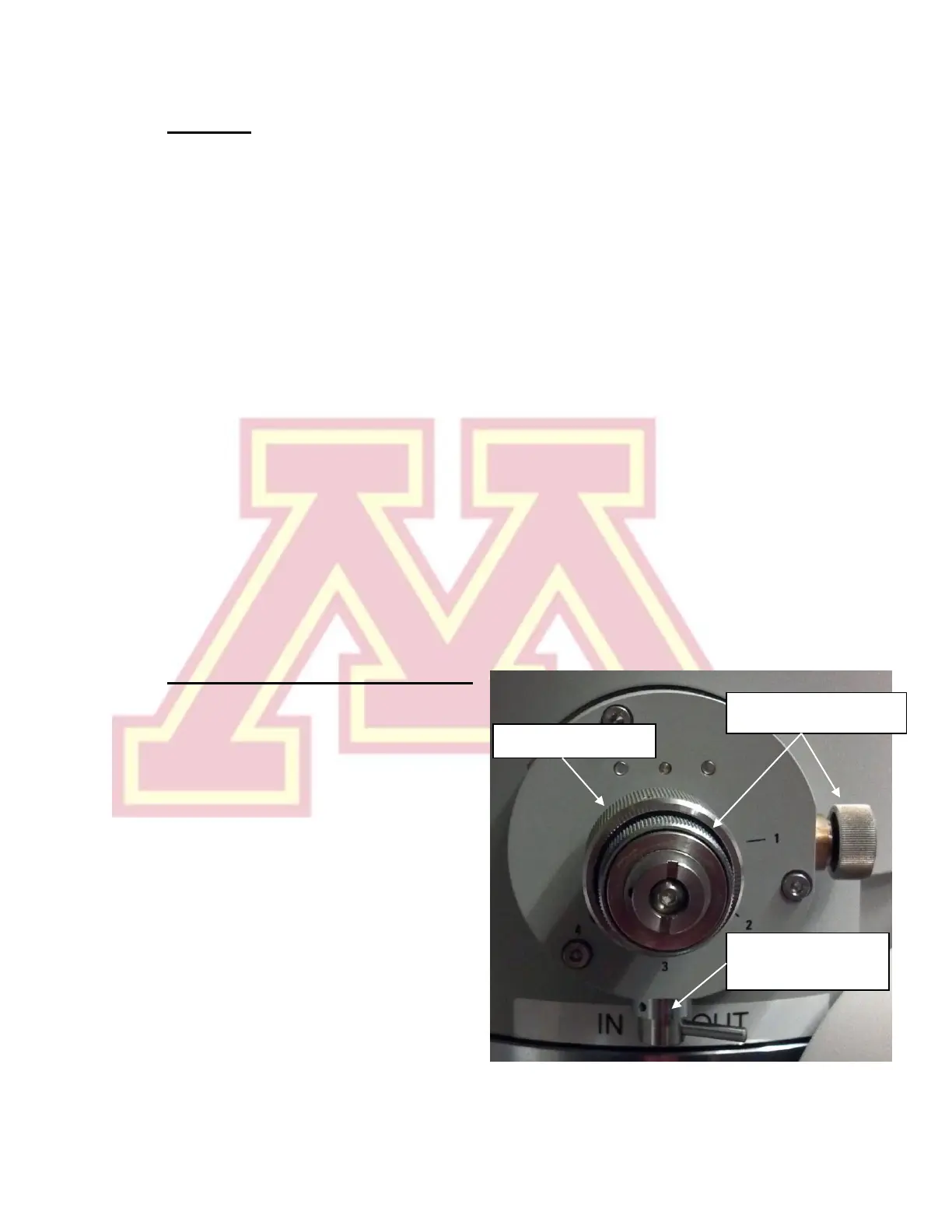
4.) Centering the Condenser Aperture
a.) Select the desired condenser
aperture (4 is largest; 1 is
smallest) using the large, outer
knob on the aperture.
b.) Converge the beam to crossover
(LC “Intensity”) and center the
beam using the beam shift
trackball (LC).
c.) Spread the beam (“Intensity”
clockwise from crossover) and
center the illuminated area using
the X and Y knobs on the
aperture (not MF knobs)
d.) Repeat steps b and c until the beam spreads evenly across the screen.


 To Next Page