EasyManua.ls Logo

Tecno CD6 - User Manual

Tecno CD6
6 pages
Print Icon
To Next Page IconTo Next Page
Loading...
Emergency call
If any emergency arises, dial 112/911 (or other emergency call number) for
emergency help.
Due to the nature of cellular networking, the success of emergency call is not
guaranteed.
FCC Warning:
This device complies with part 15 of the FCC Rules. Operation is subject to the
following two conditions: (1) This device may not cause harmful interference,
and (2) this device must accept any interference received, including
interference that may cause undesired operation.
Any Changes or modifications not expressly approved by the party responsible
for compliance could void the user's authority to operate the equipment.
This equipment has been tested and found to comply with the limits for a Class
B digital device, pursuant to part 15 of the FCC Rules. These limits are
designed to provide reasonable protection against harmful interference in a
residential installation. This equipment generates uses and can radiate radio
frequency energy and, if not installed and used in accordance with the
instructions, may cause harmful interference to radio communications.
However, there is no guarantee that interference will not occur in a particular
installation. If this equipment does cause harmful interference to radio or
television reception, which can be determined by turning the equipment off and
on, the user is encouraged to try to correct the interference by one or more of
the following measures:
-Reorient or relocate the receiving antenna.
-Increase the separation between the equipment and receiver.
-Connect the equipment into an outlet on a circuit different from that to which
the receiver is connected.
-Consult the dealer or an experienced radio/TV technician for help.
The SAR limit of USA (FCC) is 1.6 W/kg averaged over one gram of tissue.
Device types CD6 (FCC ID: 2ADYY-CD6) has also been tested against this
SAR limit. The highest reported SAR values for head, body-worn accessory,
and product specific (Hotspot) are 0.98 W/kg, 0.63 W/kg, and 0.63 W/kg
respectively. The Max simultaneous SAR is 1.21W/kg. This device was tested
for typical body-worn operations with the back of the handset kept 10mm from
the body. To maintain compliance with FCC RF exposure requirements, use
accessories that maintain a 10mm separation distance between the user's
body and the back of the handset. The use of belt clips, holsters and similar
accessories should not contain metallic components in its assembly. The use
of accessories that do not satisfy these requirements may not comply with
FCC RF exposure requirements, and should be avoided.
Question and Answer IconNeed help?

Do you have a question about the Tecno CD6 and is the answer not in the manual?

Summary

Emergency Call Procedures

FCC Compliance and RF Exposure Information

FCC Part 15 Regulatory Compliance

Device operates under FCC Part 15 rules, subject to two conditions concerning interference.

User Modifications and Authority

Unauthorized modifications void the user's authority to operate the equipment.

RF Interference and Mitigation Measures

Equipment tested for Class B limits; users encouraged to correct interference if it occurs.

SAR Limits and Body-Worn Accessory Guidelines

Explains US SAR limit, tested values, and accessory usage for RF exposure compliance.

Explosion Diagram Specification

Know Your Phone Layout

SIM and SD Card Installation

Charging the Phone

Summary

Emergency Call Procedures

FCC Compliance and RF Exposure Information

FCC Part 15 Regulatory Compliance

Device operates under FCC Part 15 rules, subject to two conditions concerning interference.

User Modifications and Authority

Unauthorized modifications void the user's authority to operate the equipment.

RF Interference and Mitigation Measures

Equipment tested for Class B limits; users encouraged to correct interference if it occurs.

SAR Limits and Body-Worn Accessory Guidelines

Explains US SAR limit, tested values, and accessory usage for RF exposure compliance.

Explosion Diagram Specification

Know Your Phone Layout

SIM and SD Card Installation

Charging the Phone

Overview

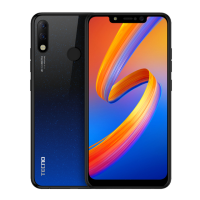
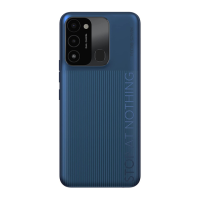
This document outlines the user manual for the TECNO Mobile Phone, model CD6, providing essential information for its operation, maintenance, and safety compliance.

Function Description

The TECNO CD6 is a mobile phone designed for communication and various digital tasks. It supports emergency calls, though their success is not guaranteed due to the nature of cellular networking. The device is equipped with a front camera, volume keys, and a return key for navigation and interaction. It facilitates SIM/SD card installation for network connectivity and expandable storage. The phone is rechargeable via a dedicated charger or by connecting it to a computer using a USB cable.

Usage Features

Emergency Calls: In case of an emergency, users can dial 112/911 (or other relevant emergency numbers) for assistance. It's important to note that the reliability of emergency calls can be affected by cellular network conditions.

FCC Compliance: The device adheres to FCC Rules, Part 15, ensuring it operates without causing harmful interference and accepts any received interference. Users are advised against unauthorized modifications to avoid voiding their authority to operate the equipment.

Interference Management: Should the device cause harmful interference to radio or television reception, users can take several corrective measures:

  • Reorienting or relocating the receiving antenna.
  • Increasing the separation between the device and the receiver.
  • Connecting the equipment to an outlet on a different circuit.
  • Consulting a radio/TV technician for further assistance.

SIM/SD Card Installation:

  1. Power off the mobile phone before installation.
  2. Refer to the provided picture for the correct placement of SIM and SD cards. This ensures proper network connectivity and storage expansion.

Charging the Phone:

  1. The device can be charged using a TECNO-approved charger or by connecting it to a computer via a USB cable.
  2. Users should pay attention to the front and back orientation of the plug during connection.
  3. It is crucial to use only TECNO-approved chargers and cables to prevent damage to the device and avoid invalidating the phone's warranty.

Physical Features:

  • Front Camera: Located on the front of the device, used for taking selfies and video calls.
  • Volume Key: Typically located on the side, used to adjust the audio volume.
  • Return Key: A navigational key, often part of the on-screen controls, used to go back to the previous screen or menu.

Maintenance Features

RF Exposure Compliance: To maintain compliance with FCC RF exposure requirements, specific guidelines must be followed for body-worn operations:

  • The back of the handset should be kept at least 10mm away from the body.
  • Accessories used with the device (e.g., belt clips, holsters) must maintain a 10mm separation distance between the user's body and the back of the handset.
  • These accessories should not contain metallic components in their assembly.
  • The use of accessories that do not meet these requirements should be avoided to ensure compliance with FCC RF exposure standards.

General Care:

  • Avoid making unauthorized changes or modifications to the device, as this can void the user's authority to operate the equipment and potentially lead to non-compliance with regulations.
  • Use only original or TECNO-approved accessories, especially for charging, to prevent damage and maintain warranty validity.
  • If experiencing interference, follow the recommended troubleshooting steps before seeking professional help.

The manual emphasizes the importance of adhering to these guidelines for safe and optimal use of the TECNO CD6 mobile phone.

Tecno CD6 Specifications

General IconGeneral
ModelCD6
BrandTecno
Display TypeIPS LCD
SIMDual SIM
Resolution720 x 1600 pixels
Operating SystemAndroid 10
CPU1.8 GHz
Internal Memory32GB
RAM2GB
Battery5000 mAh
Device TypeSmartphone

Related product manuals