Need help?
Do you have a question about the Tecno SPARK 5 Pro and is the answer not in the manual?
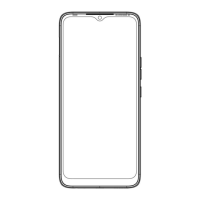
Identifies the front-facing camera on the device.
Locates and describes the function of the volume control buttons.
Identifies the power button and its primary function.
Details the modulation schemes used for various wireless technologies.
Specifies the radio frequency output power levels for different bands.
This document serves as the user manual for the TECNO SPARK 5 Pro mobile phone, model KD7, providing essential information for its operation, installation, charging, and safety.
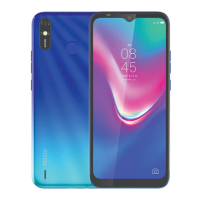
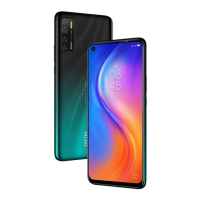
The TECNO SPARK 5 Pro is a mobile phone designed for everyday communication and various smart functionalities. Its primary function is to enable users to make calls, send messages, and access a wide range of applications and services typical of a modern smartphone. The device is equipped with a front camera, allowing for selfies and video calls. Physical controls include a volume key for adjusting audio levels and a power key for turning the device on/off or locking/unlocking the screen.
For initial setup, the manual details the process of SIM/SD card installation. Users are instructed to power off the mobile phone before proceeding with the installation, ensuring safe handling of the internal components. A visual guide is provided to illustrate the correct placement of SIM cards (SIM 1, SIM 2) and an SD card within the designated slots. This ensures that the device can connect to mobile networks for communication and that storage can be expanded for media and applications.
Charging the TECNO SPARK 5 Pro is straightforward, with instructions to connect the device to a charger or a computer using a USB cable. The manual emphasizes the importance of using only TECNO-branded chargers and cables to prevent damage to the device and to maintain warranty validity. Users are also reminded to pay attention to the orientation of the plug when connecting the USB cable. This highlights a key maintenance feature: proper charging practices are crucial for the longevity and performance of the phone's battery and internal circuitry.
The manual also includes important regulatory information, particularly concerning radio equipment and its compliance with Directive 2014/53/EU. It specifies that the mobile phone's WLAN function, particularly in the 5GHz band, is restricted to indoor use in certain European countries. This restriction is a regulatory measure to prevent interference with other services and ensures the device operates within legal parameters in various regions. The list of countries where this restriction applies is extensive, covering most of the European Economic Area and Switzerland. This information is critical for users who travel or reside in these areas, as it dictates how and where they can utilize the device's Wi-Fi capabilities.
Safety guidelines are a significant part of the manual, particularly regarding Specific Absorption Rate (SAR) certification and general cautions. The SAR certification confirms that the device meets international guidelines for exposure to radio waves, with specific test values provided for head and body exposure. This information assures users that the device has been tested and deemed safe for use under normal conditions.
Further cautions include warnings about potential hearing loss from excessive sound pressure when using earphones or headphones. Users are advised to use earphones carefully and avoid listening at high volume levels for extended periods. This is a crucial health and safety recommendation. Another critical caution addresses the risk of explosion if the battery is replaced with an incorrect type, instructing users to dispose of used batteries according to proper guidelines. This underscores the importance of using genuine replacement parts and following environmental disposal procedures.
The manual also specifies that the product should only be connected to a USB interface of version USB 2.0, ensuring compatibility and proper data transfer/charging. It states that the adapter should be installed near the equipment and be easily accessible, which is a practical tip for safe and convenient charging. Operating temperature ranges for the EUT (Equipment Under Test) are provided, indicating the environmental conditions under which the device is designed to function optimally. Details about the input and output specifications of two different adapters (U100TKA and XCU32) are also included, offering clarity on power requirements.
Finally, the manual reiterates that the device complies with RF specifications when used at a minimum distance of 5 mm from the body, and that any holder used should not be made of metal composition. This ensures that the device's radio frequency performance and user safety are maintained. The instruction that the earphone and USB cable are shielded further emphasizes the device's design for minimizing electromagnetic interference and ensuring signal integrity. A warming label (IEC 60417-6044) is referenced, likely indicating a visual warning related to hearing protection or other safety aspects. These details collectively provide a comprehensive guide for the safe and effective use of the TECNO SPARK 5 Pro.
 General
| Display Size | 6.6 inches |
|---|---|
| Resolution | 720 x 1600 pixels |
| Display Type | IPS LCD |
| Processor | MediaTek Helio A25 |
| CPU | Octa-core (4x1.8 GHz Cortex-A53 & 4x1.5 GHz Cortex-A53) |
| GPU | PowerVR GE8320 |
| RAM | 4 GB |
| Internal Storage | 64 GB |
| Front Camera | 8 MP |
| Battery Capacity | 5000 mAh |
| Operating System | Android 10, HIOS 6.1 |
| SIM | Dual SIM (Nano-SIM, dual stand-by) |
| Network | GSM / HSPA / LTE |
| Colors | Ice Jadeite, Spark Orange, Seabed Blue, Cloud White |
| Dimensions | 164.7 x 76.3 x 8.8 mm |

 To Next Page