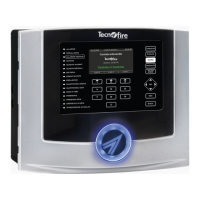
The TFNET is a communication interface designed for Hi-Tech Fire Alarm Systems, specifically compatible with TFAXFIRE systems including TFA1-298, TFA2-596, and TFA4-1192 control panels. It acts as a bridge, enabling communication between fire detection systems and other devices or networks, and facilitating data transfer and system management.
Function Description
The TFNET communication interface serves several key functions:
- Data Transfer: It allows for the transmission of events and data from the fire alarm control panel to external systems or monitoring centers. This includes 33 categories of transmittable events and 5 transmittable zone events.
- Network Integration: The device integrates with Ethernet networks, supporting Standard 803.2 - ATE4, and can act as a server (Server 1, Server 2, Tecnoserver, Tecnoalarm, Service Tecnoalarm, Tecno Out, Modbus) for various communication protocols.
- Remote Monitoring and Control: Through its interface, it enables remote monitoring of the fire alarm system status and can facilitate remote control operations, such as acknowledging alarms or managing system settings.
- Firmware Upgrade: The TFNET supports firmware upgrades via Ethernet, ensuring the device can be updated with the latest features and improvements.
- Communication Protocols: It supports 10 communication protocols, including Modbus (optional), allowing for flexible integration with different systems.
- Telephone/IP Address Communication: Each channel supports 2 telephone numbers or IP addresses (max. 24 digits) for event notification.
- Event Queue: It features a call event queue capable of storing up to 64 events.
- Automation: The device supports test calls with TCP/IP.
Important Technical Specifications
- Model: TFNET
- Description: Ethernet interface
- Protocol: Fire-Bus
- Address Programming: Dip-switch
- Connection: RS485
- Class: Standard 803.2 - ATE4
- Ethernet Channels: 8
- Power Supply: Over serial bus, 24V DC
- Rated Voltage: 20V...27.6V DC
- Stand-by Consumption: 90mA @ 24V DC
- Max. Consumption: 140mA @ 24V DC
- Operating Temperature: -5°C...+40°C
- Relative Humidity (non-condensing): 10%...93%
- Protection Class: IP30
- Casing: ABS V0
- Dimensions (L x H x D): 165 x 110 x 41mm
- Weight: 200g
- Conformity: R&TTE 1999/05/EC class 1/TTE, EN 50136-1-1, EN 50136-2-1. Approved for use with TFA1-298, TFA2-596 and TFA4-1192 control panels.
- Document Version: 0.3
- FW Version: 1.0.00
- HW Version: TFNET
- Serial SW Version: 5.2
- Update Date: 12/2016
- Language: English
Usage Features
The TFNET features a user-friendly interface with 6 LEDs that indicate the functional states of the communicator. These LEDs provide visual feedback on:
- POWER SUPPLY: Indicates the power supply status (ON-OK, POWER SUPPLY FAILURE).
- DATA: Shows the status of connections to the TECNOALARM TECNOSERVER TECNOALARM SERVICE (NO COMMUNICATION, DATA TRANSFER, CONNECTION).
- TECNO OUT: Displays the connection status of the channel TECNO OUT (NO COMMUNICATION, DATA TRANSFER, CONNECTION).
- Modbus: Indicates the connection status of the channel MODBUS (NO COMMUNICATION, DATA TRANSFER, CONNECTION).
- NOTIFIED EVENTS: Reports the transmission states of notifications to remote receiving devices (NO NOTIFICATION IN PROGRESS, NOTIFICATION TRANSMISSION IN PROGRESS, NOTIFICATION TRANSMISSION PERFORMED SUCCESSFULLY).
- REGISTERED (DDNS): Shows the status of the Dynamic DNS service (DDNS DISABLED, DDNS REGISTRATION IN PROGRESS, DDNS REGISTRATION ERROR, DDNS REGISTERED).
The LED indicators use different flashing frequencies (ON, OFF, SLOW FLASHING, QUICK FLASHING) to convey specific information about the device's operational status.
The device supports different access levels (Level 1, Level 2, Level 3, Level 4) for managing system operations, each requiring specific key sequences or codes. This ensures secure access to critical functions.
- Level 1: Provides basic access for operations like acknowledging alarms or displaying previously acknowledged ongoing alarms.
- Level 2: Allows for more advanced operations, such as resetting the unit, switching operating modes, or manually activating an evacuation alarm.
- Level 3: Enables access to edit important operating parameters, typically for installer/maintainer staff.
- Level 4: The highest access level, reserved for qualified personnel authorized by the manufacturer, allowing full control over the system.
The TFNET also includes a menu structure accessible via the control panel, allowing users to perform various functions, including:
- Test light signaling: Verifies the operation of the display and LEDs.
- Sound test: Tests the operation of the internal speaker.
- Test words: Verifies the transmission of words from the central unit.
- Test system: Submits programmed zones to the functional test procedure.
Maintenance Features
Regular maintenance of the TFNET is crucial for ensuring the reliability and efficiency of the fire detection system. The manual recommends periodic inspections, ideally every 6 months, to verify the proper functioning of the device and associated systems. Key maintenance checks include:
- Functional state of power supply units and accumulators (APS).
- State of the batteries of the self-powered devices (sirens, communicators).
- Functional tests of the sensors that make up the system.
- Checks about the state of cleanliness of the analysis chambers of the optical sensors.
- Efficiency of the control panel, of the control panel and repeaters.
- Functional and operational efficiency of the acknowledgement, evacuation and system recovery procedures.
- Efficiency of manual alarm button module.
- Efficiency of optical and acoustic notification module.
- Efficiency of phone communicators (phone call tests).
- Verification of system actuations entrusted to input and output interface modules, etc.
- Check for correct wiring of the fire detection wires.
- Final drafting of a test report signed by the maintainer and by the customer for acceptance.
The TFNET's design facilitates installation and cabling, with clear instructions for connecting power supply, RS485 bus, and Ethernet cables. It emphasizes the use of appropriate cables and adherence to installation standards to ensure proper operation and prevent interference. The casing is designed for protection against dust and water splashes (IP30).
Firmware upgrades are a key maintenance feature, allowing the device to stay current with the latest software. The process involves connecting the TFNET to a PC via Ethernet and using dedicated software to upload the new firmware. This ensures the device benefits from bug fixes, performance enhancements, and new functionalities.

 Need help?
 General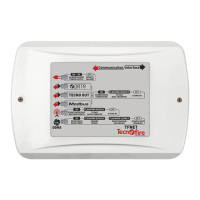

 To Next Page