EVO
SELF
| User and Maintenance Manual | EN
35
ACCESSING AND USING THE MENUS
Resources are organised into 2 menus which are accessed as explained below:
• ‘Machine Status’ menu: press and release the
key.
• ‘Programming’ menu: press for at least 5 secs the
key.
Either do not press any keys for 15 seconds (time-out) or press the key once, to confi rm the last value displayed and return to the previous screen.
MACHINE STATUS MENU
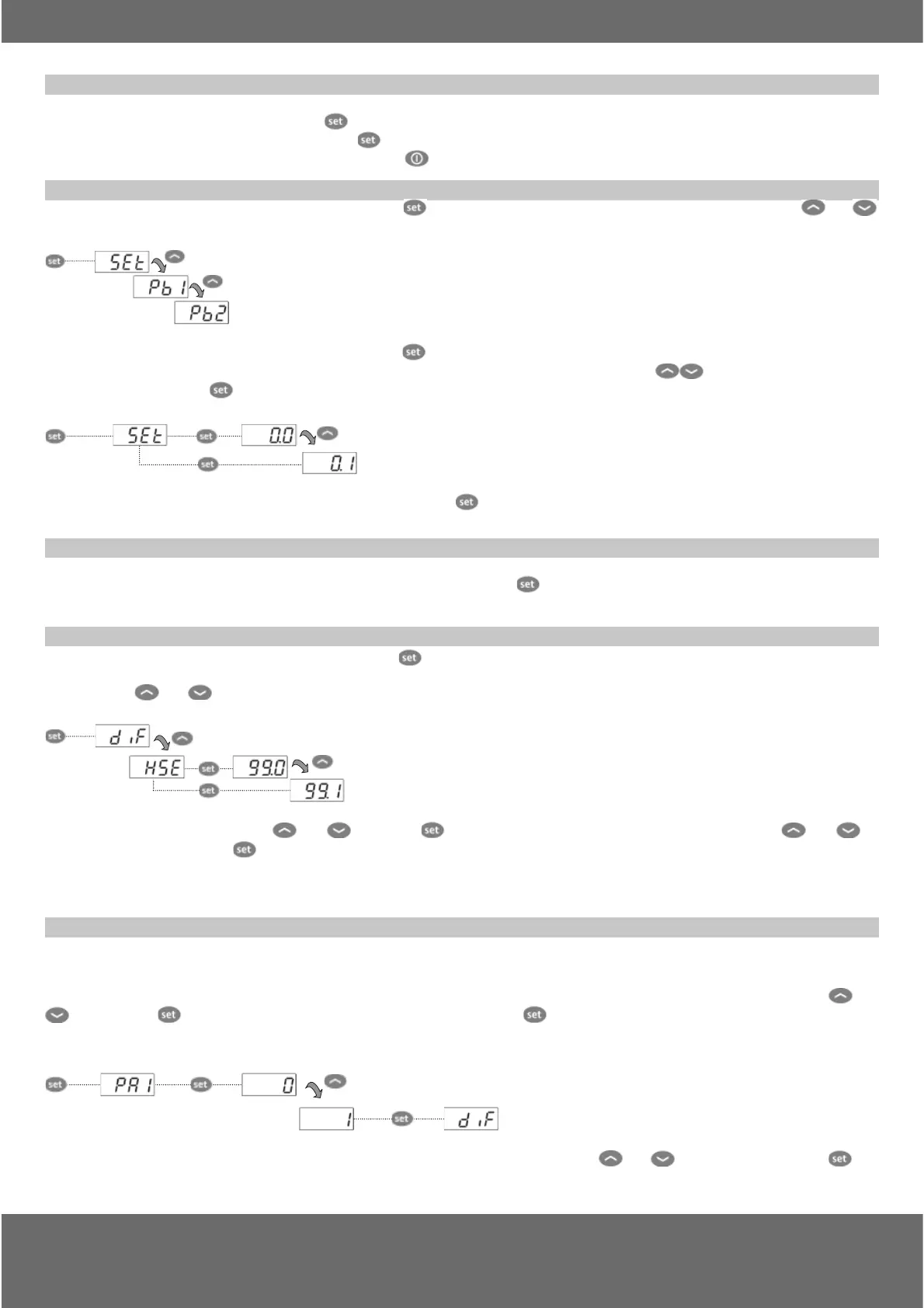
Access the “Machine Status” menu by pressing and releasing the key. If no alarms are active, the “SEt” label appears. By pressing the and
keys you can scroll all folders in the “Machine Status” menu:
- AL: alarms folder (only visible if an alarm is active);
- SEt: Set point setting folder;
- Pb1: probe 1 folder;
- Pb2: probe 2 folder **;
(** models EW971 and EW974 only)
Setting the Set point: To display the Set point value press the
key when the ‘SEt’ label is displayed.
The Set point value appears on the display. To change the Set point value, press the
and keys within 15 seconds.
Press
to confi rm the modifi cation.
Displaying the probes: When the Pb1 or Pb2* label is displayed, press and the associated probe value will appear (* Pb2 is only present on
models EW971 and EW974).
SET POINT EDIT LOCK
It is possible to disable the keypad on this device. The keypad can be locked by programming the ‘LOC’ parameter.
With the keypad locked you can still access the ‘Machine Status’ menu by pressing
to display the Set point, but you cannot edit them.
To disable the keypad lock, repeat the locking procedure.
PROGRAMMING MENU
To access the ‘Programming’ menu press for at least 5 secs the key. If specifi ed, the ‘PA1’ access PASSWORD will be requested (see ‘PASSWORD’
paragraph). At the access, the display will show the fi rst parameter (“diF”).
By pressing the
and keys you can scroll all parameters in the Programming menu:
5 sec
Select the desired parameter using the and keys. Press to see the current value of the selected parameter. Press and to
change the value and then press
to save it.
NOTE: It is strongly recommended that you switch the device off and on again each time the parameter confi guration is changed, in order to prevent
malfunctioning of the confi guration and/or ongoing timings.
PASSWORD
The password “PA1” allow access to the level 1 parameters (User) as the password “PA2” allow access to the level 2 parameters (Installer).
The level 2 parameters group include also all the level 1 parameters.
Default setting has the password “PA1” disabled (value = 0) while the password “PA2” is enabled (value = 15).
To enabled the password “PA1” (value ≠ 0) and assign the required value, enter in the “Programming” menu, select the parameter “PS1” with
and
keys, press the key, assign the required value and confi rm it by pressing the key again.
If the password “PA1” is already enable, at the access to the “Programming” menu, will be required to put in the password “PA1” or “PA2” according to
the parameters that you need to edit. To enter the password ‘PA1’ (or ‘PA2’):
5 secs
If the password is incorrect, the display will show the ‘PA1’ (or ‘PA2’) label and you will have to repeat the entry procedure. It is possible to access to level
2 parameters also from level 1 parameters by selecting parameter ‘PA2’ (available at level 1) through
and keys and then pressing the key.



 To Next Page