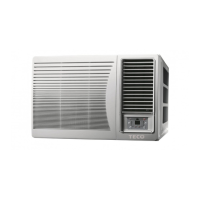
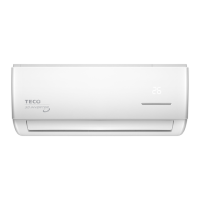
This document is a user manual for TECO Window - Wall Type Room Air Conditioners, specifically for R32 Refrigerant Models. It covers various aspects of the air conditioner, including its functions, operating conditions, installation, part identification, control panel, remote control, operation tips, general operation, care & maintenance, and troubleshooting.
Function Description
The TECO window-wall room air conditioners are designed to maintain a comfortable temperature in a room. They offer several modes of operation:
- Cool in Summer: During hot summer days, the air conditioner cools the room by circulating and cooling the air within.
- Dry During Wet or Humid Conditions (Dehumidifying): In wet or humid conditions, the unit dehumidifies the air by drawing moisture, leaving the room dry and fresh without significantly affecting the temperature.
- Warm in Winter (Heat Pump Units Only): During cold winter months, heat pump models can warm the room by circulating and heating the air. Note that during lower outside temperatures, supplementary heating sources might be necessary.
- Exhaust Air Vent: The unit includes an exhaust air vent that can be opened to expel air from the room, allowing fresh air to enter.
Important Technical Specifications
- Refrigerant: The appliance uses HFC R32 (difluoromethane), which is mildly flammable. R32 has a lower global warming potential and zero ozone-depleting potential compared to other refrigerants, offering high energy efficiency and requiring less refrigerant.
- Rated Voltage and Voltage Range: 220~240V. Operating outside this range can damage electrical components or cause the compressor to malfunction.
- Operating Temperature Range (Cool & Heat Mode): Outdoor air temperature should be between 18°C ~ 43°C for cooling and 1°C ~ 24°C for heating.
- Operating Temperature Range (Dry Mode): Outdoor air temperature should be in the range of 18°C ~ 43°C.
- Room Humidity: Should be lower than 90% in cool & heat mode to prevent moisture or dew formation on the front panel.
- Power Supply: The appliance is supplied with a mains cable and molded plug for connection to a single-phase power supply (220~240V/50Hz).
- Temperature Setting Range: 16°C~30°C.
- Timer Setting Range: 0.5~24 hours.
Usage Features
- Control Panel (for TWW16CFDG Only):
- Main Control Knob: Selects operation modes (Low Cool, Med Cool, High Cool, or Fan Only). A 3-minute wait is required before resetting to cooling operation if turned off or set to Fan.
- Thermostat Knob: Sets desired room temperature (6~7 recommended). Setting to 10 may cause evaporator fins to freeze.
- Air Swing Switch: Controls side-to-side airflow direction. "ON" for continuous circulation, "OFF" to fix direction.
- Remote Control (for other models):
- On/Off Button: Turns the unit on or off.
- Mode Button: Selects operation modes: AUTO, COOL, DRY, FAN ONLY, HEAT (for reverse cycle models).
- Auto Mode: Operates automatically based on factory settings; temperature cannot be adjusted.
- Cool Mode: Cooling operation; fan speed adjustable.
- Dry Mode: Dehumidification at low fan speed; fan speed not adjustable.
- Fan Only Mode: Circulates air without cooling or heating; fan speed adjustable.
- Heat Mode: Heating operation; fan speed adjustable. During defrost (H1 displayed), operation may temporarily stop.
- +/- Button: Adjusts set temperature by 1°C (°F) per press, or quickly changes it by holding. Also adjusts timer settings in 0.5-hour increments.
- Swing Button: Toggles automatic air swing function.
- Fan Button: Cycles through fan speeds: AUTO, Speed 1, Speed 2, Speed 3.
- Sleep Button: Activates/deactivates Sleep operation mode, available in COOL and HEAT modes for comfortable temperature maintenance.
- Timer Button: Sets ON/OFF timer (0.5-24 hours).
- WiFi Button: Toggles WiFi function (for compatible models).
- Ventilation Lever:
- Open Position: Opens the ventilation door to expel air and odors.
- Closed Position: Closes the ventilation door for internal air circulation and conditioning.
- Combined Button Functions:
- Child Lock Function: Activates/deactivates by pressing "+" and "-" simultaneously. Prevents signals from being sent from the remote.
- Temperature Display Switchover: Switches temperature display between °C and °F by pressing "-" and "Mode" buttons simultaneously when the unit is OFF.
- Light Function: Toggles the unit's lamp on/off by holding "+" and "FAN" buttons simultaneously. Defaulted to ON when energized.
- General Operation Tips:
- Avoid setting cooling temperature too low to prevent health issues and save electricity.
- Keep blinds and curtains closed to prevent direct sunlight.
- Adjust vertical and horizontal airflow for uniform room temperature.
- Keep doors and windows tightly closed to retain conditioned air.
- Ventilate the room occasionally by opening windows and doors for a few hours.
- Wait at least 3 minutes before restarting the air conditioner after turning it off during cooling or heating.
- Do not use the air conditioner for purposes other than cooling or heating.
- Avoid blocking air intake and outlet vents.
- Do not insert objects into vents.
- Adjust temperature to suit occupants (infants, elderly, sick).
- Avoid using heating equipment near the air conditioner.
- Avoid prolonged direct exposure to unidirectional airflow.
Maintenance Features
- Air Filter Cleaning: The air filter behind the intake grille should be washed at least once every two weeks, or more often if needed.
- Remove the air intake grille and pull out the filter.
- Vacuum dust from the filter.
- Wash the filter under gentle flowing water to remove dust and lint. For very dirty filters, use a mild household detergent.
- Thoroughly dry the filter before reinstalling.
- Filter Button (on remote control): A reminder feature that illuminates an LED after 250 hours of operation to indicate filter cleaning is due. Press the Filter button to reset the timer. To reset before 250 hours, press and hold for 3 seconds.
- Cabinet Cleaning: Use a soft cloth to clean the cabinet. For very dirty cabinets, dip the cloth in warm water (below 40°C) and wring it dry before wiping.
- Safety Precautions for Maintenance:
- Always turn off the air conditioner and main power supply before performing maintenance.
- Do not use gas, benzene, solvent, cleanser, or chemical solvents for cleaning.
- Do not splash water directly into the indoor unit to protect micro-computers and circuit boards.
- Do not wet the front panel; wipe with a cloth.
- Checks:
- Check the earth wire for damage, breakage, or looseness.
- Check if the air inlet and outlet of the outdoor unit are clear to prevent poor efficiency.
Troubleshooting
The manual provides solutions for common issues:
- Air conditioner does not operate: Check power failure, plug connection, fuse/main switch, and voltage consistency.
- Poor efficiency: Check for blocked air inlet/outlet, other cooling/heating sources, clean air filter, fan speed setting, and room temperature at startup.
- Odors or foggy air: Foggy air can occur in high humidity cooling; odors can be transferred from near the air intake.
- Excess noise: Flowing water sound is normal refrigerant flow; falling water sound is normal dehumidifying process.
- Condensation leakage: Normal when cool air meets warm room air.
- 3-minute restart delay: A protective mechanism; wait for operation to begin.
Safety Warnings:
- Do not start/stop by plugging/unplugging the power cord.
- Do not use extension cords, power boards, or adapters.
- Do not damage or modify the power cord or plug.
- Replace damaged supply cords with special cords from the manufacturer or TECO service center.
- Do not insert fingers or objects into air outlets/inlets.
- Do not attempt to repair, disassemble, or modify the appliance.
- Do not place near heat-generating devices.
- Insert power plug firmly into the socket.
- In case of malfunction (e.g., burning smell), switch off and unplug immediately.
- Do not cover air inlet/outlet.
- Do not place water-filled objects on the unit.
- Prevent water leakage into the appliance.
- Do not use for special purposes (e.g., food preservation).
- Prevent drainage hose from freezing.
- Do not block drainage outlet or continuous drainage hose.
- Ensure internal and external drain is clear for long-term use.
- Do not use in places subject to oil or flammable gas leakage.
- Do not wash with water.
- Do not use where it is likely to come into contact with water.
- All electrical work must be carried out by a qualified person according to regulations.
- Ensure power is off during installation.
- The appliance is supplied with a mains cable and molded plug for 220~240V/50Hz.
- Ensure electrical connection data matches household mains supply.
- Connection should be made via an easily accessible switched socket.
- Do not connect earth wire to water pipes.
- Do not push objects into the condensate drain hole.
- If any abnormal operation, power fuse trips, fluid splashes, damaged electrical cord, or unusual noises occur, immediately power off and unplug, then contact local service center.
- When changing remote control batteries, do not mix new and old batteries or different brands/types. Remove batteries if not used for long periods.

 Need help?
 General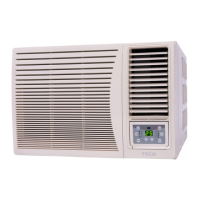

 To Next Page