To Next Page
S
Samuel Vargas MDAug 9, 2025
Can I use two Tecson Microphone systems together without interference?
- RrluceroAug 10, 2025
To use two Tecson Microphone systems together without interference, ensure each microphone operates on a different frequency.

Can I use two Tecson Microphone systems together without interference?
To use two Tecson Microphone systems together without interference, ensure each microphone operates on a different frequency.
Why is there always harsh sound or loopback with Tecson Microphone system?
To resolve harsh sounds or loopback with your Tecson Microphone system, minimize the microphone volume before plugging in the receiver, and then gradually increase the volume.
What to do if I cannot hear my voice when I am doing recording with Tecson Hotec H-U25 Microphone system?
If you cannot hear your voice when recording with the Tecson Microphone system, plug the TS to TRS adapter into the mic jack of the headphone splitter and the headset into the headphone jack of the headphone splitter.
How to pair Tecson Microphone system receiver and transmitter?
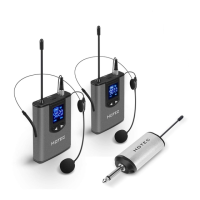
To pair the Tecson Microphone system receiver and transmitter, if they are not syncing: * Power off the receiver and power on the transmitter. * Hold and press the power button, volume up, and volume down buttons simultaneously until the LCD screen flashes. If the receiver and transmitter lost pairing because the receiver has not been in use for some time, turn off the transmitter and then turn it back on. You can also press both volume up and volume down buttons to change the frequency.
Details on battery indicator, power button, USB port, AF/RF, and charging status indicators.
Covers power button, mic input, volume/frequency controls, and charging indicators.
Includes charging devices, attaching microphones, and verifying connections.
Ensure proper pairing via AF/RF indicator colors for H-U05 and H-U25.
Steps for connecting to devices with a 1/4" mic jack like speakers or mixers.
Instructions for connecting to iOS/Android phones using the TS to TRRS cable.
Guides connection to cameras/camcorders with a mic input using TS to TRS adapter.
Steps for connecting to computers with separate or combo mic/headphone jacks.
Details modulation mode, frequency range, response, S/N, and working range.
Provides dimensions, power, consumption, and working hours for receiver and transmitter.
Addresses pairing problems, signal cuts, mic sensitivity, and harsh sound.
Solutions for products not working with iPhone or hearing voice during recording/karaoke.
Advice on finding clean frequencies and not bending the antenna for stability.
Warning against product disassembly and recommendation against use with Bluetooth speakers.
 General
| Brand | Tecson |
|---|---|
| Model | Hotec H-U25 |
| Category | Microphone system |
| Language | English |