The LR69Q68 is a portable 2.1 karaoke speaker designed for versatile audio playback and entertainment. It can be easily connected to various audio and video devices for daily use.
Technical Specifications
- Output Power: 40W
- Frequency Response: 60Hz-20KHz
- Control: Volume, Bluetooth, Remote Controller, USB, TF
- Speaker Driver Size: 4" + 3" x 2
- Product Size: 336 x 134 x 260mm
- Power Supply: 5V 2A
- Battery Capacity: 7.4V 3600mAh
- Battery Charging Time: 5-8 hours
- Working Time: Up to 12 hours
Product Features
The LR69Q68 incorporates the latest decoding chip for high-quality audio processing. It offers multiple connectivity options and powerful sound output, making it suitable for various applications.
- Versatile Connectivity: Supports Bluetooth, Aux in, USB, TF card, and FM radio.
- Powerful Sound: Delivers a super powerful sound with 40W output.
- Karaoke Functionality: Equipped with microphone input, functioning as both a karaoke speaker and an amplifier.
- Broad Compatibility: Compatible with personal computers, MP3 players, MP4 players, smartphones, and other smart devices.
Speaker Control Panel
The speaker features an intuitive control panel with various buttons and inputs:
- Mode Switch: Toggles between Bluetooth, FM radio, USB music, Micro SD, and AUX input modes.
- Record Button: Long press for recording, short press for playback of recordings.
- Previous Track/Station: In USB/TF card mode, long press for fast backward. In FM radio mode, long press for manual search of the last station.
- Play/Pause: In Bluetooth mode, long press to disconnect Bluetooth and enter pairing mode. In FM mode, long press for automatic searching and memory. In Aux in mode, it functions as a mute button.
- Next Track/Station: In USB/TF card mode, long press for fast forward. In FM radio mode, long press for manual search of the next station.
- TF Card (Micro SD) Slot: Insert a TF card to play music (MP3, WMA formats supported).
- USB Slot: Insert a U-disk to play music (MP3, WMA formats supported).
- Aux In: Audio input interface for external music sources.
- Mic Input 1: First microphone input.
- Mic Input 2: Second microphone input.
- 5V_2A Charging Port: For charging the device.
- Microphone Volume Control: Adjusts the microphone volume.
- Volume Control/Power On/Off: Adjusts overall volume and powers the device on/off.
- ECHO: Controls the echo effect for microphones.
Remote Control
The included remote control provides convenient access to various functions:
- Stand-by: Puts the speaker in standby mode.
- Mode: Switches between different modes.
- Replay: Repeats the current track or recording.
- Number Buttons (0-9, 10+): For direct track selection or frequency input.
- Volume Up: Increases the speaker volume.
- Volume Down: Decreases the speaker volume.
- Previous Track: In FM mode, short press for frequency adjustment, long press for manual search of the last station.
- Next Track: In FM mode, short press for frequency adjustment, long press for manual search of the next station.
- Pause/Play: In FM state, long press for automatically searching stations and memory.
- Bluetooth Button: Quickly enters Bluetooth mode.
- Equalizer: Adjusts sound equalization.
- Record Button: Short press for recording (with storage file).
Speaker Modes Introduction
-
MODE Button: Serves as the primary switch to cycle through Bluetooth, FM radio, micro USB, Micro SD, and AUX input modes.
-
BLUETOOTH MODE:
- Power On/Off: Use the power button to turn the speaker on/off.
- Bluetooth Connection: The device name is "LR69Q68". Enable Bluetooth on your smartphone or tablet, search for "LR69Q68", and select it to pair. A "Ding-dong" sound indicates successful pairing. If pairing fails, disable and re-enable Bluetooth. If the speaker is turned off while your smartphone's Bluetooth remains active, the connection will automatically re-establish upon powering on the speaker again.
-
RADIO MODE:
- To activate FM radio, select "Radio" using the Mode button.
- Automatic Search: Click and hold "►II" to automatically search and save available radio stations.
- Manual Search: Click "I«" or "lb" to manually search for radio stations.
-
AUX MODE:
- Select "AUX" using the Mode button. Sound will be played through the AUX port.
-
SD MODE:
- Select "SD" using the Mode button. Sound will be played from a previously installed micro SD memory card.
-
USB MUSIC MODE:
- Select "USB music" using the Mode button. Sound will be played from a previously installed U-DISK.
Microphone Setup
The LR69Q68 comes with a microphone, and its wireless receiver is built into the speaker.
- Battery Installation: Install an AA battery into the microphone.
- Power On: Push the power button on the microphone to turn it on.
- Speaker Power & Volume: Power on the PA speaker. Adjust the microphone volume using the microphone volume knob (not the main speaker volume/power knob).
- Echo Adjustment: Adjust the echo effect on the top of the speaker if desired.
- Additional wireless microphones can be used by plugging their wireless receiver into Mic Input 1 (#9 on the speaker control panel).
Charging
To charge the battery:
- Connect a micro USB cable to the USB music port.
- Connect the other end to a USB power adapter.
- Charging LED Indicator: A solid red light indicates charging; a solid blue light indicates a full charge.
To ensure safe and optimal use of the LR69Q68, please observe the following guidelines:
- Environmental Conditions: Keep the loudspeaker away from humid areas, high temperatures, oil, and other liquids.
- Exposure: Do not expose the product to direct sunlight or rain.
- Volume Control: Set a suitable volume level to prevent hearing impairment.
- Battery Maintenance: If the product is not used for an extended period, charge it at least once every three months to prevent damage to the lithium battery.
- Disassembly: It is strictly forbidden to disassemble, repair, or open the product.
- Child Safety: Keep the device out of the reach of children to avoid electric shock or suffocation hazards.
Troubleshooting
-
Cannot connect with the device:
- Ensure your device's Bluetooth function is enabled.
- If already connected to another Bluetooth device, disconnect it and try again.
- Make sure the speaker is in Bluetooth mode by pressing the Mode button.
-
Volume too low or distortion:
- Check and adjust the volume on your mobile phone.
-
Music playing staccato or no sound:
- Verify that the speaker and mobile phone are within an effective distance and that there are no obstacles between them.
-
Play/Pause not working:
- If the player is a phone's built-in player, some downloaded players might not be controllable by the speaker.
-
Microphone sound quality is poor:
- Adjust the echo setting for better microphone sound quality.
-
Speaker volume is low:
- Turn the Bluetooth device volume to maximum.
-
Other issues:
- For further assistance, contact customer support at Support@sz-tecson.com.

 Need help?
 General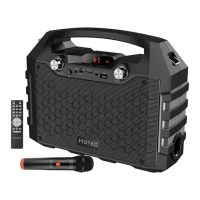

 To Next Page