eKeys
1
STEP
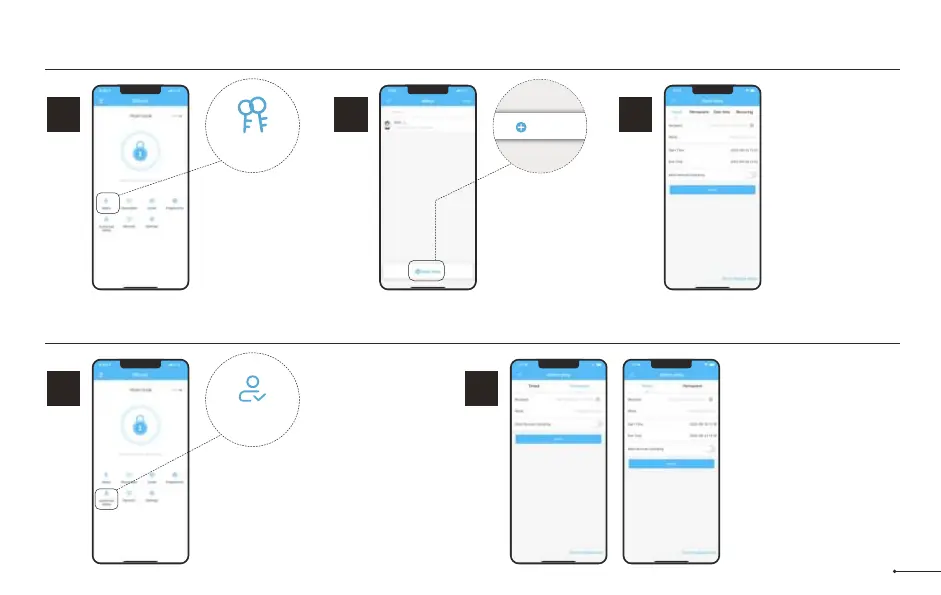
eKeys work by sharing app
access of your lock with
another DDLock account.
eKey recipients will be
able to use their phone to
unlock/lock the lock.
eKeys
2
STEP
Tap on “Send
eKey”.
3
STEP
Enter recipient’s
username. It will be
the phone number or
email address during
registration.
eKeys do not require
wifi or bluetooth to be
sent or revoked.
Send eKey
Authorized Admin
1
STEP
1. Unlock/lock via the app.
2. Generate, Edit, Delete
passcodes, IC cards, &
fingerprints.
3. Adjust settings like passage
mode, auto-lock timer, & turn
on/off the lock sound.
Authorized Admin
2
STEP
Tap on “Authorized
Admin” Set Timed Admin
or Permanent Admin.
Authorized Admins are similar to eKeys; however, an authorized admin can do the following:
18


 To Next Page
 Loading...