19
Passage Mode & Auto-Lock
1
STEP
Auto-lock will automatically lock
the lock when it has be opened
after 5 seconds by default. This
can be adjusted with Passage
Mode and Auto-lock timer.
Outlined below is how to adjust
these settings related to auto-lock.
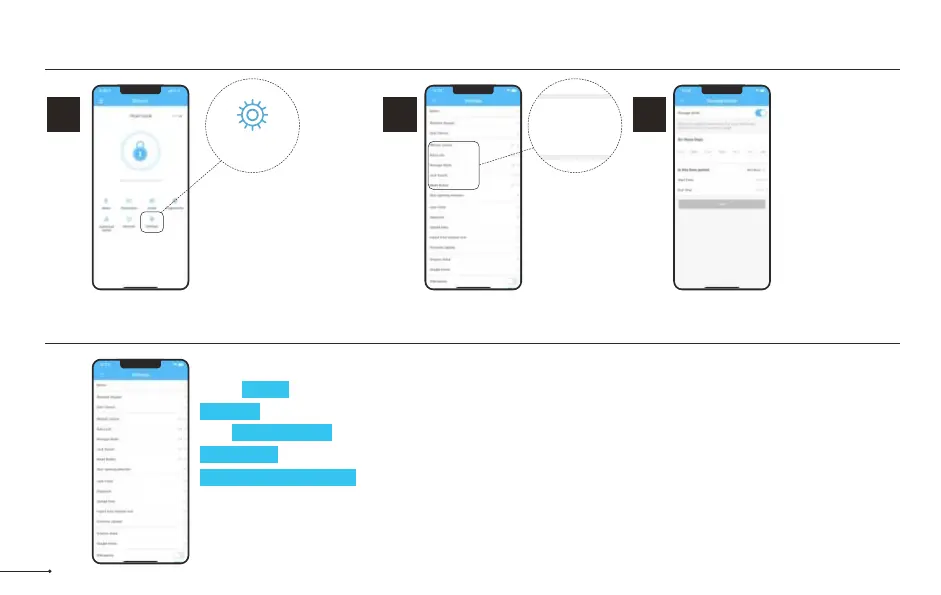
Select Passage
Mode.
Settings
2
STEP
3
STEP
Passage Mode
disables auto-lock
during a set
schedule.
Lock Settings
Wireless Keypad
Door Sensor
Remote Unlock
Auto Lock
Passage Mode
Lock Sound
Reset Button
Here are some settings you should familiarize yourself with.
Under Basics, you can view and change information such as Lock Name.
Gateway shows signal strength if Gateway is connected.
With Remote Unlock on and a Gateway connected, you can remotely unlock/lock your lock.
Lock Sound adjusts the locks sound level.
Import from another lock allows for the transfer of passcodes and cards from one lock to another.
Delete will remove the lock from your account and clear any settings one the lock. You must be near the lock to
do this.


 To Next Page
 Loading...