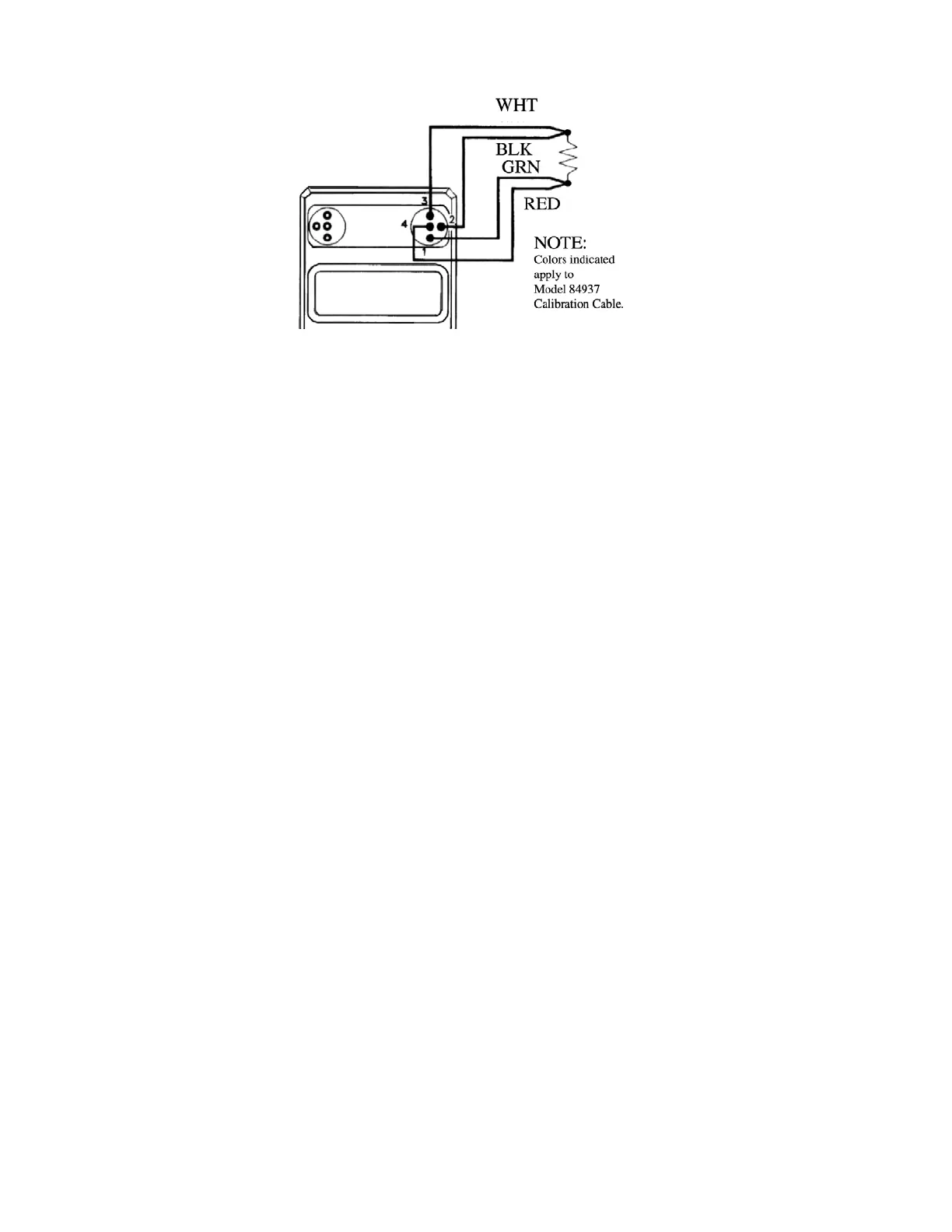
Figure 6. 4-Wire Resistance Measurement
Any of these readouts can be recalled by turning the unit off and
back on.
5. DATA LOGGING AND RECALL
Operating as a meter, the unit can save and recall up to 10 readings (each
with independent parameters: eg. °F/°C, TC-type and resolution) in random
access memory.
To Save Readings:
1. While in the METER OPR mode, depress the STORE key. Note that the
OPR annunciator is replaced by STO.
2. Next depress one of the memory location numbers (keys 0, 1, ..., 9). The
corresponding memory annunciator turns on and the meter returns
momentarily to the OPR mode, displaying thermocouple temperature.
eg. STORE 7
NOTES:
• The enabled location annunciator indicates that the meter read-
ing at the instant that the location number key was hit, was
stored in memory.
• When data is stored in a location already filed with data, the
new data replaces the old.
• Stored readings are retained during power-off.
To Recall Readings:
1. While in the METER OPR mode, readings stored earlier can be displayed
by first depressing the RECALL key. Note that the OPR annunciator is
replaced by RCL, and all memory location annunciators are blanked.
15


 To Next Page
 Loading...