Need help?
Do you have a question about the tekkiwear AK-T500 Plus and is the answer not in the manual?
Specifies OS (Android/iOS) and Bluetooth version (BT4.0) required for the smartwatch.
Instructions on how to download and install the "M2 Wear" app using QR code or app stores.
Guide on charging the smartwatch and connecting it to the mobile app via Bluetooth 3.0/4.0.
Explains power button functions and navigating the clock interface to the system menu.
Lists available options within the system menu, such as battery, ringer, and find device.
Describes how to change the smartwatch's clock face by long-pressing and sliding.
Enables calling, synchronizing contacts, call history, and receiving SMS messages from the phone.
Covers heart rate monitoring, sleep detection, and general health metrics.
Details controlling music, using the phone's camera remotely, and finding a lost phone.
Includes setting alarms, customizing watch faces, language, volume, and accessing SIRI.
Advises against wearing the smartwatch during bathing or swimming activities.
Instructions on cleaning the display with mild soap and water, and protecting sensors.
Avoid exposure to chemicals, high temperatures, strong impacts, and ensure water resistance.
Solutions for not finding the smartwatch via Bluetooth and unstable connections.
Explains data syncing, storage limits (one week), and overwriting of old data.
Troubleshooting steps for when the smartwatch cannot be charged.
Addresses concerns about long-term wear and radiation, stating it's negligible.
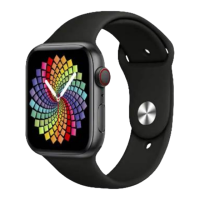
The Smartwatch AD0095 - AK-T500 Plus is a versatile wearable device designed to integrate seamlessly with your mobile phone, offering a range of functions for communication, health monitoring, and daily convenience. It requires an Android phone running version 4.2 or above, or an iOS device running version 9.0 or above, and utilizes Bluetooth BT4.0 for connectivity.
The smartwatch serves as an extension of your mobile phone, allowing you to manage calls, contacts, and messages directly from your wrist. When connected via Bluetooth, you can use the Phone dialling feature to make calls, access your synchronized Contacts, and view your Call history. The Messages function synchronizes SMS content from your mobile phone, though it's important to note that iOS 12 and above may block SMS reminders by default.
For health monitoring, the device includes Heart rate monitoring. To get an accurate reading, the watch should be worn snugly above the wrist bone against the arm. It measures real-time heart rate, and can perform an automatic heart rate measurement over approximately 20 seconds, providing current, resting, and average heart rate values. Normal heart rate for common individuals is typically between 60-90 beats per minute. The smartwatch also offers Sleep monitoring, which, when enabled, detects and monitors your sleep quality.
Convenience features include Turn on display when turning the wrist, which automatically activates the screen when you turn your wrist. You can Set the watch language and Adjust the volume for various situations, as well as Set the ringtone music. The Bluetooth camera function allows you to remotely control your phone's camera; when the phone's screen is unlocked and the watch enters the Bluetooth camera interface, you can click to take a picture, which will then be saved to your phone. With Bluetooth music, you can control and play music from your connected phone. If you misplace your phone, the Find your phone feature will make your phone ring when connected to the watch.
The smartwatch also includes a customizable Alarm clock, which can be set and deleted with a long press. You can Set the clock time and view your schedule using the Calendar. Various local Settings can be configured on the device. For iOS users, SIRI access is available by pressing and holding, provided Siri is enabled on your phone. The Multisystem feature allows you to change the style of the user interface. Finally, a QR Code is provided for easy download of the mobile APP.
To begin using the smartwatch, it must first be charged. Align the charging clip's contact point with the contact point on the back of the smartwatch. Be careful not to reverse the contact point, as this could short-circuit the battery.
Connecting the smartwatch to the companion APP requires accepting all permissions during the APP installation. Both Bluetooth 3.0 and 4.0 connections are necessary for full functionality. For Bluetooth 4.0, open the APP and Bluetooth on your mobile phone, enable the notification point, click "Add device," and search for and connect to the device name. Android phones require GPS to be turned on to find the smartwatch's Bluetooth name, and GPS access should always be allowed, not just over Wi-Fi. For Bluetooth 3.0, Apple users should search for "Hry Bluetooth 3.0" and connect to pair once Bluetooth 4.0 is connected. Android users, after Bluetooth 4.0 is connected, can enter their phone's Bluetooth settings, and the 3.0 pairing should be remembered automatically; if not, search for the Bluetooth device.
If you encounter common Bluetooth problems, such as unstable connections due to varying Bluetooth protocols across phone brands, try turning off and reconnecting your phone's Bluetooth. Note that problems arising from Bluetooth instability are not covered by the watch's warranty.
If the smartwatch isn't providing notification reminders for calls or notifications, you'll need to adjust your mobile phone's notification settings. Open the corresponding application and enable notification access to receive information.
Operating the smartwatch is intuitive. The Power key can be short-pressed to wake up or turn off the screen display, and long-pressed to turn the device on or off. Sliding the Clock interface left or right accesses the system menu, which includes battery info, ringer/mute, find my device, torch, SIRI voice, and Bluetooth. To change the clock face, long-press the clock interface screen, then slide left or right to select your desired clock and press to confirm.
The smartwatch stores exercise and sleep data on its host. When successfully connected to your phone via Bluetooth, this data is automatically uploaded. However, the smartwatch has limited storage, typically holding about one week of Bluetooth data. Once full, the oldest data is overwritten, so it's important to sync your smartwatch with your phone regularly. If incoming call and SMS reminder functions are enabled, Bluetooth connection must be maintained. The alarm function, however, will work even if Bluetooth is disconnected.
To ensure the longevity and proper functioning of your smartwatch, follow these maintenance guidelines. Always use the built-in charging cable for charging. Avoid exposing the grip ring to high humidity or extremely high or low temperatures for extended periods.
Protect the sensor from damage and avoid scratching it. Clean the display surface with a damp cloth and mild soap and water to remove any oil or dust. Do not expose the smartwatch to strong chemicals such as gasoline, cleaning solvents, propanol, alcohol, or insect repellent, as these can damage the sealing ability and surface of the case.
Avoid subjecting the smartwatch to strong impacts and extreme exposure to high temperatures. While the device is resistant to water splashes when the lens and casing are intact, violent disassembly will compromise its waterproofness.
If the smartwatch cannot be charged, first confirm that the charging cradle's direction is correct and that the charging clip is in good contact with the smartwatch. If the smartwatch's power is below 3.6V, it will undergo a precharging period. After plugging in the charger, it will immediately enter the charging state; if there's no display, it may take 3 to 5 minutes to show the charging state.
Rest assured that wearing the smartwatch for extended periods is safe. The radiation emitted by the device is well below the US FCC standard and is considered negligible, posing no radiation damage to the human body.
It is important not to wear the smartwatch while bathing or swimming. Always connect the smartwatch when syncing data.
 General
| Model | AK-T500 Plus |
|---|---|
| Water Resistance | IP67 |
| Sensors | Heart Rate Sensor, Accelerometer |
| Strap Material | Silicone |
| Category | Watch |
| Connectivity | Bluetooth |
| Features | Heart Rate Monitoring, Sleep Tracking, Call and Message Notifications |
| Battery Life | Up to 7 days |
| Compatibility | Android, iOS |
| Weight | 50g |
| Colors | Black, Pink, Blue |


 To Next Page