EasyManua.ls Logo

tekkiwear X8 MAX - User Manual

tekkiwear X8 MAX
5 pages
Print Icon
To Next Page IconTo Next Page
Loading...
Smartwatch X8 MAX
Instrucons manual
Firstly, it is important to note that for Android cell phones, Android 4.2 or higher operang
system is required; for Apple cell phones, IOS 8.0 or higher is required, likewise your cell phone
needs to support Bluetooth BT4.0.
Secondly, before the rst me use, please make sure that the watch has enough charge. If the
device cannot power on, please charge it rst.
Next step, download the APP.
Android download method:
Search for "HryFine" on Android Google Play to download the app or scan the QR code to
download.
IOS download method:
Scan the QR code to download the app.
To pair your watch to your cell phone:
+ Press and hold the power buon to turn on, please make sure the Bluetooth on the cell phone
is turned on (on Android you have to turn on the GPS).
+ Open the "HryFine" on the cell phone, input my device to match the watch, select the MAC
address matching your watch to connect, if you can't nd the device, you can click the device list
on the top right corner to refresh and search.
+ When the APP successfully connects to the watch, a guide page will appear. According to the
guide page, enter the Bluetooth search pairing "Hry 3.0 Bluetooth". Aer the connecon is
Question and Answer IconNeed help?

Do you have a question about the tekkiwear X8 MAX and is the answer not in the manual?

Overview

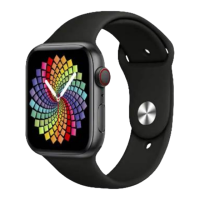
The Smartwatch X8 MAX is a versatile wearable device designed to integrate seamlessly with both Android and iOS smartphones, offering a wide array of features for communication, fitness tracking, and daily convenience.

Function Description:

The Smartwatch X8 MAX serves as an extension of your smartphone, enabling you to make and receive calls, play Bluetooth music, and receive notifications directly from your wrist. It's a comprehensive fitness tracker, monitoring various activities such as running, jumping, cycling, and swimming, along with detailed sleep analysis. Beyond fitness, it offers health monitoring features including heart rate, blood pressure, and blood oxygen measurements. For daily utility, it includes a stopwatch, remote camera control, flashlight, alarm, and sedentary reminders.
Important Technical Specifications:

  • Compatibility:
    • Android: Requires Android 4.2 or higher.
    • iOS: Requires iOS 8.0 or higher.
    • Bluetooth: Supports Bluetooth BT4.0.
  • Connectivity: Utilizes Bluetooth for pairing with smartphones. For calls and Bluetooth music, Bluetooth 3.0 connection is specifically mentioned.
  • Battery: Requires initial charging before first use. Specific battery capacity or life is not detailed, but it mentions a precharging time when power is below 3.6V.
  • Display: Features adjustable brightness with 5 levels. The clock interface can be customized with different themes.
  • Storage: The watch can store approximately one week of Bluetooth data (exercise and sleep data) before overwriting the oldest data when full.
  • Sensors: Includes sensors for heart rate, blood pressure, blood oxygen, and pedometer functions.
  • Water Resistance: The manual states that the watch is water resistant as long as the lens and case are intact, but warns against violent disassembly affecting this. It also advises against wearing it while bathing or swimming and exposing it to strong chemicals.
  • Radiation: The device's radiation is stated to be lower than the US FCC standard and is considered negligible.

Usage Features:

  • Initial Setup:
    • Ensure the watch is charged.
    • Download the "HryFine" app from Android Google Play or by scanning the QR code (for both Android and iOS).
    • Turn on the watch by pressing and holding the power button.
    • Enable Bluetooth on your phone (and GPS on Android).
    • Open "HryFine," go to "my device," and select the MAC address matching your watch to connect. If not found, refresh the device list.
    • After successful connection, follow the guide to pair "Hry 3.0 Bluetooth" for call and music functions.
  • Navigation:
    • Power Button: Turns the screen off/on and returns to the clock interface from other apps.
    • Clock Interface: Automatically syncs with phone's date and time. Press and hold for 2 seconds to switch dialing interfaces.
  • Communication:
    • Phone Dialing: Make calls directly from the watch when Bluetooth 3.0 is connected.
    • Phonebook: Add up to 50 frequently used contacts via the "HryFine" app, which then syncs to the watch.
    • Call Log: Records calls made from the watch.
    • Information/Message Reminder: Displays the last 8 messages clicked from the phone. Set message types (QQ, WeChat, Weibo, Whatsapp, mail, incoming calls) in the app to notify the watch (requires phone authorization).
  • Fitness & Health Tracking:
    • Sports Mode: Records distance and calorie consumption for running, jumping, cycling, and swimming.
    • Pedometer: Displays step count, completion status, distance, and daily calories.
    • Sleep Detection: Records sleep duration, deep sleep, light sleep, and wake time when worn during sleep. Data can be viewed in the app. Sleep detection time intervals can be set.
    • Sedentary Reminder: Set reminder periods and effective time ranges via the app.
    • Heart Rate Measurement: Automatically measures and displays heart rate data. Data is uploaded to the app. Automatic measurement time points can be set.
    • Blood Pressure Measurement: Automatically measures and displays blood pressure data.
    • Blood Oxygen Measurement: Automatically measures and displays blood oxygen data.
  • Convenience Features:
    • Remote Camera: Connect to the app, open the remote camera function, and shake the watch to take a picture.
    • Stopwatch: Start and stop time.
    • Search Cell Phone: When connected, the phone will emit a ringtone.
    • Flashlight: Turns the clock display bright white.
    • Device Information: Displays MAC serial number and version number.
    • Brightness Adjustment: Choose from 5 brightness levels.
    • Alarm: Add up to 5 alarms via the app; they sync to the watch and vibrate even when disconnected.
    • Bluetooth Music: Control play/pause of music on the phone (requires Bluetooth 3.0 connection).
    • Theme: Select different clock themes by sliding up and down after login.
    • QR Code: Displays the QR code for app download.
    • Personal Information: Set avatar, nickname, gender, age, height, weight, and daily step target in the app.
    • Device Search: Makes the watch vibrate when clicked in the app.
    • Do Not Disturb Mode: Set time periods to stop receiving notifications.
    • Vibration: Enable/disable vibration reminders.
    • Language Setting: Select supported languages; the watch automatically switches.
    • Wearing Mode: Adjust algorithms for heart rate and pedometer based on left/right wrist wearing.
    • Synchronize System Time: Manually sync phone time to the watch.
    • Factory Reset: Restores defaults and erases all data.
    • Raise Hand to Illuminate Screen: Activates the screen when the wrist is raised and turns it off when lowered.

Maintenance Features:

  • Cleaning: Clean the watch surface with a damp cloth and mild soapy water to remove oil or dust.
  • Protection:
    • Do not scratch the sensor.
    • Avoid exposing the watch to strong chemicals (gasoline, cleaning solvents, propanol, alcohol, insect repellent) as they can damage water resistance and the case.
    • Avoid strong impacts and extreme high temperatures.
    • Do not expose the watch to high humidity, extremely high, or low temperatures for long periods.
  • Troubleshooting:
    • Connection Issues:
      • Confirm phone compatibility (iOS 8.0+/Android 4.4+, Bluetooth 4.0).
      • Connect in an area with no magnetic fields or Bluetooth interference.
      • Turn Bluetooth off/on on the phone.
      • Delete/restart the app or phone.
      • Avoid connecting to other similar smart devices simultaneously.
      • If the watch signal isn't displayed, ensure it's on, activated, not connected to other phones, move it closer to the phone, and search again. If still not showing, turn off phone Bluetooth for 20 seconds, restart, and search.
    • Data Storage: Exercise and sleep data are saved on the wristband. When connected, data uploads automatically. Limited to about one week of data before overwriting.
    • Charging Issues:
      • Confirm the charging cradle is correctly placed and the charging clip is in good contact.
      • A precharging time occurs if power is below 3.6V. The display may take 3-5 minutes to show charging status.
    • Unexpected Restarts: Check phone memory, clear it, and try again, or close and reopen the app.

tekkiwear X8 MAX Specifications

General IconGeneral
Brandtekkiwear
ModelX8 MAX
CategoryWatch
LanguageEnglish

Related product manuals