58
GB
TYPE 1
AUTOMATION OF 2 MOTORS WITHOUT ELECTRIC LIMIT SWITCHES, WITHOUT ENCODER AND WITHOUT MAS200
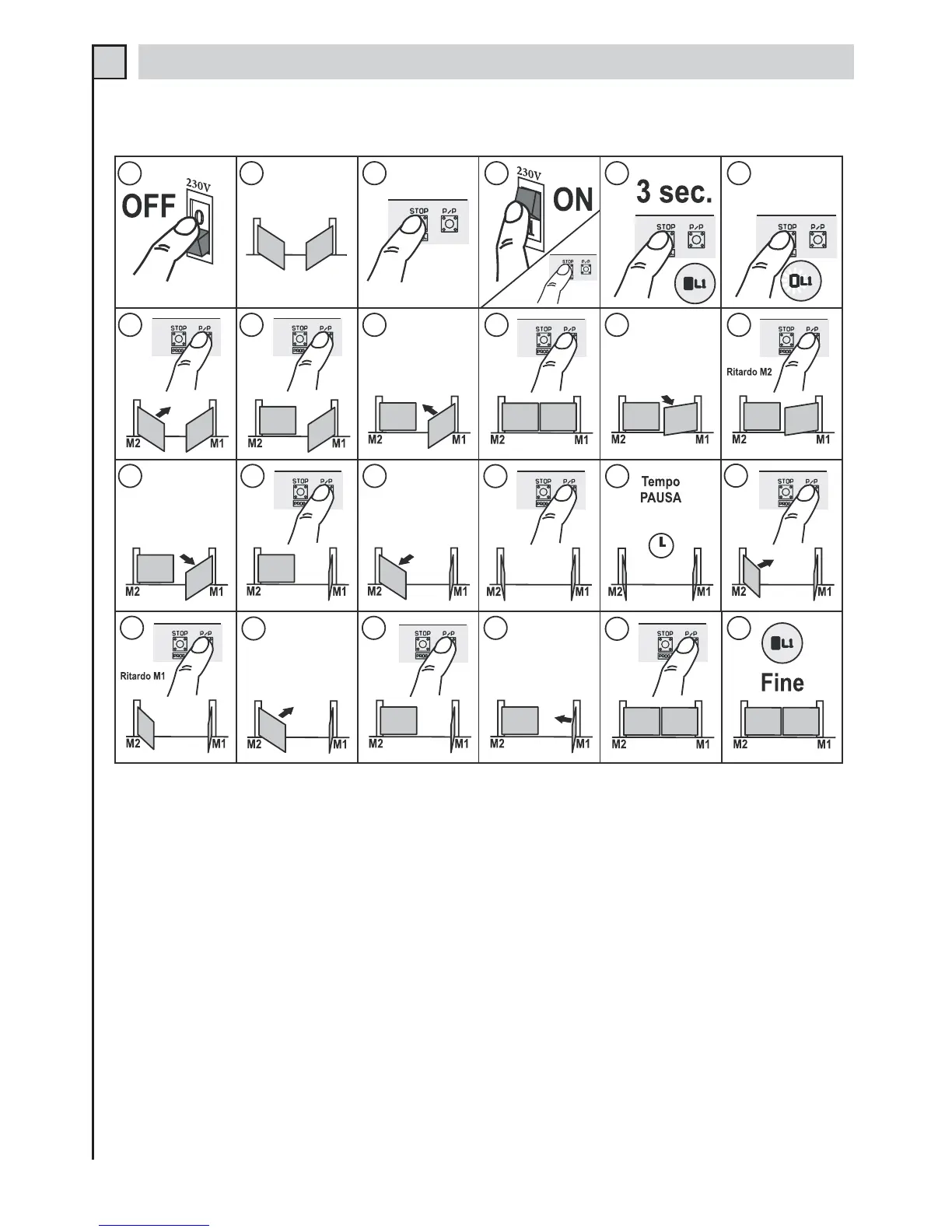
SIMPLE PROGRAMMING - dip-switch 9 to OFF - det. 14 fig. 1*
1
2
3
4
5
6
7
8
9
10
11
12
13
14
15
16
17
18
19
20
21
22
24
23
Programming:
1 - Disconnect the power supply to the control unit.
2 - Bring the gate to mid-travel position.
3 - Press the STOP/PROG. button (det. 21 fig.1)
4, 5 and 6 - Power the control unit while holding down the STOP/PROG. button until Led L1 lights up (det. 8 fig. 1).
7 - Press the P/P button (det. 20 fig. 1); motor M2 will start closing (wing without electric lock). (if the motor rotates in
the reverse direction, disconnect the power supply, exchange the motor phase wires and repeat the procedure).
8 and 9 - When it reaches the stop point press button P/P. Motor M2 will stop while motor M1 will automatically start
closing (wing with electric lock).
10 and 11 - When M1 also reaches the stop position, press button P/P. The motor will stop and then start again in the
opening direction.
12 - During this manoeuvre, the space offset of the two opening wings must be selected. In order to set the time delay,
press button P/P when the wing driven by motor M1reaches the point where the wing driven by motor M2 should
start moving.
13 - Motor M1 stops momentarily and then starts opening the wing again.
14 - Press button P/P when the wing driven by motor M1 has opened all the way.
15 - The wing driven by motor M2 will automatically start opening.


 To Next Page
 Loading...