EasyManua.ls Logo

TelecomSquare TS-61 - User Manual

TelecomSquare TS-61
7 pages
Print Icon
To Next Page IconTo Next Page
Loading...
WiFi Power Bank User
Manual
Model: TS-61
Question and Answer IconNeed help?

Do you have a question about the TelecomSquare TS-61 and is the answer not in the manual?

Summary

Device Functions Overview

Wireless WiFi Router Function

Enables the device to act as a WiFi router, supporting 3G/4G internet and up to 5 simultaneous connections.

Power Bank Functionality

Allows the device to charge other mobile devices with its 5000mAh battery.

Device Ports and Indicators

WiFi LED Indicator

Indicates the status of the WiFi connection, showing if it's ready or unavailable.

Data Transfer LED

Shows whether data transfer is available or currently in progress.

Cellular LED Status

Displays the status of the cellular connection, including connection, attempt, or error.

Battery Level Indicator

Indicates the remaining battery charge level through multiple LEDs.

Charging Button Operation

Initiates the power bank function to charge connected mobile devices.

Power Button and Reset

Controls device power and performs a reset function with different press durations.

Charging Cable and Ports

Details the types of charging cables and ports (USB-A, Type-C) for charging the device and other devices.

General Safety Instructions

Device Specifications

Connectivity and Network Specs

Details on supported 3G/4G networks, WiFi standards, and bands.

Hardware and Power Specs

Information on chipset, memory, dimensions, battery capacity, input/output, and operating temperature.

Safety and Compliance Warnings

CE Safety Warnings

Important safety precautions related to battery handling, operating conditions, and device connection.

FCC Regulatory Information

Details on FCC compliance, labeling requirements, user information, and RF exposure guidelines.

Summary

Device Functions Overview

Wireless WiFi Router Function

Enables the device to act as a WiFi router, supporting 3G/4G internet and up to 5 simultaneous connections.

Power Bank Functionality

Allows the device to charge other mobile devices with its 5000mAh battery.

Device Ports and Indicators

WiFi LED Indicator

Indicates the status of the WiFi connection, showing if it's ready or unavailable.

Data Transfer LED

Shows whether data transfer is available or currently in progress.

Cellular LED Status

Displays the status of the cellular connection, including connection, attempt, or error.

Battery Level Indicator

Indicates the remaining battery charge level through multiple LEDs.

Charging Button Operation

Initiates the power bank function to charge connected mobile devices.

Power Button and Reset

Controls device power and performs a reset function with different press durations.

Charging Cable and Ports

Details the types of charging cables and ports (USB-A, Type-C) for charging the device and other devices.

General Safety Instructions

Device Specifications

Connectivity and Network Specs

Details on supported 3G/4G networks, WiFi standards, and bands.

Hardware and Power Specs

Information on chipset, memory, dimensions, battery capacity, input/output, and operating temperature.

Safety and Compliance Warnings

CE Safety Warnings

Important safety precautions related to battery handling, operating conditions, and device connection.

FCC Regulatory Information

Details on FCC compliance, labeling requirements, user information, and RF exposure guidelines.

Overview

This document describes the Skyroam WiFi Power Bank, model TS-61, a multi-function device that combines a WiFi router and a power bank. It supports 3G/4G internet and allows up to 5 users to connect simultaneously via WiFi. Any terminal device with WiFi functionality can access the internet through this device.

Function Description:

The device serves two primary functions:

  1. Wireless WiFi Router:

    • To activate the WiFi router function, press the button located on the side of the device for 3 seconds.
    • Wait until the three signal LEDs become solid, indicating the device is ready.
    • Terminal devices such as PCs, mobile phones, and tablet PCs can then connect to the WiFi Power Bank via Wi-Fi.
    • It supports a maximum of 5 terminal devices connected simultaneously.
  2. Power Bank:

    • The WiFi Power Bank has a built-in 5000mAh Lithium polymer battery.
    • It can be used to charge most mobile phones, MP3 players, Tablet PCs, and similar devices.
    • To charge a device, connect the WiFi Power Bank and the mobile phone (or other device) using a charging cable.
    • Press the charging power button to activate the power bank function, and the WiFi Power Bank will begin charging the connected device.
    • To stop charging, simply remove the cable from the smartphone.

Important Usage Notes for Power Bank Function:

  • Do not charge the WiFi Power Bank while it is simultaneously outputting charge to another mobile device, as this can shorten battery life. (This warning is repeated twice in the original text, emphasizing its importance).

Ports and Indicators:

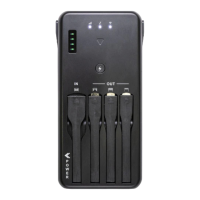
The device features various ports and LED indicators:

LED Indicators:

  • WiFi LED (1):
    • White Solid: WiFi is ready.
    • Unlit: WiFi is not available.
  • Data transfer LED (2):
    • White Solid: Data transfer is available.
    • White Blinking: Data is currently being transferred.
    • Unlit: Data is not available or turned off.
  • Cellular LED (3):
    • White Solid: Connected to cellular network.
    • White Blinking: Attempting to connect and get signal.
    • Red: Error.
  • Battery LED (4):
    • 4 LEDs: More than 75% battery.
    • 3 LEDs: Between 50%~75% battery.
    • 2 LEDs: Between 25%~50% battery.
    • 1 LED: Between 10%~25% battery.
    • 1 LED Blinking: Less than 10% battery.

Buttons and Ports:

  • Power button (6):
    • Press for 3 seconds: Turns on or off the device.
    • Press for 15 seconds: Resets the device.
  • Charging button (5): Press to start the power bank function.
  • Charging cable (7): USB-A cable for charging the WiFi Power Bank.
  • Micro-USB cable (8): For charging a USB device via micro USB.
  • IOS cable (9): For charging an iPhone or iPad.
  • Type-C cable (10): For charging a USB device via Type-C.
  • Charging pins (11): For charging the WiFi Power Bank with a cabinet.
  • Type-C port (12): For charging the WiFi Power Bank.
  • QR code (13): (No specific function described, likely for device information or app download).

Important Technical Specifications (Model: TS-61):

  • Chipset: MT6761 4XA53 @ 2.0GHz
  • Memory: 1G RAM + 8G ROM
  • Dimensions: 132 * 68 * 17mm
  • Shell material: Plastic ABS+PC
  • Color: Black
  • Ports:
    • Power Out: 1USB-C, 1USB-Micro, 1*Apple USB Port
    • Power In: 1*USB-A
  • 3G Network: WCDMA: B1/B2/B4/B5/B8
  • 4G Network:
    • FDD: B1/B2/B3/B4/B5/B7/B8/B12/B17/B18/B19/B20/B25/B26/
    • TDD: B38/B39/B40/B41
  • WiFi:
    • 2.4GHz 802.11b/g/n
    • 5GHz 802.11a/n/ac
    • 11n 20M&40M, 11a band1\2\4 (slave)
  • Battery: 5000mAh lithium polymer battery
  • Input: 5V2A
  • Output: 5V1A
  • Temperature Standard:
    • Storage: -30°C ~ +70°C
    • Operation: -10°C ~ +55°C
  • OS: Android 8.1

General Safety Instructions (Maintenance and Usage):

  • Initial Use: Ensure the WiFi Power Bank is fully charged before its first use.
  • Low Battery: When the battery is low, LED lights will turn off during device charging. Recharge the Mobile Power Bank as soon as possible to prevent shortening battery life.
  • Regular Charging: The battery should be charged at least every three months to maintain battery life.
  • Disconnecting Devices: It is recommended to disconnect a fully-charged device to avoid unnecessary battery consumption.
  • Temperature Control: Keep the WiFi Power Bank away from fire. Avoid temperatures above 70°C during use or 55°C when not in use.
  • Water Exposure: Do not get the WiFi Power Bank wet or immerse it in water.
  • Cleaning: Do not wash the WiFi Power Bank with corrosive cleaners.
  • Physical Damage: Do not squeeze or puncture the WiFi Power Bank to prevent electrolyte leakage from the lithium-ion battery.
  • Disassembly/Modification: Do not attempt to disassemble, modify, or repair the WiFi Power Bank.
  • Cables/Chargers: Do not use damaged cables or power chargers to charge the WiFi Power Bank.

CE Warning:

  • Battery Replacement: Risk of explosion if the battery is replaced with an incorrect type. Dispose of used batteries according to instructions.
  • USB Interface: The product should only be connected to a USB interface of version USB2.0 or higher.
  • Adapter Placement: The adapter should be installed near the equipment and be easily accessible.
  • Operating Temperature: The device's operating temperature must not exceed 55°C and should not be lower than -10°C.
  • Disconnect Device: The plug is considered the disconnect device of the adapter.
  • RF Specifications: The device complies with RF specifications when used at 5mm from the body and 0mm from the head.
  • Frequency Band: The 5150-5350MHz band is for indoor use only.
  • EU Compliance: Skyroam Technology Co., Ltd. declares this product complies with essential requirements and other relevant provisions of Directive 2014/53/EU. This product is allowed for use in all EU member states.

FCC Warning:

  • Labeling Requirements (15.19): This device complies with Part 15 of the FCC Rules. Operation is subject to two conditions: (1) it may not cause harmful interference, and (2) it must accept any interference received, including interference that may cause undesired operation.
  • Information to User (15.21): Any unauthorized changes or modifications could void the user's authority to operate the equipment.
  • Information to the User (15.105): This equipment has been tested and found to comply with Class B digital device limits. It generates and radiates radio frequency energy. If not installed and used according to instructions, it may cause harmful interference to radio communications. If interference occurs, the user is encouraged to try to correct it by:
    • Reorienting or relocating the receiving antenna.
    • Increasing the separation between the equipment and receiver.
    • Connecting the equipment to an outlet on a different circuit.
    • Consulting the dealer or an experienced radio/TV technician.
  • Absorption Rate (SAR) Information:
    • This device meets government requirements for exposure to radio waves.
    • The SAR limit for USA (FCC) is 1.6 W/kg averaged over one gram of tissue.
    • The device was tested for typical body-worn operations with the back of the device kept 10mm from the body.
    • To maintain compliance with FCC RF exposure requirements, use accessories that maintain an appropriate separation distance between the user's body and the back of the device.
    • Accessories like belt clips, holsters, and similar items should not contain metallic components.
    • Use only supplied or approved antennas.

TelecomSquare TS-61 Specifications

General IconGeneral
BrandTelecomSquare
ModelTS-61
CategoryAccessories
LanguageEnglish