Telecor Administrative Communication Systems Page 3
Output
Terminals
TEL-125
Maximum Load /
Minimum Impedance
TEL-250
Maximum Load /
Minimum Impedance
70 V 39 Ω 19.5 Ω
25 V 5 Ω 2.5 Ω
8 Ω 8 Ω 8 Ω
4 Ω 4 Ω 4 Ω
The amplifier should be plugged into a standard three prong 120 V, 60 Hz grounded outlet. Turn the Power Switch off when connecting
and disconnecting the AC receptacle.
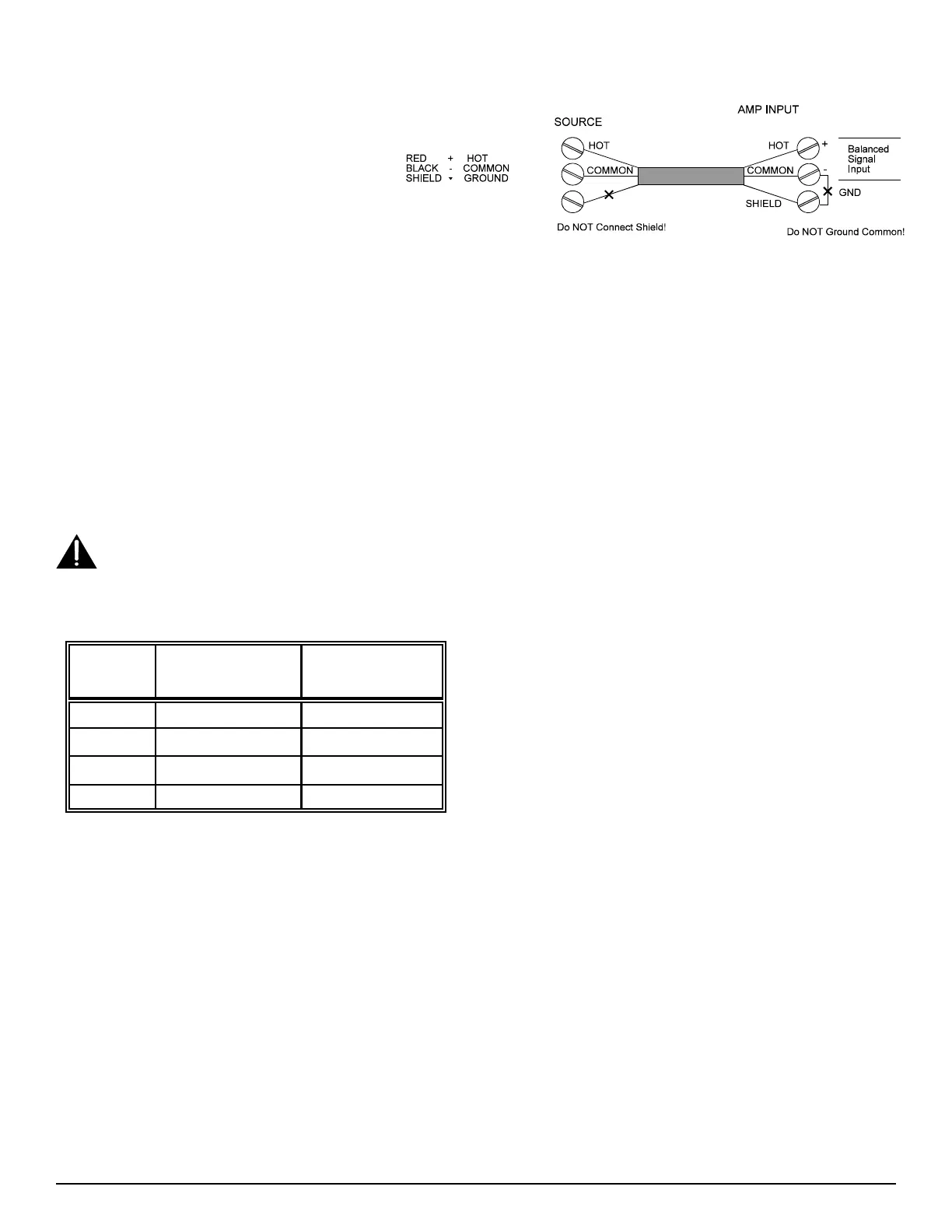
Input Connections: The screw terminals on the right
side of the back of the amplifier are for signal input.
The input terminals are suitable for both balanced and
single ended inputs. A ground terminal is provided for
grounding the shield of the cable if required. An
example of typical input wiring is shown in Figure 4.
Figure 4: Input Connections
To reduce the incidence of ground loop hum, oscillation, or interference from other audio sources:
1) Use a shielded cable for input wiring. The shield must be grounded at one end of the cable only, not at both.
2) Regardless of what type of input signal is supplied to the amplifier (balanced or single ended), the GND terminal should not
be connected to the - (common) terminal.
Set the “Input Level” switch to match the level of your input. If connecting the input of the amplifier to an unknown level signal, set the
“Input Level” switch to 1 V and the “Gain” to 0. Then apply the signal and increase the gain. If an unacceptable level is not reached with
the gain at maximum: turn the “Gain” to 0, switch the “Input Level” to 100 mV, and then increase the gain.
Output Connections: The left terminal strip is the signal output of the amplifier. Terminals are provided for 70 V and 25 V speaker
lines, as well as 8 Ω and 4 Ω loads. Connect the speaker load to the appropriate terminals depending on the load impedance. Class 2 wiring
may be used. The output of the amplifier is floating with respect to ground and should remain that way. Do not connect the COM and GND
terminals together. The GND terminal is provided for use with shielded cable only.
Ensure the amplifier is OFF before making, removing or handling any output connections. The output terminal cover must be
in place when the amplifier is operating.
To reduce the incidence of output audio being induced into other conductors, use twisted pair wiring and keep the input and output wiring
separated. To avoid overloading the amplifier, ensure that the total speaker load impedance is no less than the values in the table below:
Line Impedance Measurements: Measure the amplifier's load
impedance using an audio signal impedance meter (1 kHz) with the
amplifier output disconnected. Also, measure the impedance of each
side of the load to earth ground, which should be open circuit. If it is not
(i.e. there is a fault to ground), isolate the fault and correct it. Do not
operate the amplifier on a ground faulted output line. Note: In school
applications, there is often a privacy switch in the room which when
activated will ground one side of the room speaker line to ground
through a transformer. Make sure all these privacy switches are not in
the “Privacy” position when measuring line impedance to ground. These
switches do not adversely affect the operation of the amplifier. When
measuring load impedance on a Telecor installation: disconnect the amplifier output from the line, connect the impedance meter across the
line, make sure the system is in an ALL CALL mode, then measure the line’s impedance and check for line ground faults.
Operation
• Before turning the amplifier on, ensure that - the speakers have an adequate power rating.
- the proper output terminals have been used.
- the gain of the amplifier is appropriate for the input signal supplied.
• If you are unsure about the “Input Level” and “Gain” settings, turn the “Gain” control to minimum before turning the amplifier on.
• Once the amplifier is mounted and wired, turn the unit on. The Power Switch should illuminate. Watch the VU Meter on the front of
the Power Amplifier. With no signal connected, ensure that none of the LEDs are illuminated. If any LEDs illuminate, see the section
on Troubleshooting in this document.
• With the signal applied, adjust the “Gain” control until an appropriate output level is obtained. If the “Current Overload” or “Clip”
lights illuminate, see the section on Troubleshooting in this document.
• To reduce the low frequency amplification, set the “Low Cut” switch to the CUT position.


 To Next Page
 Loading...