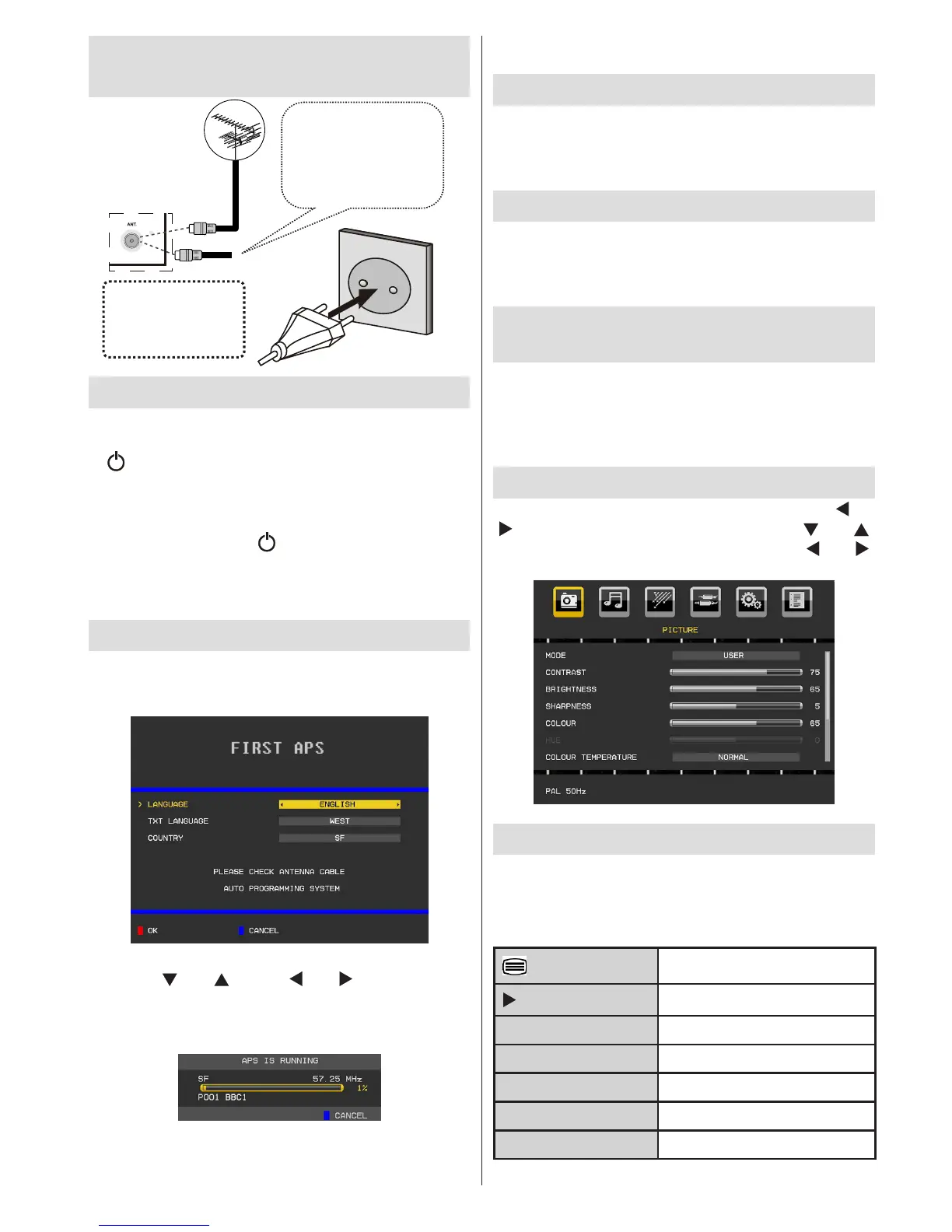
Step 5 - Switching On/Off
Connect the power cord to the 220-240V AC 50 Hz. •
Then the standby LED lights up. Press and hold the
“ ” button on the TV, P+ / P- or a numeric button on
the remote control. The TV will then switch on..
To Switch the TV Off
Press and hold the “• ” button on the TV or on
the remote control, so the TV will switch to standby
mode. To power down the TV completely, unplug
the power cord from the mains socket.
Step 6 - First Time Installation
The following menu appears on the screen for the rst
time you switch on your TV:
Select your Language, Text language and Country
by using “ ” or “ ” and “ ” or “ ” buttons. Press
“OK” or RED button to continue. To cancel, press
BLUE button. The following menu will be displayed
during the automatic tuning:
After APS is nalized, the programme table will appear
on the screen. In the programme table you will see
the programme numbers and names assigned to the
programmes.
Input Selection
Once you have connected external systems to your
TV, you can switch to different input sources. Press
SOURCE button on your remote control consecutively
for directly changing sources.
Changing Channels and Volume
You can change the channel and adjust the volume
by using the V+/- and P+/- buttons on the remote. You
can also change the channels by pressing the buttons
on the front panel of your TV.
Changing Image Size: Picture
Formats
Programmes can be watched in different picture formats,
depending on the transmission received. You can
change the aspect ratio (image size) of the TV for viewing
the picture in different zoom modes. Press SCREEN
button repeatedly to change the image size.
Menu Operation
Press MENU button to view main menu. Use “ ” or
“ ” button to select a menu icon and use “ ” or “ ”
to highlight an item. Set an item by using “ ” or “ ”
button. Press OK to conrm or enter.
Teletext
The teletext system is available if your broadcaster
supports. The teletext system transmits information
such as news, sports and weather on your TV. Basic
remote control txt functions are as the following:
Teletext On / Mix / Teletext Off
Subcode Pages








 To Next Page