4
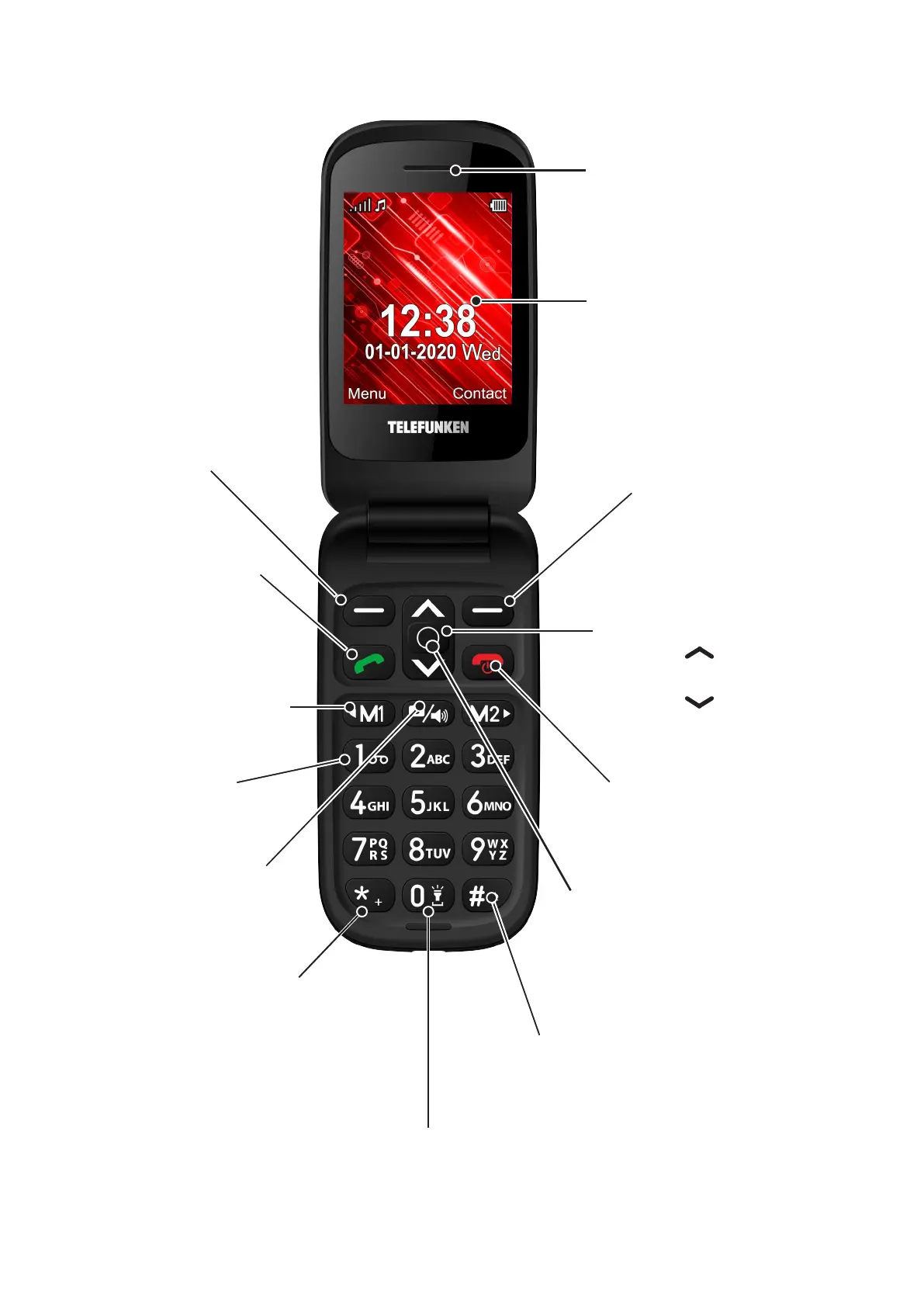
2. CONTROL ELEMENTS
* /Symbol Key
In text editing mode:
f Press to access list of special
symbols
f Press and hold to switch to the +
key when dialing a number
Earpiece
Display
Right key:
f Back key
f Contact access
f Mute a call
Up and Down Direction
keys
f Navigate menu.
f Press
to access
shortcut feature
f Press
to access
shortcut feature
Power/End key
f Hold down to power
On or Off
f Press to end a call
OK key
f Used to confirm selection
as with the Left Key
f Skips certain context/
confirmation menus
# key
On a main screen:
f
Press and hold to switch between
currently set, Vibration and Silent
sound profile
In text editing mode:
f Press to change text input
method (Abc, ABC, abc, 123)
and select writing language
Left key:
f OK key
f Main menu key
fAnswer a call
Call key:
f Dial a number
f Answer a call
f Show call history
Voicemail key
f Press and
hold to access
voicemail
Photo key
f Access camera mode
f In camera mode,
press to take a photo
Direct memory keys
f Press to dial M1/M2
assigned numbers
f In menu, used as
left/right direction
keys
0/Space/Flash light key
In text editing mode:
f Press to add space between words
f
From main screen, press and hold to
open or close the torch



 To Next Page