9
6. USEFUL TIPS
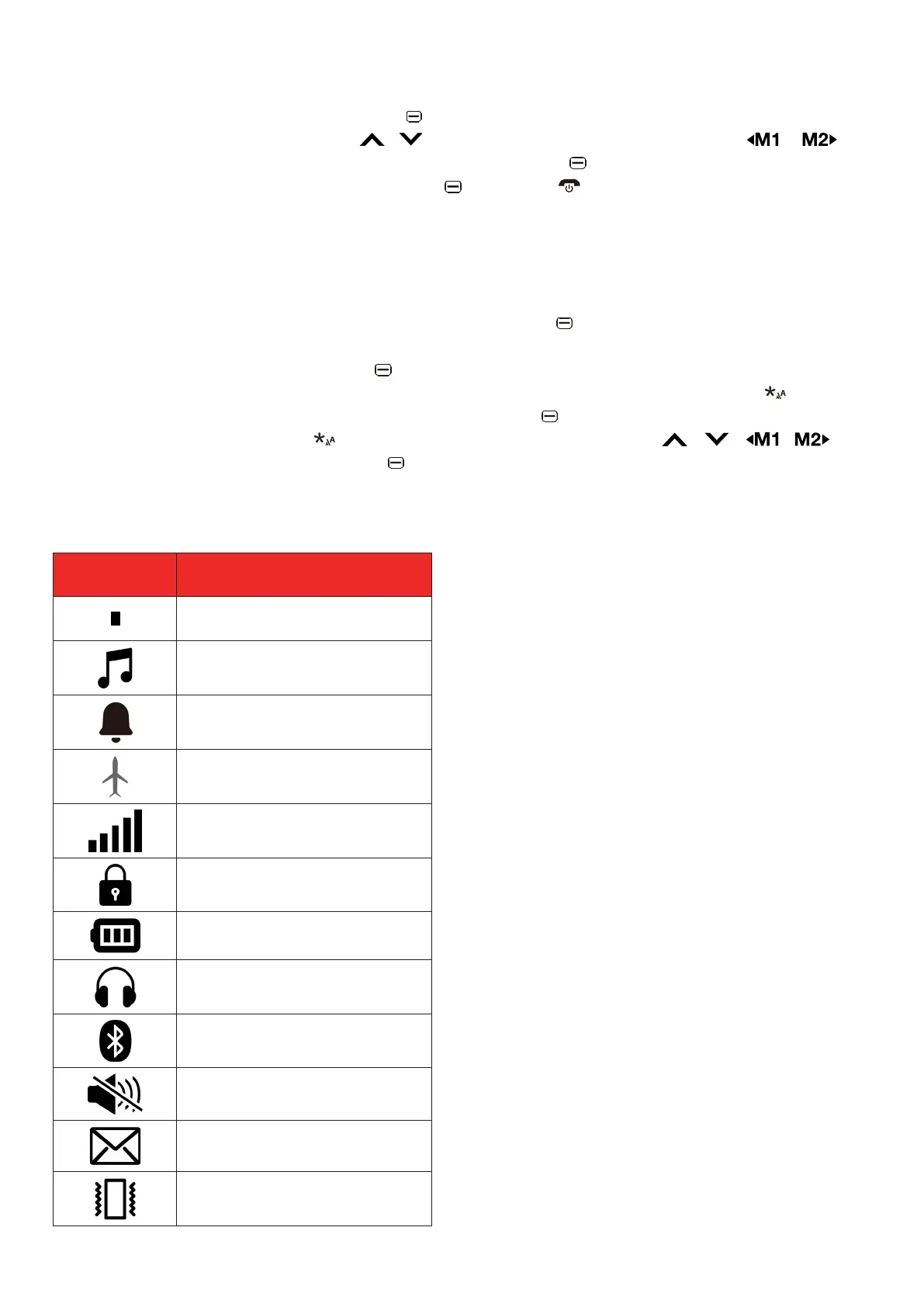
To access the main menu, press the left key.
To navigate up and down, press the / key. To navigate left and right, press the or
key.
To confirm a choice or access Options menu, press the left key.
To go back or cancel an option, use the right key, or the key to go back to the main screen.
On the main screen, press and hold the # key to switch ring modes.
The default password for phone lock is “0000”.
6.1 Enter text with the keypad
Press the # key to toggle between input methods (ABC, abc, Abc, and 123) or select Options ->
Input method to display the input methods. Press the left key to confirm a selection.
To add a space, press the 0 key.
To delete characters, press the right key.
To toggle between common punctuation marks, press the 1 key repeatedly or press to display
the punctuation marks and other symbols. Press the left key to confirm a selection.
To insert a symbol, press the key to display the symbol list. Use the / / / keys
to select a symbol, then press the left key to confirm a selection.
7. STATUS BAR ICONS
Icon Description
No signal
General mode
Alarm is set
Fly mode activated
Signal strength for SIM
Lock screen
Battery full
Earphones connected
Bluetooth
Silent mode
New message
Vibration mode



 To Next Page