22 www.telematrix.net 3300 SERIES VoIP USER GUIDE
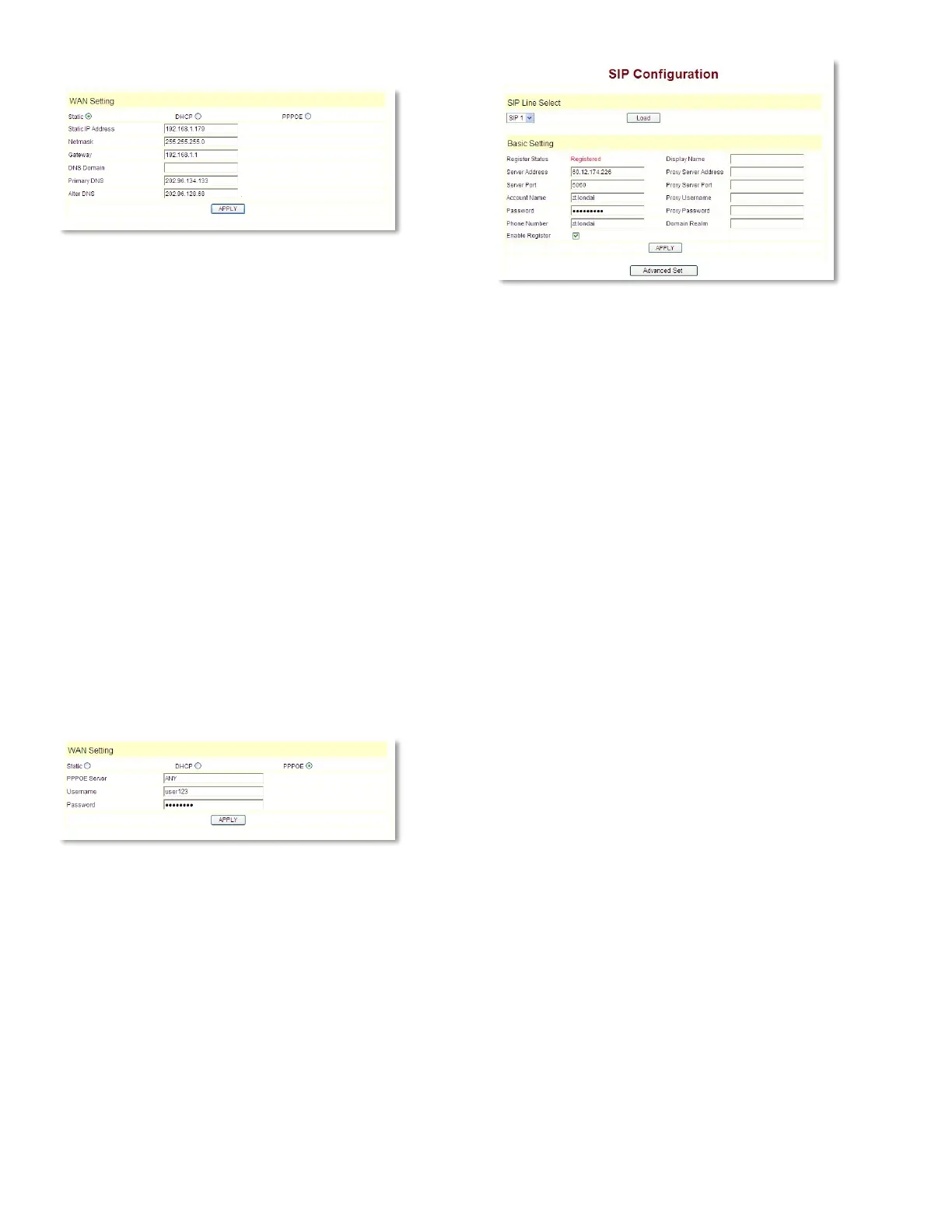
CONFIGURE STATIC IP
– Choose Static
– Fill in the IP address of the 3300 Series phone
in the Static IP Address field
– Fill in the subnet mask in Netmask
– Fill in the router address or up Gateway
address in the Gateway
– Fill in the local DNS server address in the
Primary DNS and Alter DNS respectively
USE THE CONFIGURATION TO DYNAMICALLY
OBTAIN IP TO GET THE IP ADDRESS
– Choose the DHCP option
Now, if the network has a DHCP server, then the
3300 Series phone will receive the IP Address,
Netmask, Gateway, Primary DNS, and Alter DNS
from this DHCP server automatically.
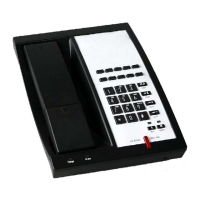
USE PPPOE DIALING TO CONNECT THE
INTERNET
– Choose the PPPoE option
– Fill in the account and the password that
PPPoE dialed in the PPPoE Username and
Password areas
So the 3300 Series phone could connect to the
Internet through PPPoE dialing and automatically
receive the IP Address, Netmask, Gateway, Primary
DNS, and Alter DNS information, and so on.
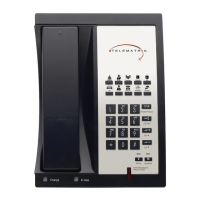
4.2.2 SIP CONFIGURATION
Enter into the VoIP -> SIP Configuration window
to set up the SIP account information:
Server Address: This is the IP address or FQDN
(Fully Qualified Domain Name) of the IP/PBX SIP
Registration server.
Server Port: This is the Internet Socket Port for
SIP information. The common UDP port for a SIP
server is 5060. Default port is 5060.
Account Name: Username of your SIP account.
(Often the same as the phone number.)
Password: Password of your SIP account.
Phone Number: Phone number of your SIP
account.
Enable Register: Choose Enable Register to
allow the phone to begin the SIP registration
Call/Response process.
Display Name: This field will display the User
Agent (UA) in the header.
Proxy Server Address: (usually left blank)—
IP address of proxy SIP server. (A SIP provider
usually uses the same IP for the register server
and the proxy server. In this case you don’t need
to configure the proxy server information.)
Proxy Server Port: (usually left blank) Signal
port of the SIP proxy.
Proxy Username: (usually left blank) Proxy
server username.
Proxy Password: (usually left blank) Proxy server
password.
Domain Realm: (often left blank) SIP domain—
enter the SIP domain if any. Otherwise, the
3300 Series phone will use the proxy server
address as the SIP domain.


 To Next Page