Ethernet extension using existing
DVB-T ( TV aerial) cabling.
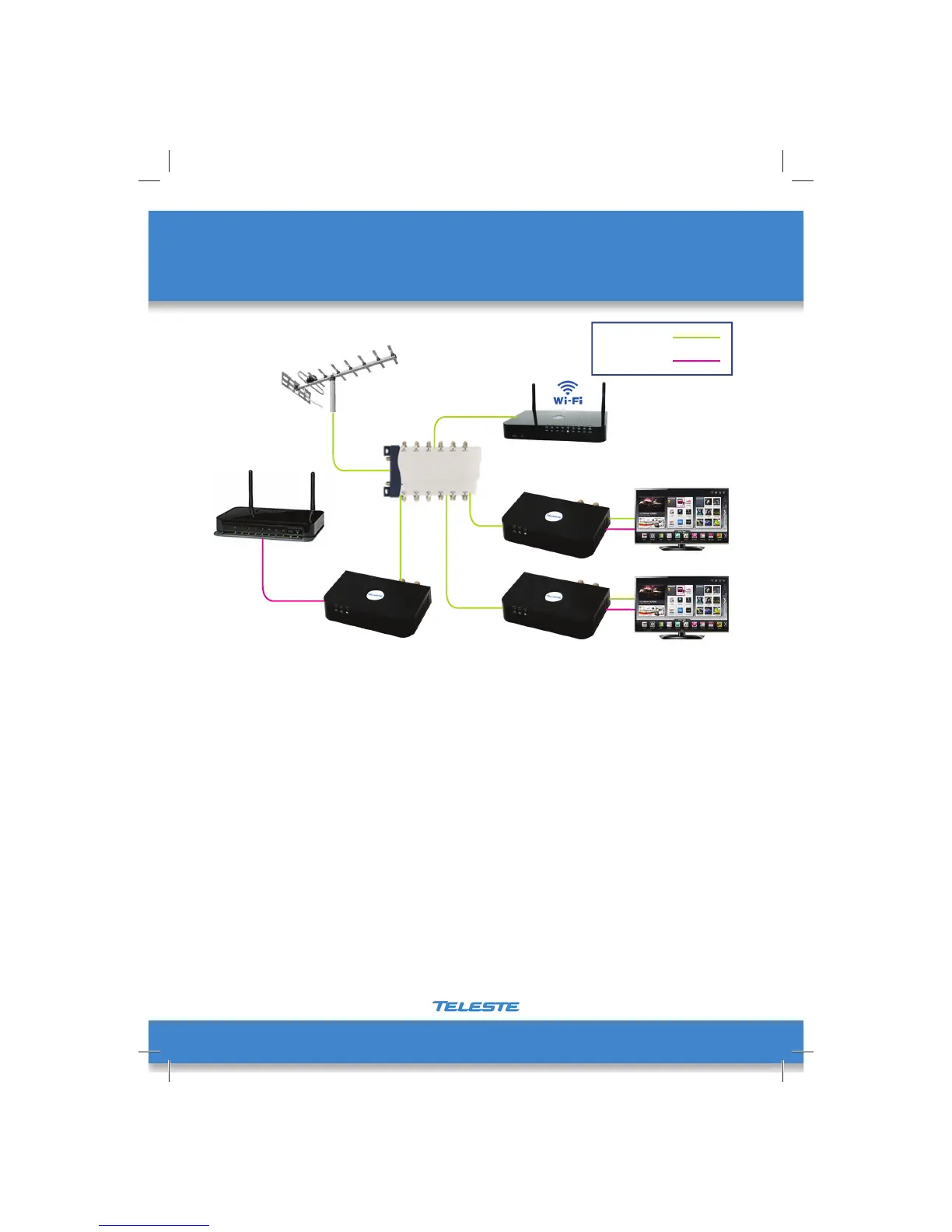
The fi rst EOC adapter needs to be connected to the Modem / Router, Via an Ethernet patch
cord, to get an Ethernet signal into the system.
Make a connection from a spare OUTPUT on the TV aerial distribution amplifi er to the
CABLE IN connection on the fi rst EOC adapter.
It is essential that the EOC adapter is only connected to an OUTPUT port of the amplifi er, as
the Ethernet over coax signal cannot pass through the amplifi er.
At the 2nd EOC03 extender, connect the ‘CABLE IN’ socket to the wall outlet. Use the
supplied COAX fl y lead to then make a connection to the TV or set top box, so that the
signal is passing through the EOC03 to the TV or set top box.
Connect any Ethernet devices – Smart TV, IP Set top Box etc. using an Ethernet patch cord.
Power up the EOC device – the unit will take between 10-15 seconds to boot up and stabilise.
The red power light will then come on and the yellow ethernet over coax light, indicating
the EOC03 had found another EOC or MOCA device on the coax network.
Distribution
amplifer
Coax Cable
Ethernet
Gateway
Router
First EOC03 adapter
EOC04 WiFi Adapter
Smart TV
Smart TV
6
Note: maximum of 16 adapters may be connected in a network.


 To Next Page