Care and Feeding of Telex Radio Dispatch Systems
C-6200 Setup
Phase 4 Design, Inc.
Dave Grant / dgrant@hostnw.net
425.402.7308
11/5/2010 Page 2 of 18
Setting the basic IP information
As was mentioned before, all other parameters are setup by using a browser such as Netscape or
Internet Explorer. Before connecting to the console with the browser, an IP address and Mask that is
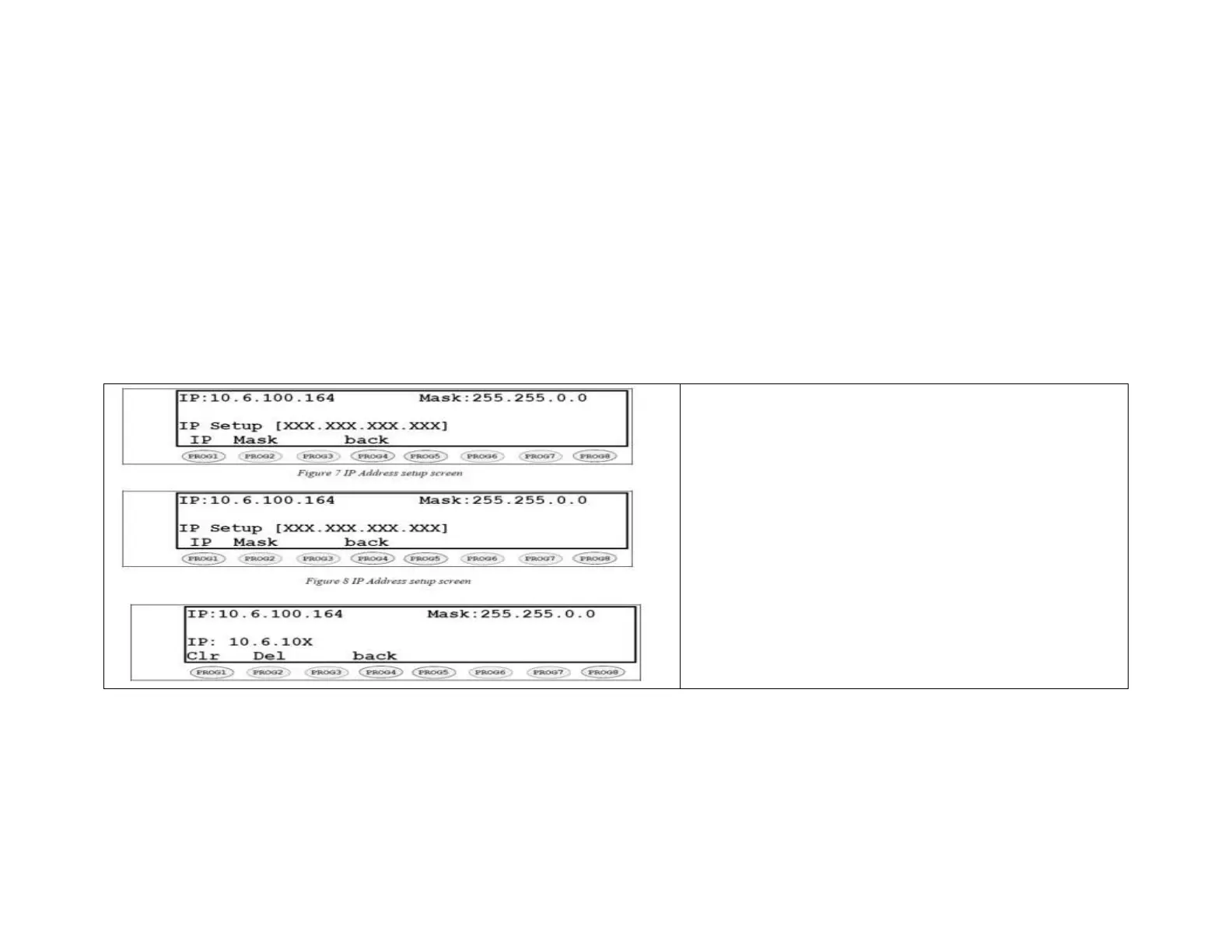
compatible with the users existing network must be set. Figure 7 shows the screen selected when
PROG2 is pressed from the main setup screen. See your network administrator to determine the
proper values. The following keys are used to enter the IP dotted quad once PROG1 or PROG2 is
pressed.
DTMF 0-9: The DTMF digits allow entry of the specific
numbers .
DTMF A: DTMF digit A is the decimal point used in
dotted quad PROG4: The “back” key is pressed when the
dotted quad has been entered.
PROG1: The “Clr” function clears the current entered
value and starts over.
PROG2: The “Del” function deletes the last entered
number.
Once these values have been set, the unit must be
reset for them to take affect. It is now possible to
connect to the C-6200 with a computer and web browser.



 To Next Page