Station Head Unit
!
Before connecting power wires to the UP100J,
please carefully read the Wiring options section of
this manual on page 4. If you are not 100% sure of
the type of electrical service you are connecting to,
call your local utility for assistance.
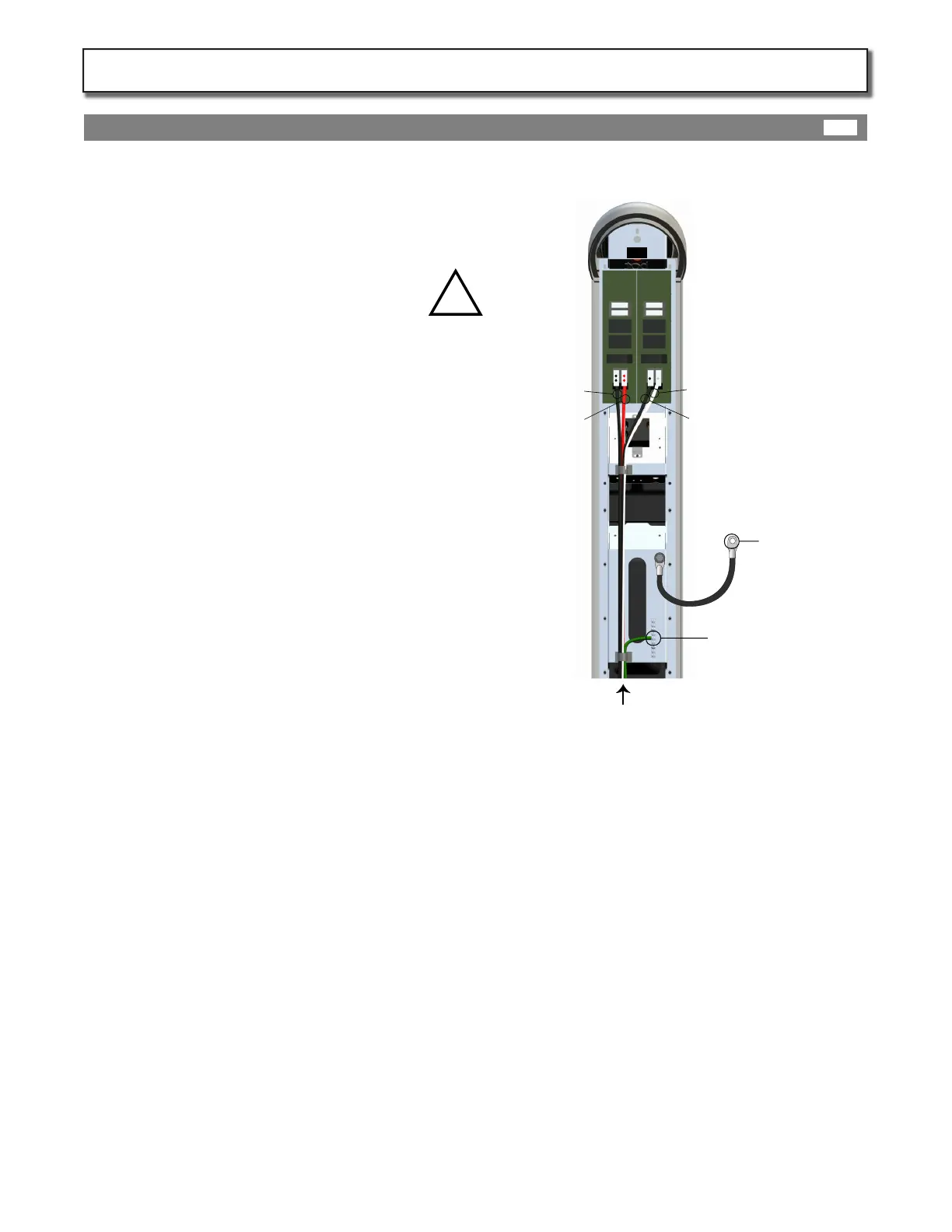
First connect the shared ground conductor (green)
to the grounding bar on the station head unit.
NOTE: The station will not operate without a
successful ground path to the service panel.
Insert the 240VAC conductors into the spring
connectors labeled 240VAC and push down spring
tabs.
Insert the 120VAC conductors (Line, and Neutral)
into the spring connectors labeled 120VAC as
indicated and push down spring tabs.
Insert the terminated (RJ45 male) Cat 5 data cable
into the data input port at top of station until it
clicks.
Pull on all conductors to check that they are rmly
attached. Tie down conductors with provided
tie-downs.
5 Wires in from service
Earth Ground wire
connected to
grounding bar
Neutral
Line
Line
Line
120VAC
}
240VAC
{
Grounding Strap
connected
to housing
Make Connections:
Page 10
Station Power Wiring:
10A
KIT302-IM-20140501


 To Next Page
 Loading...