Master Client
Networked Networked Networked Networked
Networked Networked Networked Networked
Client Client
Before ordering Station Heads, It is best to go to the site with a 2G Verizon Mobile phone and check the verizon data
signal strength. This will help you to plan one of the “Master” station to be placed in a strong signal location. This
Master station will data connectivity to the all other stations connected to it with Cat 5 cable. If good Verizon signal is
detected, order one station head with -MSTR-V sux, and proceed with option 1 bellow. If not see Options 2 and C.
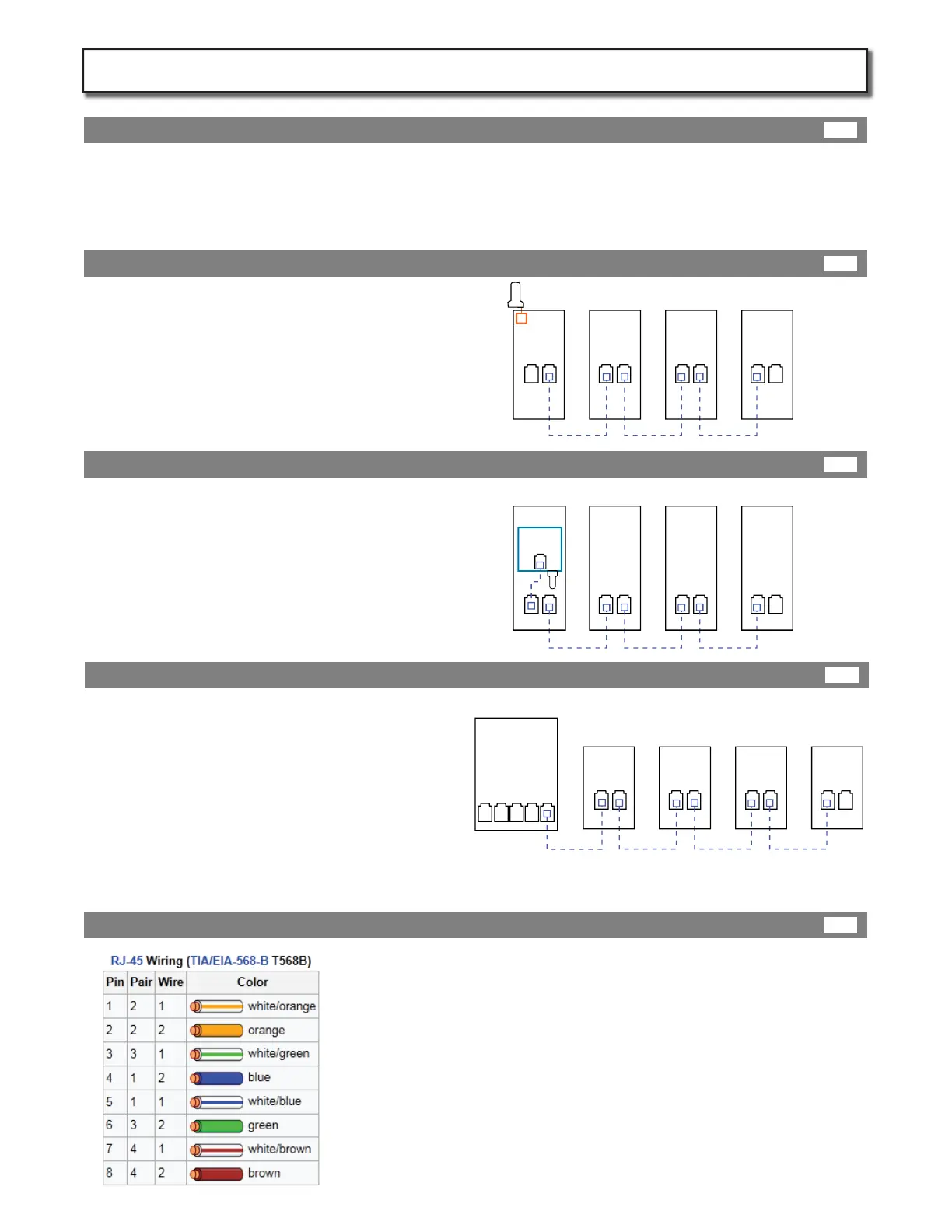
Most cost eective way to network stations is
via a Verizon Master station. All stations at the
site can be supported by one Master station
daisy chainged with Cat5 cable to the rest of
the stations (Client). Congure the site as
follows:
Regardless of the option above, Install data conduit and pull Cat5 cable
between each station in a linear daisy chain manor leaving 6ft of Cat5 in
each station. Each network segment between stations can have a maxi-
mum distance of 90 metres (300 ft).
Terminate cables with Rj45 male connectors. Standard termination for Cat5
(T568B) wires are in the order 1, 2, 3, 6, 4, 5, 7, 8 on the modular jack at each
end: orange/white, orange, green/white, blue, blue/white, green,
brown/white, brown.
Test each segment of terminated cable with a simple battery operated
Ethernet tester (aprox $20 and most computer supply stores).
If Verizon signals are not strong enough and
ATT has a good signal, you may replace the
master module with a kit. Order UP-COM-ATT
-3G. This kit comes with a bracket and
instruction for installing inside the rsts
station. Once again all other stations at the
site can be supported by this one Raven
Router station. Congure the site as follows:
If no mobile carrier has a good signal at the site you
can also support all stations by connecting them to
the building internet router. However , make sure
that the internet connection to this router is reliable.
Stations will not allow charging without an internet
connection.
If this is not possible, you will have to order internet
service from a local provider and have them install
the router on the wall next to the service panel. Then
congure the site as follows:
Test site mobile signal strength:
Instal data conduit and cable:
Option 1 : Master Verizon
Option 2 : UP-COM-ATT-3G Kit
Option 3 : Building Router
Page 11
Station Data Wiring:
11A
11E
11B
11C
11D
KIT302-IM-20140501
Building
Internet
Router
(DHCP)
STN-1
-MSTR
STN-2 STN-3 STN-4
STN-1
STN-2
STN-3
STN-4
Raven
Router
STN-1
STN-2
STN-3
STN-4


 To Next Page
 Loading...