EasyManua.ls Logo

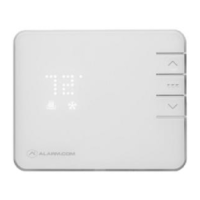
TELUS Smart Thermostat - User Manual

TELUS Smart Thermostat
3 pages
Print Icon
To Next Page IconTo Next Page
Loading...
How to Remove and Reposition a Smart Thermostat
Description
This page shows how to remove and reposition a Smart Thermostat
Please read through the directions in its entirety before commencing.
Instructional Video Link
This Video link illustrates how to re-install a Smart Thermostat
https://www.youtube.com/watch?v=nFkBvKLXg5A
Checklist: Ensure to have the following items before beginning
1. Needle nose pliers
2. Phillips head screwdriver
3. Power drill
4. Pencil
5. Labels and/or a Camera
Removal of a Smart Thermostat
1. Gently remove the thermostat body from the wall by firming pulling from the top
center down and out
Question and Answer IconNeed help?

Do you have a question about the TELUS Smart Thermostat and is the answer not in the manual?

Summary

Smart Thermostat Removal and Checklist

Instructional Video Link

Video link illustrating how to re-install a Smart Thermostat.

Items Required for Removal

List of tools and materials needed before starting the thermostat removal process.

Smart Thermostat Removal Steps

Instructions on how to gently detach the thermostat body from the wall.

Smart Thermostat Repositioning Requirements and Steps

Requirements Before Repositioning

Ensuring the Smart Thermostat is compatible with the home's heating system and power is off.

Repositioning of Smart Thermostat

Steps for securing the baseplate, connecting wires, and attaching the thermostat body.

Connecting Smart Thermostat to Wi-Fi

Connecting to Customer App via Wi-Fi

Step-by-step guide to connecting the Smart Thermostat to the Customer App using Wi-Fi.

Summary

Smart Thermostat Removal and Checklist

Instructional Video Link

Video link illustrating how to re-install a Smart Thermostat.

Items Required for Removal

List of tools and materials needed before starting the thermostat removal process.

Smart Thermostat Removal Steps

Instructions on how to gently detach the thermostat body from the wall.

Smart Thermostat Repositioning Requirements and Steps

Requirements Before Repositioning

Ensuring the Smart Thermostat is compatible with the home's heating system and power is off.

Repositioning of Smart Thermostat

Steps for securing the baseplate, connecting wires, and attaching the thermostat body.

Connecting Smart Thermostat to Wi-Fi

Connecting to Customer App via Wi-Fi

Step-by-step guide to connecting the Smart Thermostat to the Customer App using Wi-Fi.

TELUS Smart Thermostat Specifications

General IconGeneral
ConnectivityWi-Fi
Voice ControlAmazon Alexa, Google Assistant
FeaturesRemote control via app, geofencing
CompatibilityMost HVAC systems
Installationprofessional installation
Power SourceHardwired
Energy ReportsProvides detailed energy usage reports