let’s get started
Step 1- hardware installation
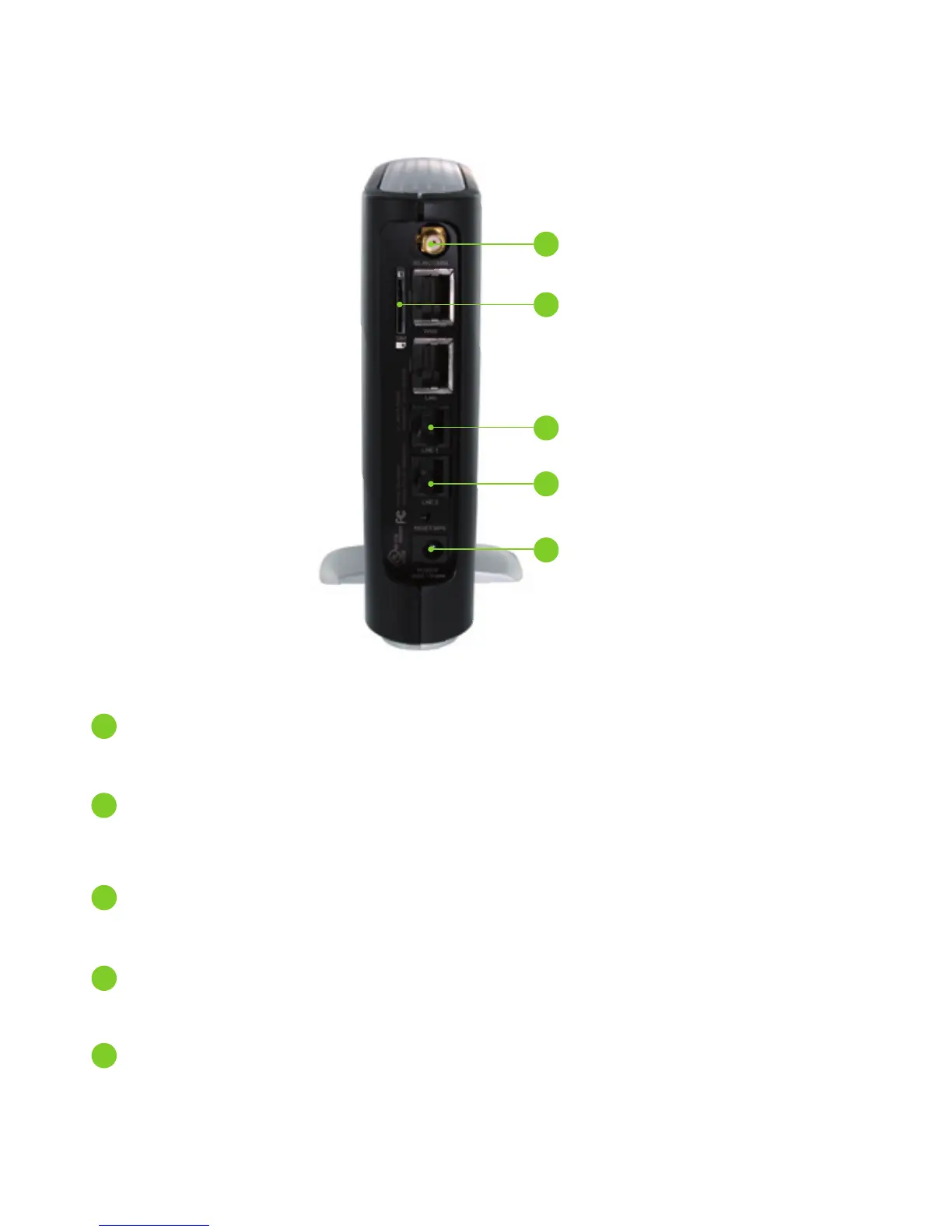
1 Attach the supplied antenna to the port marked 3G Antenna.
[This should be attached in a clockwise direction.]
2 Insert your Smart Hub SIM card (until you hear a click) into the SIM slot.
Please note – SIM cards are assigned specic rate plans for the TELUS Smart Hub. Your Smart Hub SIM card will not
work in other TELUS devices.
3 For voice calls, connect a standard Analog telephone to the port labeled
Line 1 using the RJ-11 cable provided.
4 If required, to activate jacks in your home or ofce connect an RJ-11
cable from the port labeled Line 2 to any wall jack.
5 Connect the power adapter to the Power Socket on the back of the
Smart Hub.
6 Plug the power adapter into the wall socket.
7 Wait approximately 60 seconds for the Smart Hub to power up.
1 3G Antenna
2 SIM Card Slot
3 Line 1 Port
4 Line 2 Port
5 Power Socket


 To Next Page