
 Need help?
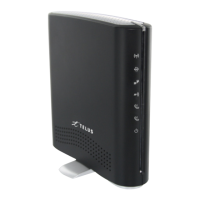
Do you have a question about the TELUS Wireless Router and is the answer not in the manual?
Attach the supplied antenna to the port marked 3G Antenna in a clockwise direction.
Insert your Smart Hub SIM card into the SIM slot until you hear a click.
Connect analog telephones to Line 1 and Line 2 ports using the RJ-11 cable as required.
Connect the power adapter to the Smart Hub and wall socket, then wait 60 seconds for power up.
Connect the yellow Ethernet cable from the LAN port on the Smart Hub to your computer.
Wait 30 seconds for the connection to establish, then open a web browser to access setup.
Open your web browser, type 192.168.20.1, and follow the steps to set up your TELUS Smart Hub.
Ensure WiFi is enabled, connect to the TELUS network name using the Wireless Security Key.
Enter the Wireless Security Key, wait for connection, then access 192.168.20.1 for setup.
Dial your mobile number from the Smart Hub to access voicemail, or dial ## followed by the number.
 General
| Brand | TELUS |
|---|---|
| Type | Wireless Router |
| Ethernet Ports | 4 x Gigabit Ethernet |
| USB Ports | 1 x USB 3.0 |
| Security Features | Firewall, VPN support |
| Wireless Standards | IEEE 802.11ac |
| Frequency Band | 2.4 GHz and 5 GHz |

 To Next Page