Select a location for the
BaseStation and/or Remote Transceiver
1
2
System range and performance may be greatly reduced if antennas
are blocked or obstructed.
• Always operate the system with antenna attached, located as high as
possible and away from all obstructions (especially metal).
• Reduced range may be experienced when using an antenna on a
BaseStation that is installed inside a metal rack.
• When using the Whip (omni-directional) antenna, always locate it as
close as possible to the center of the coverage area.
• When remotely locating antenna, use only high quality 50 ohm, low loss,
RF cable (120 ft max, or approx 37m).
• Remote antenna location of up to 1500 ft (approx 457m) using standard
CAT-5 wiring may be achieved using the optional Tempest Remote
Transceiver.
» This connection cannot be through an active IP switch or router.
» Plug your Transceiver into the BaseStation prior to powering ON
the BaseStation.
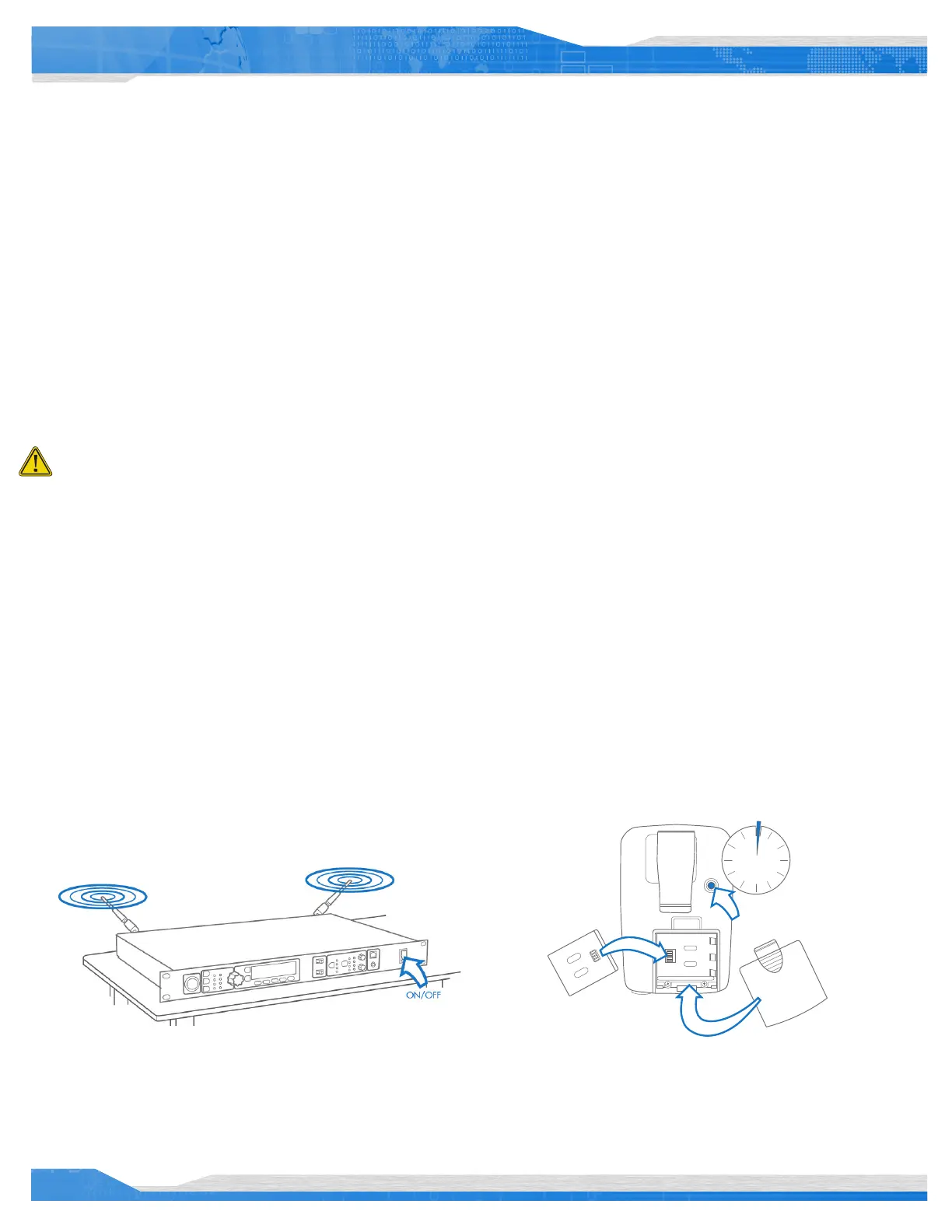
• Slide the battery door off by pressing down and back.
• Install the battery or AA batteries (x3) and replace the battery
door.
• Press and hold the ON/OFF button for two seconds; the
BeltStation will vibrate as it powers up.
• Power the BeltStation OFF by pressing and holding the ON/OFF
button for four seconds.
• Connect the AC power cord to the BaseStation and to the AC wall outlet.
• Turn the BaseStation on via the front panel ON/OFF switch.
Power ON the BaseStation
Power ON the BeltStation
2 sec
POWER ON
4
From the front of the BaseStation, follow the steps below:
• Press MENU (Main Menu).
• Press 1 (BaseStation Settings).
• Scroll to 7 (Tech Menu) and press ENTER. A Tech Menu warning
message will appear—Press ENTER to proceed.
• Press ENTER or 1 (Radio Conguration).
• Press ENTER or 1 (Network Number) and select a network other than
zero, and press ENTER to save setting.
• If you have multiple BaseStations, ensure you select a different
Network Number for each BaseStation.
• Collocated BaseStations should be in the same Network Number Group.
• Press MENU to return to previous menu; press 2 (Lockout Key) and select
a lockout key other than 255 and press ENTER to save setting.
• Press MENU repeatedly until you get back to the Operational screen.
• Power the BaseStation OFF; wait 10 seconds and power the BaseStation
ON again.
3
Changing the Default RF Conguration
Tempest900 operates in the 902 to 928 MHz frequency spectrum.
Tempest900 models should never be synced with Tempest2400 models.
Tempest BaseStations and BeltStations are shipped with a default RF
conguration. It is highly recommended that you change your system
from the default to ensure proper RF performance, especially in the
presence of other Tempest systems.
A BeltStation must be paired with a BaseStation for any communication
to take place. Pairing should be done AFTER the default RF
conguration is changed on the BaseStation.
Charge the BeltStation batteries prior to starting set-up.
Important things you need to know
2
Quick Start Guide


 To Next Page
 Loading...
