OWNER'S MANUAL Duct Free Split System - High Wall: DFS4(A/H), DFC4(A/H)3, DFF4(A/H)H
4 421 02 9301 00
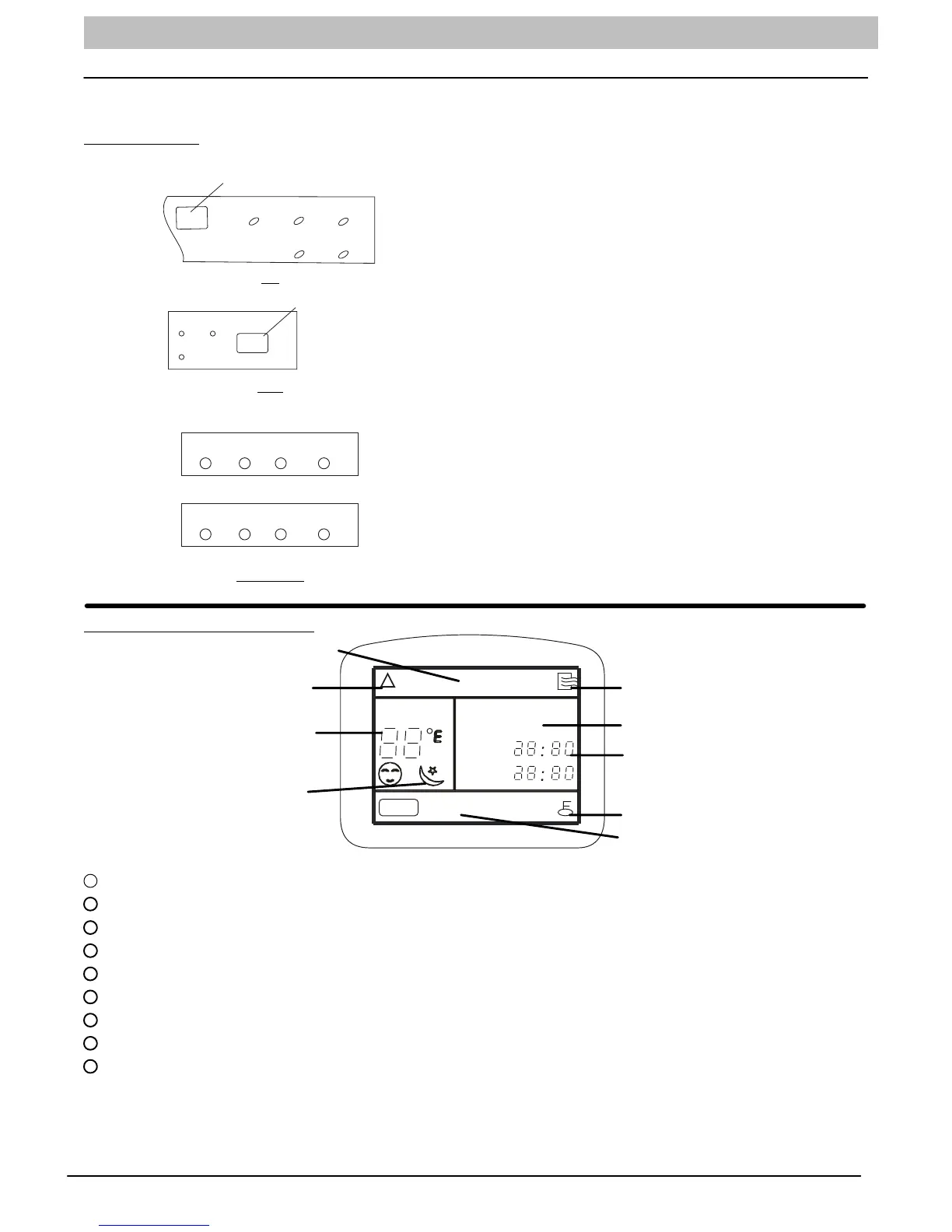
UNIT DISPLAY PANELS
NOTE: The display panel on the indoor unit will look like one of the following. Some of the functions will appear on
either the display panel, remote control, or both.
On the Unit:
Infrared signal receptor
OPERATION
TIMER
PRE-DEF
AUTO
ECON
9K
TIMER
OPERATION
PRE-DEF
Infrared signal recepto
12K
AUTO
AUTO
TIMER
TIMER
PRE.-DEF.
OPERATION
OPERATION
Cooling Only
FAN ONLY
Cooling/ Heating
18K - 24K
OPERATION:
This indicator flashes once per second after power is on and
illuminates when the unit is in operation.
TIMER:
This indicator illuminates when TIMER is set ON or OFF.
PRE.-DEF indicator (heat pump units only):
Pre-Def indicator illuminates when the coil is warming up to
prevent cold blow or when unit goes into defrost mode.
AUTO indicator:
When air conditioner is set to AUTO mode, the indicator
illuminates.
FAN ONLY indicator:
When air conditioner is set to FAN ONLY mode, this
indicator illuminates.
NOTE: All the pictures in this manual are for
demonstration purposes only. The actual shape of your
air conditioner may be slightly different, but the
operation instructions are the same.
Remote Control Display
A UTOC OOL DRY H E A T FA N
S ET TEM P.
CLOCK
TIMER ON
TIMER OFF
SPEED
AUTO LOW MED HIGH
Clock Display
Timer Display
Lock Display
Sleep Display
Fan Speed Indicator
Transmission Indicator
Mode Display
ON/OFF Indicator
Temperature Setting
1
TRANSMISSION Indicator Lights when remote control transmits signals to the indoor unit.
2
MODE Display Indicates the current operation mode - “AUTO”, “COOL”, “DRY”, “HEAT” (Heat Pump Only), or “FAN”.
3
ON/OFF Indicator Symbol appears when unit is turned on by the remote control, and disappears when unit is turned off.
4
TEMPERATURE Setting From 62°F(17°C) to 88°F(30°C) will be displayed. If Fan Mode is selected there will be no display.
5
CLOCK Display Indicates the current time (0 to 24 hours).
6
TIMER Display Indicates the set times for the Timer operation (0 to 24 hours).
7
LOCK Display Appears when settings are Locked.
8
SLEEP Display Indicates unit is running in Sleep mode.
9
FAN SPEED Display Indicates the set fan speed. “Auto” is displayed when unit is running in Auto or Dry mode.
NOTE: Symbols shown in this manual are for the purpose of demonstration. During actual operation, only the
relevant symbols are displayed.



 To Next Page