OWNER'S MANUAL Duct Free Split System - High Wall: DFS4(A/H), DFC4(A/H)3, DFF4(A/H)H
6 421 02 9301 00
Static electricity or other factors (Voltage fluctuation)
can cause the remote control clock to reset. If remote
control is reset (with “12:00” flashing) reset the clock
before starting unit.
CAUTION
!
Remote Control Operation - Quick Start
NOTE: When transmitting a command from the remote
control to the unit, be sure to point the controller toward the
right side of the unit. the unit will confirm receipt of a
command by sounding an audible beep.
1. Turn the unit on by pushing the ON/OFF button.
2. For temperatures settings to be displayed in degrees °F,
push the recessed F/C button once using a paper clip.
3. Select the desired mode by pushing the mode button.
AUTO
COOL
DRY
HEAT
FAN
NOTE: Cool only units have no heat mode.
4. Select the temperature set point by pointing the
controller toward the unit and pressing the
increase/decrease temperature set point buttons until
the desired temperature appears on screen.
5. Select the desired fan speed by pressing the FAN
SPEED button to select desired fan speed.
NOTE: If unit is operating in Dry mode, the auto fan speed
will be displayed.
6. Set the airflow direction. When the unit is turned on,
the louvers default to the cooling or heating position.
The user can adjust louver position by pushing the air
direction button or have continuous louver movement
by pushing the swing button.
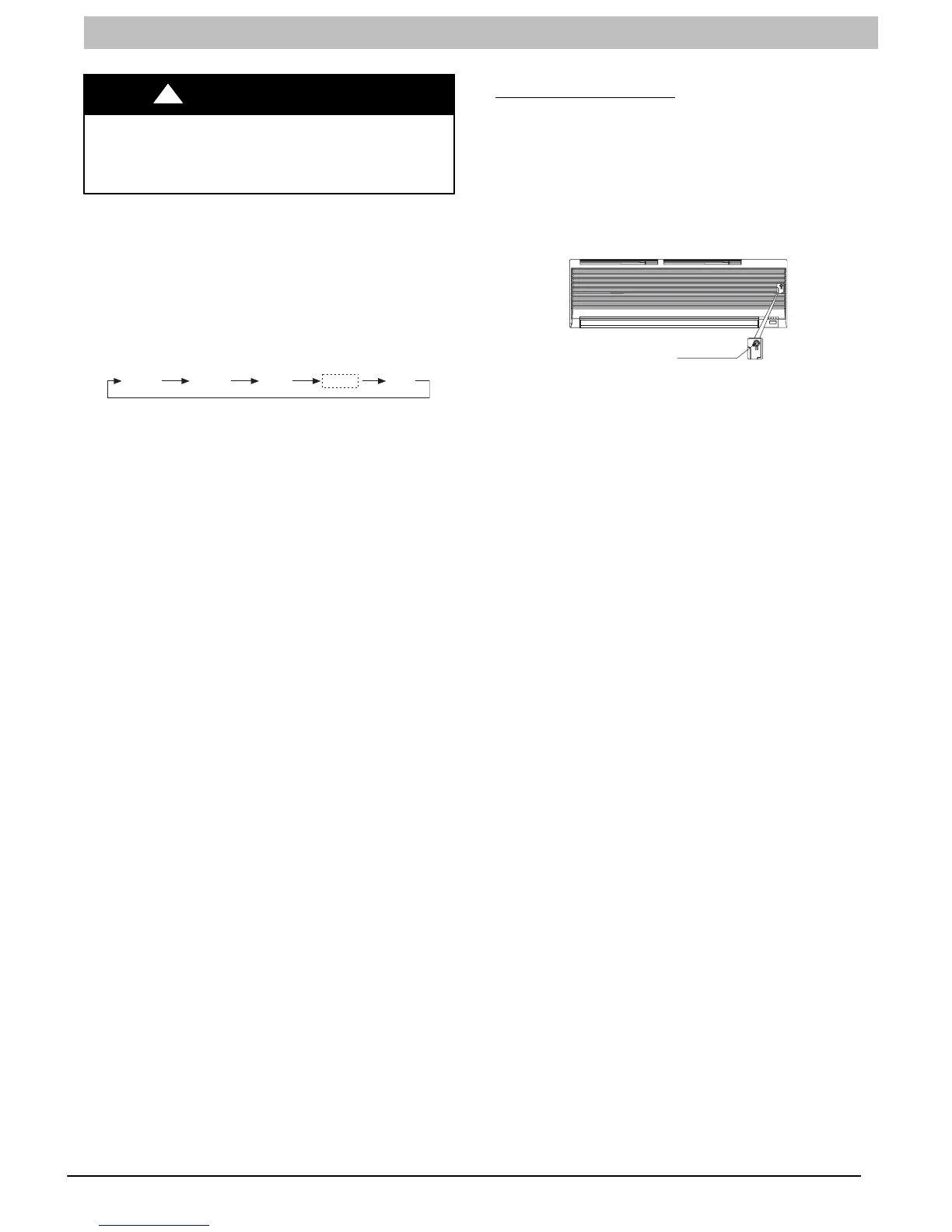
Emergency Operation
If the remote control is lost, damaged, or the batteries are
exhausted, the MANUAL button can be used to run the unit.
Open the front cover panel and press the MANUAL button
once briefly when the system is off.
To stop emergency operation, push the MANUAL button
twice or operate the remote control. If the MANUAL button
is only pushed once, the system will enter TEST mode and
run for 30 minutes.
Manual button
A07364
The set conditions of emergency operation are as follows:
Preset set point: 76F (24C)
Fan speed: AUTO
Discharge air direction: Pre-set position based on
operation in “Cool”or “Heat” mode.



 To Next Page