Tips:
If you cannot access the internet after the configuration, refer to Q2 in FAQ.
If you want to change the Wi-Fi name and Wi-Fi password, refer to Q6 in FAQ.
➑ Click OK when Change setting successfully is shown on the page.
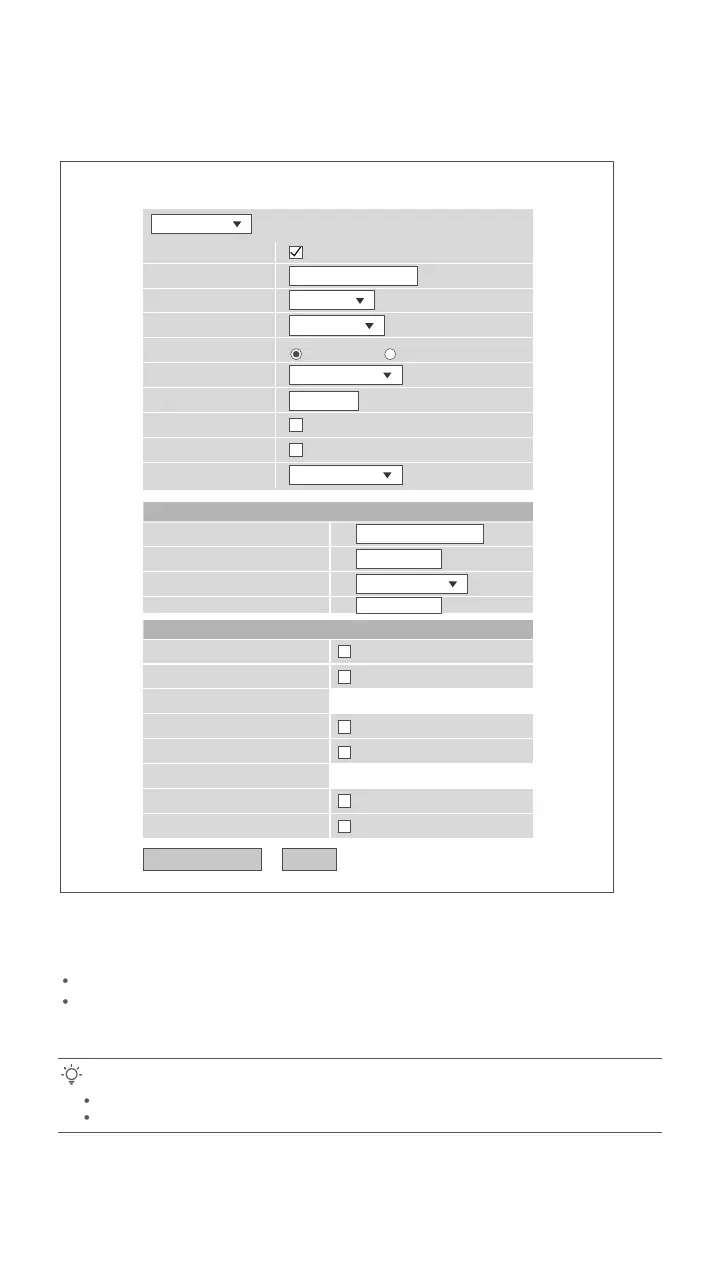
PON WAN
Apply Changes Delete
This page is used to configure the parameters for PONWAN
Enable VLAN:
VLAN ID:
802.1p_Mark
Channel Mode:
Admin Status:
Connection Type:
MTU:
Enable IGMP-Proxy:
Enable MLD-Proxy:
IP Protocol:
0
INTERNET
IPv4
1492
nas0_0
Enable Disable
UserName:
Password:
Type:
Service-Name:
PPP Settings:
Continuous
LAN_1
LAN_3
WLAN0
WLAN0-AP1
WLAN0-AP3
WLAN1
WLAN1-AP1
WLAN1-AP3
Port Mapping:
LAN_2
WLAN0-AP2
WLAN0-AP4
WLAN1-AP2
WLAN1-AP4
LAN_4
PPPoE
0
Done.
To access the internet:
Connect your wired device, such as a computer, to a LAN port of the ONT.
Connect your wireless device, such as a smartphone, to the Wi-Fi networks of the ONT,
using the SSID (Wi-Fi name) and Key (Wi-Fi password) on the bottom label.
5


 To Next Page
 Loading...