Need help?
Do you have a question about the tenlamp KB11 and is the answer not in the manual?
Output processed sound to smartphones, tablets, PCs via 3.5mm TRRS cable.
Input for external audio sources like smartphones or PCs for accompaniment.
3.5mm output port for monitoring sound in real-time.
3.5mm port for microphone input and real-time sound monitoring.
3.5mm port for condenser microphones, supports phantom power via adapter.
For USB live streaming, computer accompaniment, and charging.
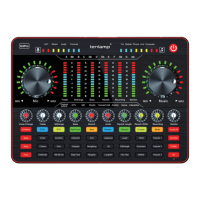
Adjusts treble effect to the right and bass effect to the left.
Adjusts the output volume for live streaming or recording devices.
Increases or decreases the reverberation effect.
Adjusts monitoring volume for earphone and headset ports.
Details indicator lights for tone, monitor, mic, reverb and the display screen.
Indicates charging status: red for charging, green for full, flashing red for low.
Adjusts the input volume of the microphone.
Controls for modes, effects, noise reduction, and voice changing.
Adjusts music volume and controls Bluetooth and electronic tone features.
Shows microphone, music, record, and MIC EQ volume levels.
Connects one phone for streaming and another for music accompaniment.
Connects PC for streaming, music, and headset for monitoring/input.
Details connections for live streaming using multiple smartphones.
Shows connections for live streaming from a desktop or laptop.
Connecting the sound card for live streaming on smartphones.
Connecting the sound card for live streaming on PCs and laptops.
Methods for inputting music accompaniment via smartphone or PC.
 General
| Brand | tenlamp |
|---|---|
| Model | KB11 |
| Category | Recording Equipment |
| Language | English |

 To Next Page