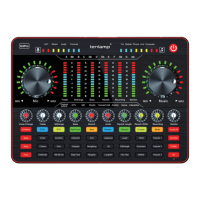
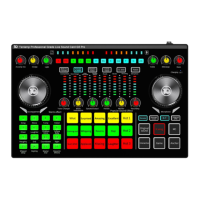
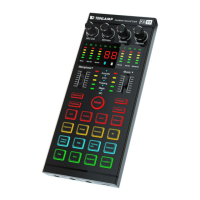
The Tenlamp V10 is a professional recording and live streaming digital audio mixer, designed to enhance audio quality and provide versatile sound effects for various applications, including livestream studios, podcast studios, personal live streaming, recording, chatting, and singing. It integrates audio input collection, processing, optimization, and output control, aiming to deliver professional, realistic, and engaging sound quality.
Function Description:
The V10 sound card features a built-in high-performance digital DSP reverberation processor, supporting high-definition digital recording and noise reduction. It enables dual mobile phone live streaming and BT wireless accompaniment. Real-time earphone monitoring is also supported. The device offers a variety of microphone interface inputs, interesting voice changer effects, 12 professional electronic tone options, and popular live streaming atmosphere sound effects. It is compatible with smartphones, tablets, and computers running Android, iOS, Windows, macOS, and Linux, operating as a plug-and-play device without requiring extra drivers. The DSP processor allows for real-time sound tuning, voice modification, and the addition of funny sound effects to podcasts or streams, making content more entertaining.
Important Technical Specifications:
- Model: V10 Sound Card
- Dimensions: L225W140H40mm
- Weight: 431g
- Operating Temperature: 0℃ ~ 45℃ / 0°F-113°F
- Battery: Lithium ion 1000mAh/3.7V (3.7Wh)
- Charging: DC+5V, 1A MAX
- Frequency Response: 50Hz~18KHz
- Reverberation Processing: 32Bit RISC Digital reverberation processor
- Sampling Rate: 44.1KHz/16Bit
- Bluetooth Version/Name: V5.0, Compatibility Bluetooth 4.2BR1 "V10 SoundCard"
- Bluetooth Receive Range: <12 m (No obstacle)
- S/N Ratio: >102dB
- Output Power: 10mW Load 32Ω (Condenser mic)
- THD: <0.3% @1kHz (Live streaming)
- Interface Parameters:
- Headset Interface: CN, US standard four-section 3.5mm plug
- Microphone Interface: Standard 3.5mm plug
- Live Interface: CN, US standard four-section 3.5mm plug
- Accompaniment Interface: Standard 3.5mm plug
- Headphone Jack: Standard 3.5mm plug
- USB Interface: 5 feet Micro USB
Usage Features:
- PC/Charging Port (DC+5V input; OTG port): Used for data transmission, computer live streaming, and computer accompaniment. It functions as an external audio console for computers, laptops, smartphones, and tablets during live streaming, recording, or singing.
- Broadcast Port (3.5mm TRRS cable): Outputs processed sound to smartphones, tablet PCs, or other devices, enabling live streaming to multiple platforms simultaneously. Can connect to desktop computer microphone jacks or laptop 3.5mm audio jacks for PC live streaming. iPhone users may need a 3.5mm to Lightning adapter (not included).
- Music Port (3.5mm TRRS audio cable): Accompaniment input for external audio sources or devices to play music during live streaming or audio production. Can connect to smartphone headphone jacks, desktop computer earphone jacks, or laptop 3.5mm jacks.
- Audio Port (3.5mm Output): Connects audio playback devices such as speakers or monitor headphones.
- Earphone Port (3.5mm Output): Monitor earphone jack for real-time monitoring of all audio console sounds.
- Headset Port (3.5mm): Used for sound input from a headphone with microphone function and for real-time monitoring.
- Microphone Port (3.5mm): Connects a 3.5mm condenser microphone that does not require external power. For 48V microphones, a phantom power supply is needed, then an XLR to 3.5mm mic cable connects to the V10 mic jack.
- Power Switch/Loopback: Long press for 2 seconds to turn on/off. Short press to toggle the Loopback function.
- Loopback ON: Accompaniment or voice is uploaded to the computer/network platform, allowing the audience to hear both microphone sound and PC sound, or to record PC sound.
- Loopback OFF: Accompaniment and PC sound are not uploaded, only microphone voice is heard by the audience or recorded.
- Music Knob: Adjusts the volume of music input.
- Record Knob: Adjusts the output volume for live streaming or recording devices.
- Mode Light: Indicates the current sound mode.
- Anaphora Button: Eliminates 85% of singer's vocals in accompaniment music when activated.
- Pattern Button: Cycles through 6 sound scene modes: Original sound, KTV, MC, Magic sound, Popping, Anchor.
- Electronic Button: Short press to cycle through 12 electronic music tones (displayed on LCD). Long press to turn off.
- Dodge Button/Status Light: Automatically lowers background music volume when microphone input is detected, highlighting the human voice (auto-ducking). Suitable for live chat scenes.
- Denoise Button: Automatically reduces ambient sound from microphone input. Toggles function on/off.
- Voice Changer Buttons (Children's, Uncle, Goddess): Activates corresponding voice changer effects.
- Sound Effects Buttons Area: 18 popular warm-up sound effects.
- Metaphone Button: Cycles through Radio, Telephone voice, and Robot sound modes.
- MIC EQ Knob: Adjusts microphone treble (right) and bass (left) effects.
- Microphone Knob: Adjusts microphone input volume.
- Changing Voice Knob: Fine-tunes the current voice changer mode effect.
- BT Indicator Light: Stays on when Bluetooth connection is successful (BT function is for accompaniment only).
- Reverb Knob: Increases reverberation effect (right) and decreases (left).
- Electronic Music Tone Mode Light: Displays 12 kinds of electronic tones.
- Battery Indicator Light: Green light flashes when battery is low, red light on when charging, green light always on when fully charged.
- Monitor Knob: Adjusts Audio/Earphone/headset monitor volume and speaker volume.
- Special Effect Volume Adjustment: Long press "Debut" to reduce volume, long press "Applause" to increase volume. Short press activates the specific effect sound.
- LED Dynamic Display Light: Responds to knob parameter adjustments and displays overall volume bounce when static.
Connection Methods:
- Smartphone Live Streaming: Use a 3.5mm to 3.5mm TRRS audio cable from the "Broadcast" jack to the smartphone's 3.5mm headphone jack. Supports up to two smartphones simultaneously.
- Computer/Laptop Live Streaming:
- USB Cable: Connects "PC/Charging" jack to computer's USB port (preferably USB2.0).
- 3.5mm TRRS Audio Cable: Connects "Broadcast" jack to desktop computer's microphone jack or laptop's 3.5mm audio jack. Supports up to three PCs simultaneously.
- Accompaniment Music Input:
- Smartphone (Cable): Use a 3.5mm to 3.5mm TRRS audio cable from the "Music" jack to the smartphone's headphone jack.
- Smartphone (Bluetooth): Connect to "V10 Soundcard" via Bluetooth.
- PC (USB): Use the micro USB charging cable from the "micro USB" charging jack to the computer's USB port. Set audio output to "Tenlamp V10 SoundCard" or "MV-AP82X".
- PC (Cable): Use a 3.5mm TRRS audio cable from the "Music" jack to the computer's "Earphone" jack.
Maintenance Features:
- Charging: Charge the audio mixer before first use and every 3 months if not used for a long period. Charging is possible when the power is off. Avoid overcharging by stopping when the battery is full.
- Troubleshooting:
- No power/sound: Check battery level and charge if necessary.
- Noise during live streaming: Check headset insertion, ensure correct earphone position, reduce microphone volume, charge battery, or unplug computer's charging cable if using a laptop with interfering sound card.
- No microphone sound: Check mic cable insertion, ensure mic logo faces user, and increase mic voice volume.
- Low/silent live streaming sound: Check live cable connection to broadcast port, ensure mobile phone is inserted, or test mobile phone recording.
- Other party can't hear sound during PC livestreaming: Check USB live cable connection to charging port, ensure recording volume is maximum, and verify "Loopback" function is ON.
- Abnormal sound: Switch sound effect to original sound mode, or re-insert earphone into the correct position.
- Environmental Considerations: Use and store in a dry, ventilated, and safe environment. Avoid humid or dusty conditions, rain, and direct exposure to fire, collision, or severe vibration.
- Safety: If the product experiences heat, smoke, or odor, turn off power immediately and seek maintenance. Do not modify, disassemble, or repair the equipment yourself to avoid voiding warranty or causing injury.
- Children: The product is not a children's toy and should be kept out of reach of children.

 Need help?
 General

 To Next Page