9. Common troubleshooting:
1. Q:
Answer: The battery is dead, please connect to USB to charge before use;
2.Q:
Answer: a. Check whether the headset is inserted in place, and then plug in the
headset again;
b. Whether the earphone is plugged into the corresponding identification position:
c. Appropriately reduce the microphone volume;
d. Check whether the battery is close to a dead state, please charge it in time;
e. If the PC is live streaming, and some laptops have interfering sound cards, try to
unplug the computer's charging cable;
3.Q:
Answer: a. Check the insertion position of the mic cable and make sure that the mic
logo is face to you;
b. The mic sound is turned off to the minimum, then please monitor and increase
gradually the voice volume of mic;
4.Q:
Answer: a. Check whether the live cable connection is plugged into the live
broadcast port;
b. Check whether the mobile phone is inserted in place;
c. Try to see if the mobile phone recording can be broadcast live again;
5. Q:
Answer: a. Check whether the USB live cable is plugged into the charging port,
please use the configuration cable of this machine correctly;
b. Check whether the recording volume is turned on to the maximum;
c. Check whether the "Loopback" function is turned on.
6.Q:
Answer: a. This device has a variety of tone-shifting effects, please switch the sound
effect to original sound mode;
b.The earphone is incorrectly inserted in the headset position, please unplug it and
insert it to the earphone mark position.
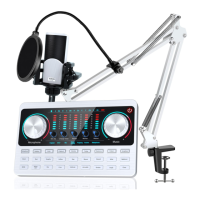
10. Accessories List of V10 sound card


 To Next Page