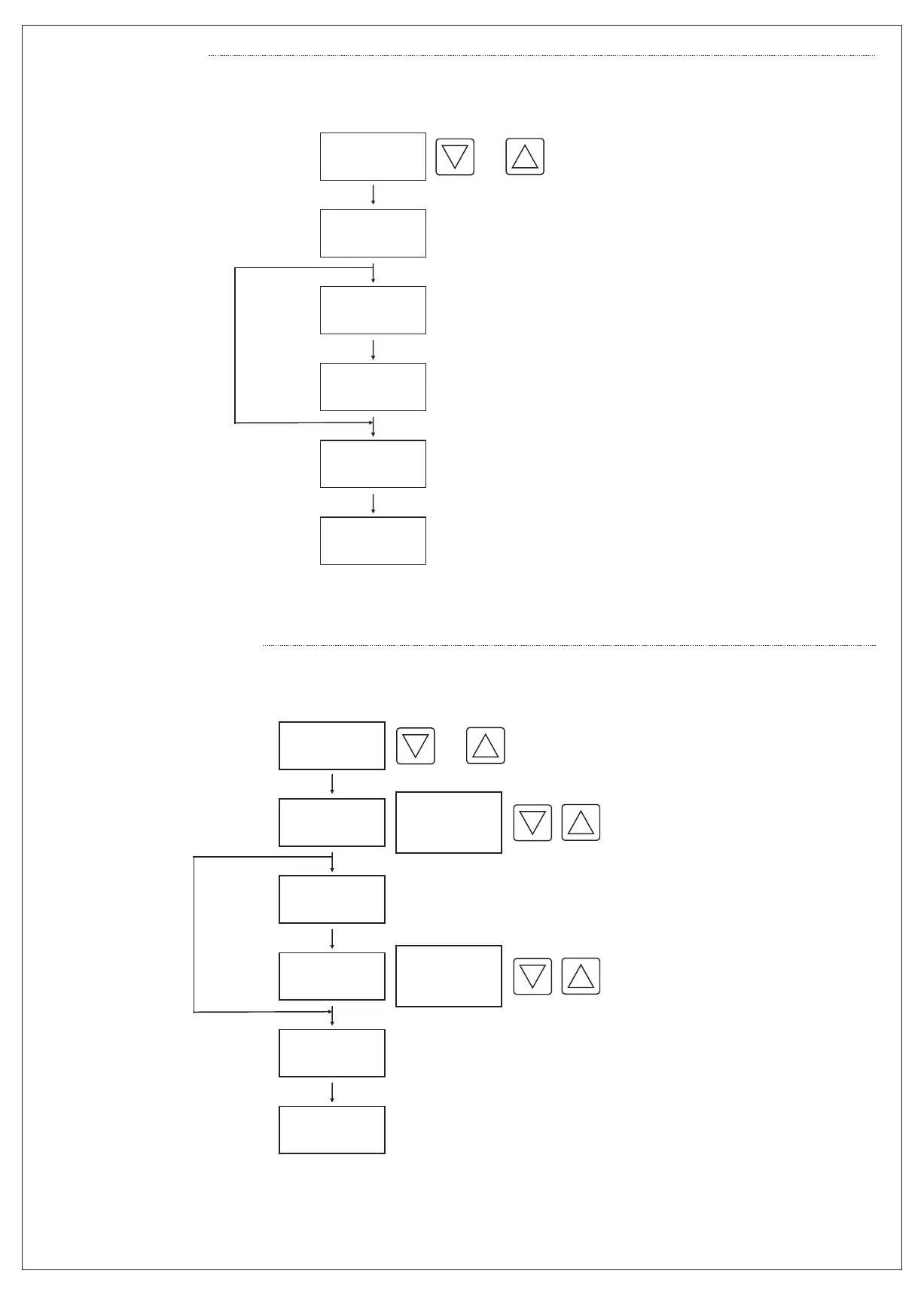
Read SET Value:
3
Enter New SET Value:
Press one of the
buttons
(Up or Down)
Read
SET / St.A
Value
Wait for 2 sec.
Read
St.b
Value
Wait for 2 sec.
Back to
Count down
Read “Set” (or St.A then St.b) code and
SET value in a cyclic manner. Wait for
2 seconds without pressing any button.
Display automatically switches to count-down.
If out : dLY
(On delay)
or
Press one of the
buttons
(Up or Down)
Enter
SET / St.A
Value
Wait for 2 sec.
Enter
St.b
Value
Wait for 2 sec.
New SET Value
Entered
Read “Set” code and SET Value in a cylic
manner. Enter new SET Value by using
up and/or down buttons.
Wait for 2 seconds without pressing any
button. New SET Value is entered
automatically. New SET Value is valid
with the next Power ON. If out = dly (on delay),
only SET value appears.
If out = FLS (flashing), St.A and St.B
values appear.
If out : dLY
(On delay)
or
0....99.9 sec.
0....999 sec.
0....99.9 min.
0...999 min.
0....99.9 sec.
0....999 sec.
0....99.9 min.
0...999 min.


 To Next Page