EasyManua.ls Logo

Tenveo NV Series - User Manual

Tenveo NV Series
47 pages
Print Icon
To Next Page IconTo Next Page
Loading...
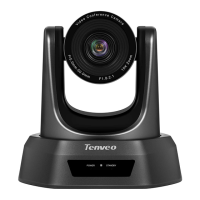
HD Conference Camera
User Manual
Version V3.21
POWER STANDBY
R

Table of Contents

Questions and Answers

  • S
    steven70Aug 6, 2025
    Why is my Tenveo IP Camera remote control not working?
    • N
      nhatfieldAug 6, 2025
      If your Tenveo IP Camera remote control isn't working, try replacing the batteries. If it's not sensitive, ensure you've selected the correct “IR select” number to match your camera, control the camera within 15 meters, remove any obstacles, and aim directly at the sensor on the front of the camera.
  • E
    Eric WrightAug 13, 2025
    What to do if the video of my Tenveo IP Camera is not displayed on the screen?
    • T
      Tanya MillerAug 13, 2025
      Check the connection between the power cable, video cable, camera, and monitor. Ensure each connector is securely attached.
  • D
    Dawn PetersonAug 21, 2025
    What to do if USB interface of Tenveo IP Camera is not identifiable?
    • T
      Tyler HernandezAug 22, 2025
      Verify that the USB cable and any extension cables are properly connected. If they are, try using a different USB port on your device.
  • B
    brett11Aug 28, 2025
    What to do if there is poor image quality while using Tenveo IP Camera in low-light conditions?
    • R
      Randy WillisAug 28, 2025
      To improve image quality of your Tenveo IP Camera in low-light environments, press the menu (ON/OFF) button to adjust the backlight effect. Also, ensure the lighting is adequate for the environment.

Summary

Product Description

Foreword

Introduction to the conference camera product and manual.

Important Notices

Safety guidelines and precautions for handling and installation.

Supplied Accessories

List of items included with the HD conference camera.

Performance Characteristics

Technical Parameters

Detailed electric, communication, operation, and physics specifications.

Camera Parameters

Image sensor, FOV, focal length, HD format, and interface details.

Quick Start Guide

Interface Definition

Explanation of camera interface ports and connections.

Interface Diagram

Visual representation of camera interface connections.

Installation Instructions

Guidance for surface and ceiling mount camera installation.

Remote Control Operation

Power and Camera Selection

Controls for powering on/off, standby, and selecting cameras.

Camera Movement Controls

Buttons for pan, tilt, and home positioning.

Zoom and Focus Controls

Buttons for adjusting zoom speed and focus modes.

Preset and Position Management

Functions for setting, calling, and resetting camera presets.

Common Operations

Camera Selection and Direction Control

How to select cameras and control their movement.

Focus, Zoom, and Preset Management

Controlling focus, zoom, and managing preset camera positions.

Dial-up Configuration

ON;OFF Settings

Configuration of SW1 and SW2 DIP switch settings.

Baud Rate Settings

DIP switch settings for baud rate selection.

Protocol Settings

DIP switch settings for VISCA, PELCO-D, PELCO-P protocols.

Control Interface and Connectivity

RS-485 and RS-232 Pin Distribution

Detailed pin assignments for RS-485 and RS-232 interfaces.

Troubleshooting

Maintenance Services

Tenveo NV Series Specifications

General IconGeneral
Effective Pixel2.07MP
Digital Noise Reduction3D DNR
Video CompressionH.264
Resolution1920x1080
Audio CompressionAAC
Network InterfaceRJ45 10/100Mbps
Communication InterfaceRS-485
Power SupplyDC12V
Operating Humidity10% to 90%
Image Sensor1/2.8" high quality HD CMOS sensor

Related product manuals